Detailed usage, demos, and command references for go.nvim features. For installation, configuration, and quick start, see the main README.
- Code Format
- Auto-fill
- Textobject
- Go Binaries Install and Update
- Build and Test
- Unit Test with gotests and testify
- GoCheat
- GoDoc
- GoDocBrowser
- GoDocAI
- GoPkgOutline
- GoPkgSymbols
- Modifytags
- GoFmt
- GoImplements
- GoImpl
- Refactor / Rename
- Debug
- Debug with dlv
- Debug Commands
- Required DAP Plugins
- Switch between Go and Test File
- Go Mock
- Comments and Doc
- GoMod Commands
- LSP
- LSP cmp Support
- LSP CodeLens
- LSP CodeActions
- Lint
- Json/Yaml to Go Struct
- Load Env File
- Generate Return Value
- Rename Modules
- govulncheck
- goenum
- gonew
- ginkgo
- GoAI
- AI Code Review
- AI Chat
- AI Documentation
The plugin provides code format, by default is gopls
Use following code to format go code
require("go.format").gofmt()  -- gofmt only
require("go.format").goimports() -- goimports + gofmtTo config format on save, add one of the following to your init.lua:
-- Run gofmt on save

local format_sync_grp = vim.api.nvim_create_augroup("GoFormat", {})
vim.api.nvim_create_autocmd("BufWritePre", {
  pattern = "*.go",
  callback = function()
   require('go.format').gofmt()
  end,
  group = format_sync_grp,
})-- Run gofmt + goimports on save
local format_sync_grp = vim.api.nvim_create_augroup("goimports", {})
vim.api.nvim_create_autocmd("BufWritePre", {
pattern = "*.go",
callback = function()
require('go.format').goimports()
end,
group = format_sync_grp,
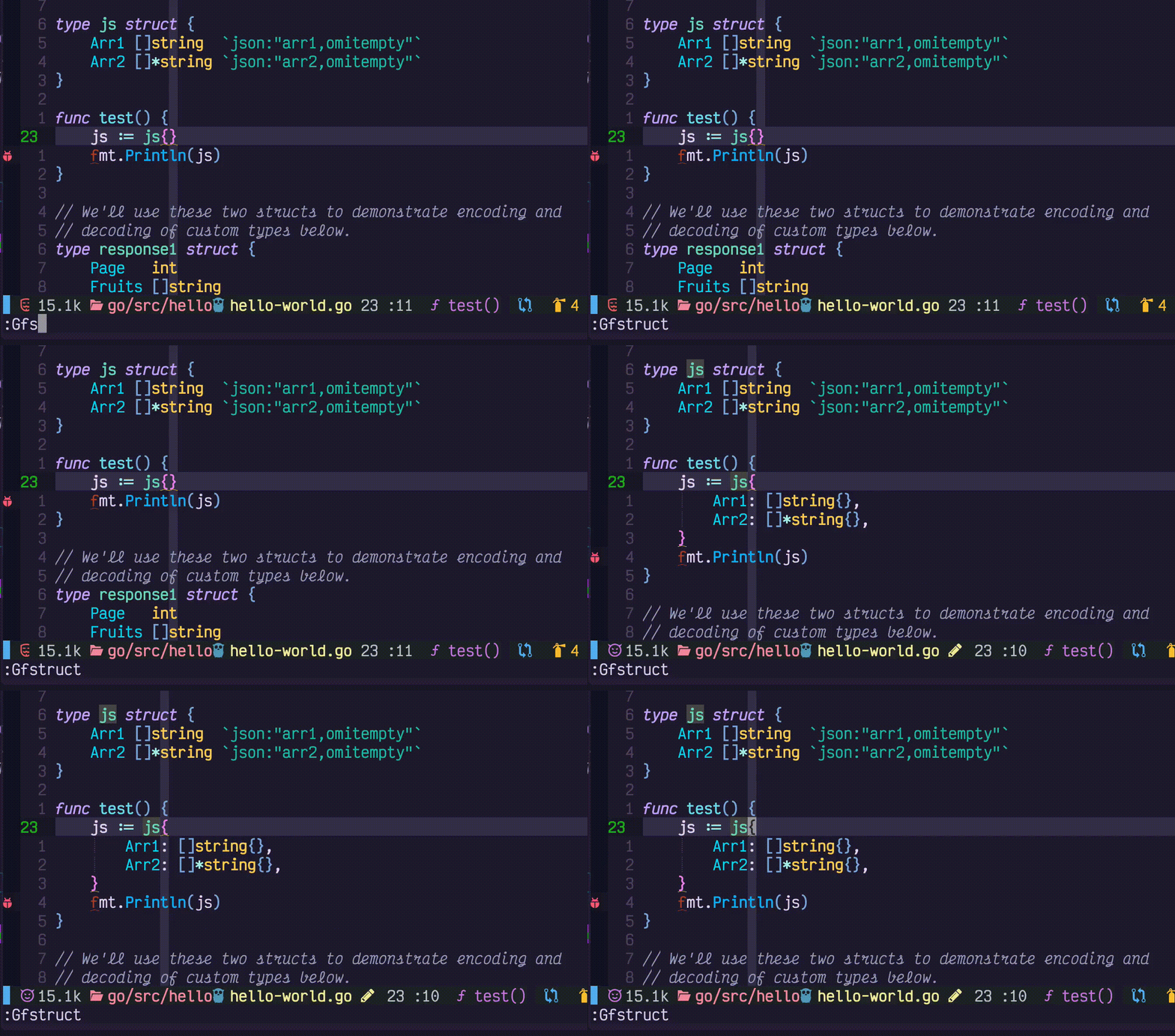
})Note: auto-fill struct also supported by gopls lsp-action
| command | Description |
|---|---|
| GoFillStruct | auto fill struct |
| GoFillSwitch | fill switch |
| GoIfErr | Add if err |
| GoFixPlurals | change func foo(b int, a int, r int) -> func foo(b, a, r int) |
package foo

import "io"

func Foo() (io.Reader, error) { // the cursor on this line to add if err statement
}
Supported by treesitter. TS provided better parse result compared to regular expression. See the example
treesitter config file on how to setup textobjects. Also with
treesitter-objects, you can move, swap the selected blocks of codes, which is fast and accurate. go.nvim will load
textobject with treesiteter, with default keybindings, if you what to set it up yourself, you can set textobject to
false.
The following go binaries are used in go.nvim (depends on your setup):
- gofumpt
- golines
- goimports
- gorename
- gomodifytags
- gotests
- iferr
- impl
- fillstruct
- fillswitch
- dlv
- ginkgo
- gotestsum
- govulncheck
- goenum
If you run GoFmt and the configured binary (e.g. golines) was not installed, the plugin will install it for you. But
the first run of GoFmt may fail. Recommended to run GoInstallBinaries to install all binaries before using the
plugin.
| command | Description |
|---|---|
| GoInstallBinary go_binary_name | use go install go_binary_url@latest to install tool, if installed will skip |
| GoUpdateBinary go_binary_name | use go install go_binary_url@latest Will force re-install/update if already installed, otherwise same as GoInstallBinary |
| GoInstallBinaries | use go install to install all tools, skip the ones installed |
| GoUpdateBinaries | use go install to update all tools to the latest version |
| command | Description |
|---|---|
| GoMake | async make, use with other commands |
| GoBuild args | go build args (-g: enable debug, %: expand to current file, %:h expand to current package) |
| GoGenerate | |
| GoRun {args} -a {cmd_args} | e.g. GoRun equal to go run .; or GoRun ./cmd equal to go run ./cmd, Additional args: -F run in floaterm |
| GoRun -a {cmd_args} | specify additional arguments pass to your main(), see notes 3 |
| GoStop {job_id} | stop the job started with GoRun |
| GoTest | go test ./... |
| GoTestSum {pkgname} {gotestsum arguments} | run gotestsum and show result in side panel |
| GoTestSum -w | run gotestsum in watch mode |
| GoTest -v | go test -v current_file_path |
| GoTest -c | go test -c current_file_path |
| GoTest -n | test nearest, see GoTestFunc |
| GoTest -f | test current file, see GoTestFile |
| GoTest -n 1 | -count=1 flag |
| GoTest -p {pkgname} | test package, see GoTestPkg, test current package if {pkgname} not specified |
| GoTest -parallel {number} | test current package with parallel number |
| GoTest -b {build_flags} | run go test with build flags e.g. -b -gcflags="all-N\ -l" |
| GoTest -t yourtags | go test ./... -tags=yourtags, see notes |
| GoTest -F ./... | awk '{$1=$1};1' | delta | pipe the test output to awk and then delta/diff-so-fancy to show diff output of go test (e.g. testify) |
| GoTest -a your_args | go test ./... -args=yourargs, see notes |
| GoTest package_path -t yourtags | go test packagepath -tags=yourtags |
| GoTest package_path -t yourtags other_args | go test packagepath -tags=yourtags other_args |
| GoLint | golangci-lint |
| GoGet {args} {package_url} | go get {args} package_url and restart gopls. Notes1 |
| GoVet | go vet |
| GoTool | go tool |
| GoWork {run | use} {pkgpath} |
| GoCoverage | go test -coverprofile |
| GoCoverage -p | go test -coverprofile (only tests package for current buffer) |
| GoCoverage -f coverage_file_name | load coverage file |
| GoCoverage {flags} | -t : toggle, -r: remove signs, -R remove sings from all files, -m show metrics |
| GoCoverage {flags} {go test flags} | e.g: GoCoverage -p -coverpkg 'yourpackagename' |
| GoTermClose | closes the floating term |
Notes:
- if package_url not provided, will check current line is a valid package url or not, if it is valid, will fetch current url
- tags: if
//+build tagsexist it will be added automatically - args: if multiple args is provided, you need toconcatenate it with '\ ', e.g. GoTest -a yourtags\ other_args
- % will expand to current file path, e.g. GoBuild %
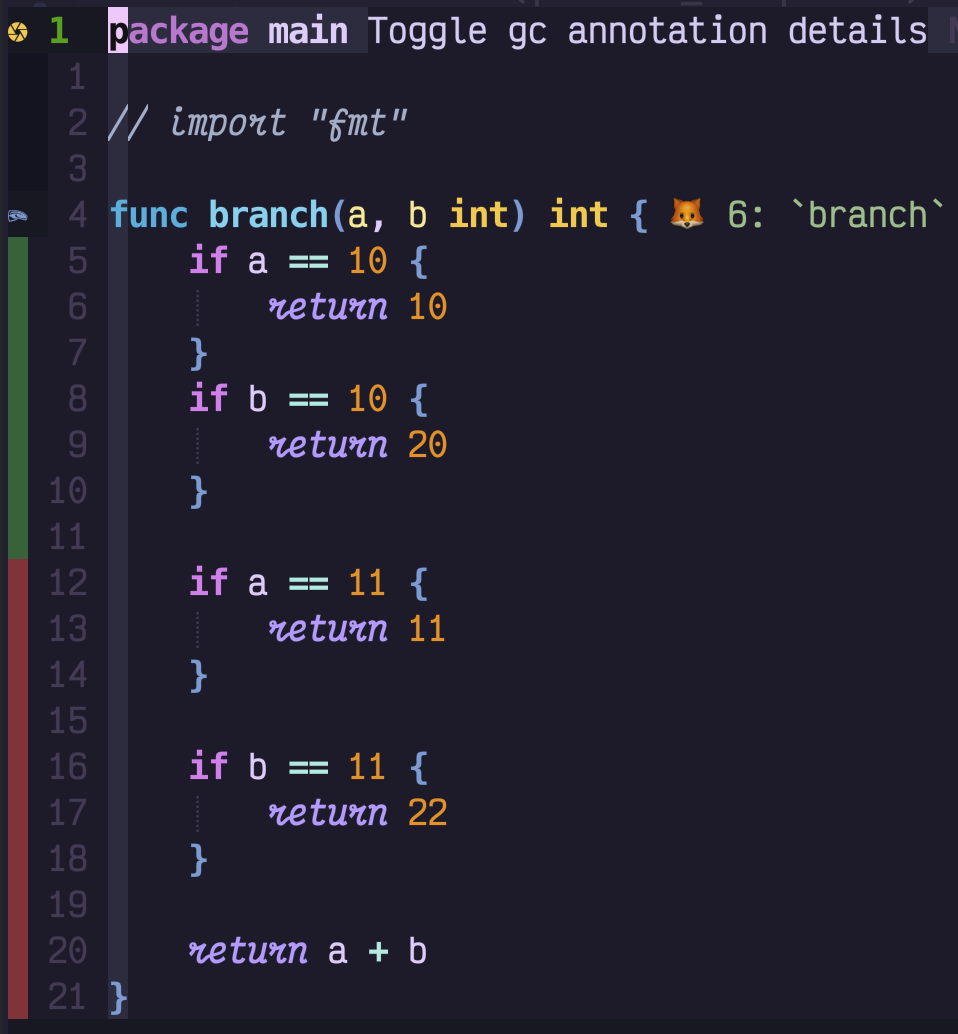
Show test coverage:
Provided wrapper for gobulild/test etc with async make Also suggest to use vim-test, which can run running tests on different granularities.
Unit Test with gotests and testify
Support table based unit test auto generate, parse current function/method name using treesitter
| command | Description |
|---|---|
| GoTestFunc | run test for current func |
| GoTestFunc -s | select the test function you want to run |
| GoTestFunc -tags=yourtag | run test for current func with -tags yourtag option |
| GoTestFile | run test for current file |
| GoTestFile -tags=yourtag | run test for current folder with -tags yourtag option |
| GoTestPkg | run test for current package/folder |
| GoTestPkg -tags=yourtag | run test for current folder with -tags yourtag option |
| GoAddTest [-parallel] | Add test for current func |
| GoAddExpTest [-parallel] | Add tests for exported funcs |
| GoAddAllTest [-parallel] | Add tests for all funcs |
GoTestXXX Arguments
| arguments | Description |
|---|---|
| -v | verbose mode |
| -c | compile |
| -C | coverprofile |
| -n | count |
| -t | tags |
| -f | fuzz |
| -bench | bench test |
| -m | metric |
| -s | select |
| -p | package |
| -F | floaterm mode |
| -a | args |
Note: For GoTestXXX
You can add available arguments with long name or character flag e.g.
GoTest -tags=integration ./internal/web -b=. -count=1 -
You can also add other unmapped arguments after the -a or -args flag GoTest -a mock=true
Show cheat.sh for api in neovim new buffer. e.g. GoCheat sort
Show go doc for api in neovim floating window. e.g. GoDoc fmt.Println

If no argument provided, fallback to lsp.hover()
Similar to GoDoc, but open the browser with the doc link. If no argument provided, open doc for current function/package
AI-powered documentation lookup. When you can't remember the exact package or function name, GoDocAI finds the
symbol using go doc and gopls workspace/symbol, then generates comprehensive documentation via AI.
:GoDocAI Println
:GoDocAI http.ListenAndServe
:GoDocAI json Marshal
If no argument is given, uses the word under the cursor. Results are shown in a floating window.
Requires ai = { enable = true } in your go.nvim setup.
A symbol outline for all symbols (var, const, func, struct, interface etc) inside a package You can still use navigator or sidebar plugins (e.g. vista, symbols-outline) to check outline within a file. But it is more useful for go to check the symbols in a package, as those symbols are visuals inside package, also the method can be defined in different source file.
Command format: GoPkgOutline {options} options: -f: show in floatwing window (default side panel, both require quihua.lua) -p package_name: the package you want to list. e.g. GoPkgOutline -p json; default package is current file's package If guihua not installed fallback to loclist

A symbol outline for all symbols (var, const, func, struct, interface etc) inside current package
Modify struct tags by gomodifytags and treesitter
| command | Description |
|---|---|
| GoAddTag | |
| GoRmTag | |
| GoClearTag |
Options: -transform/-t: transform the tag -add-options/-a: add options to the tag
nvim-lsp support goimports by default. The plugin provided a new formatter, goline + gofumpt (stricter version of gofmt)
| command | Description |
|---|---|
| GoFmt {opts} | default: gofumpt |
| GoImports | default: goimports |
| GoImports package_path | gopls add_import package |
{opts} : -a format all buffers
nvim-lsp/gopls support implementation by default. The plugin provides this command for people migrate from vim-go
generate method stubs for implementing an interface
Usage:
:GoImpl {receiver} {interface}
Also, you can put the cursor on the struct and run
:GoImpl {interface}
e.g:
:GoImpl f *File io.Reader
or simply put your cursor in a struct and do
:GoImpl io.Reader
or simply your cursor on a interface and specify a receiver type
:GoImpl MyType
gopls rename
| command | Description |
|---|---|
| GoDebug | start debug session, Note 1 |
| GoDebug -h | show helps info |
| GoDebug -c | compile only |
| GoDebug -t | start debug session for go test file, Note 2 |
| GoDebug -R | restart debug session |
| GoDebug -n | start debug session for nearest go test function |
| GoDebug -p | launch package test and start debug |
| GoDebug -e program | dap exec program |
| GoDebug -a | attach to remote process |
| GoDebug -s | stop debug session and unmap debug keymap |
| GoDebug -A args | debug session with args |
| GoDbgKeys | show debug keymaps in a floating window (guihua) |
| GoBreakToggle | GoDebug -b |
| GoDbgStop | Same as GoDebug -s |
| GoDbgContinue | Continue debug session |
| BreakCondition | conditional break |
Notes:
- Without any argument, will check if launch.json existed or not, if existed, using launch.json and popup input. If launch.json not existed, will start debug session for current file, if current file is package main will run main(), else will start the debug package test
- with -t option, if the current file is not a test file, will switch to the test file and run test for current function
- If the cursor is inside scope of a test function, will debug the current test function, if cursor is inside a test file, will debug current test file
Setup(adapter) for go included. Need Dap and Dap UI plugin nvim-dap
nvim-dap-ui
 GDB style
key mapping is used
GDB style
key mapping is used
| key | Description |
|---|---|
| c | continue |
| n | next |
| s | step |
| o | stepout |
| S | cap S: stop debug |
| u | up |
| D | cap D: down |
| C | cap C: run to cursor |
| b | toggle breakpoint |
| P | cap P: pause |
| p | print, hover value (also in visual mode) |
Please check Vscode Launch configurations
for more info go.nvim support launch debugger from vscode-go .vscode/launch.json configurations If launch.json is valid,
run GoDebug will launch from the launch.json configuration.

- GoToggleInlay
- GoToggleIferrLessHighlight
Please use jsonls/null-ls check your launch.json is valid json file. Following syntax is not supported
- Trailing comma
- Comment
Here is a sample launch.json
| Command | Description |
|---|---|
| GoDebug | Start debugger, to debug test, run GoDebug test, to add addition args run GoDebug arg1 arg2 |
| GoDebugConfig | Open launch.json file |
| GoBreakSave | save all breakpoints to project file |
| GoBreakLoad | load all breakpoints from project file |
| GoBreakToggle | toggle break point |
| BreakCondition | conditional break point |
| ReplRun | dap repl run_last |
| ReplToggle | dap repl toggle |
The plugin will setup debugger. But you need to install
-
dap
- 'mfussenegger/nvim-dap'
-
dap ui (optional)
- 'rcarriga/nvim-dap-ui'
- 'nvim-neotest/nvim-nio'
-
dap virtual text (optional)
- 'theHamsta/nvim-dap-virtual-text'
Also you can check telescope dap extension : nvim-telescope/telescope-dap.nvim
Sample vimrc for DAP
Plug 'mfussenegger/nvim-dap'
Plug 'rcarriga/nvim-dap-ui'
Plug 'nvim-neotest/nvim-nio'
Plug 'theHamsta/nvim-dap-virtual-text'
" Plug 'nvim-telescope/telescope-dap.nvim'| command | Description |
|---|---|
| GoAlt / GoAlt! | open alternative go file (use ! to create if not exist) |
| GoAltS / GoAltS! | open alternative go file in split |
| GoAltV / GoAltV! | open alternative go file in vertical split |
| command | Description |
|---|---|
| GoMockGen | default: generate mocks for current file |
| GoMockGen -s | source mode(default) |
| GoMockGen -i | interface mode, provide interface name or put the cursor on interface -p package |
| GoMockGen -d | destination directory, default: ./mocks |
Auto doc (to suppress golang-lint warning), generate comments by treesitter parsing result
type GoLintComplaining struct{}And run
lua.require('go.comment').gen() -- or your favorite key binding and setup placeholder "no more complaint ;P"The code will be:
// GoLintComplaining struct no more complaint ;P
type GoLintComplaining struct{}| command | Description |
|---|---|
| GoCmt | Add comment |
| GoCmtAI | Generate doc comment using AI (Copilot or OpenAI) for declaration at cursor. Requires ai = { enable = true } |
| command | Description |
|---|---|
| GoModInit | run go mod init and restart gopls |
| GoModTidy | run go mod tidy and restart gopls |
| GoModVendor | run go mod vendor and restart gopls |
| GoModWhy | run go mod why for current module |
| GoModDnld | run go mod download for current module |
| GoModGraph | run go mod graph |
run go mod tidy and restart gopls
Nvim-lsp is good enough for a gopher. If you looking for a better GUI. You can install navigator, or lspsaga, and lsp-utils etc. The goal of go.nvim is more provide unique functions releated to gopls instead of a general lsp gui client. The lsp config in go.nvim has a none default setup and contains some improvement and I would suggest you to use.
The latest version enabled lsp snippets (and other setups) by default. In case you need flowing the setup from cmp README.md, please use flowing command:
local capabilities = require('cmp_nvim_lsp').default_capabilities(vim.lsp.protocol.make_client_capabilities())
require('go').setup({
  -- other setups ....
  lsp_cfg = {
    capabilities = capabilities,
    -- other setups
  },
})Gopls supports code lens. To run gopls code lens action GoCodeLenAct Note: codelens need to be enabled in gopls, check
default config in
You can use native code action provided by lspconfig. If you installed guihua, you can also use a GUI version of code
action GoCodeAction, or with visual selection :'<,'>GoCodeAction
Supported by LSP, also GoLint command (by calling golangcl-lint) if you need background golangci-lint(v2) check, you can configure it with ALE
- ["x]GoJson2Struct! Visual select the json/yaml and run
GoJson2Struct youStructName-bang will put result to registergif ["x] specified, will put get json from clipboard if 'yourStructName' not provided, will use default nameT
-
GoEnv {filename} By default load .env file in current directory, if you want to load other file, use {filename} option
-
Alternatively, you can specify an
dap_enrich_configfunction, to modify the selected launch.json configuration on the fly, as suggested by mfussenegger/nvim-dap#548 (comment):dap_enrich_config = function(config, on_config) local final_config = vim.deepcopy(finalConfig) final_config.env['NEW_ENV_VAR'] = 'env-var-value' -- load .env file for your project local workspacefolder = vim.lsp.buf.list_workspace_folders()[1] or vim.fn.getcwd() local envs_from_file = require('go.env').load_env(workspacefolder .. 'your_project_dot_env_file_name') final_config = vim.tbl_extend("force", final_config, envs_from_file) on_config(final_config) end
- GoGenReturn
create return value for current function e.g. if we have
func Foo() (int, error) {
  return 1, nil
}
and in your code you cursor on Foo
Foo()will generate
i, err := Foo()
if err != nil {
  return
}- Gomvp Rename module name in under cursor e.g. Gomvp Gomvp old_mod_name Gomvp old_mod_name new_mod_name
- GoVulnCheck {arguments} Run govulncheck on current project
- GoEnum {arguments} Run goenum on current project
- GoNew {filename} Create new go file. It will use template file. e.g.
GoNew ./pkg/string.gowill create string.go with template file GoNew also support usinggonewcommand to create new file with template file gonew cli, e.gGoNew hello package_name/folderis same asgonew golang.org/x/example/hello package_name/folderif package_name/folder not provided, a hello project will be created in current folder
- Ginkgo {args}
| Arg | Description |
|---|---|
| run | |
| watch | |
| build | |
| bootstrap | |
| labels | |
| outline |
GoAI is a natural-language command dispatcher — it translates plain English into the correct go.nvim
command using an LLM (Copilot or OpenAI-compatible). Visual ranges are forwarded to range-capable commands.
| Command | Description |
|---|---|
| GoAI 'run unit test for tags test' | Translates to GoTest -tags=test |
| GoAI 'add json tags to struct' | Translates to GoAddTag json |
| GoAI 'format file with gofumpt' | Translates to GoFmt gofumpt |
| :'<,'>GoAI 'convert this json to struct' | Range is forwarded to GoJson2Struct |
| GoAI -f '{request}' | Include the full command catalog in the prompt (better accuracy) |
| GoAI | Open an interactive prompt |
The natural language request must be wrapped in single quotes (').
The -f flag sends the complete go.nvim command reference to the LLM, which improves accuracy
for less common commands at the cost of more tokens.
A confirmation dialog is shown before executing (configurable via ai.confirm).
Tab completion provides common prompts.
Requires ai = { enable = true } in your go.nvim setup.
All AI commands (GoAI, GoAIChat, GoCodeReview -m) support context macros in prompts.
Macros are expanded before the request is sent to the LLM.
| Macro | Description |
|---|---|
/buffer |
Select a loaded buffer (default: current buffer). Injects buffer contents. |
/file |
Select a Go file from the workspace (default: current file). Injects file contents. |
/function |
Injects the enclosing function at cursor (detected via treesitter). |
Examples:
:GoAI 'review /function for concurrency issues'
:GoAIChat 'explain /buffer'
:GoAIChat 'compare /function with /file'
:GoCodeReview -m refactored /function to handle errors
For /buffer and /file, a selector is shown to pick the target (the default is pre-selected).
/function expands immediately using the treesitter node at the cursor position.
GoCodeReview uses an LLM (Copilot or OpenAI-compatible) to review Go code and populate the quickfix list with
actionable findings (errors, warnings, suggestions).
| Command | Description |
|---|---|
| GoCodeReview | Review the entire current file |
| :'<,'>GoCodeReview | Review the visual selection only |
| GoCodeReview -d | Review only changes (diff) against the default branch (main/master) |
| GoCodeReview -d develop | Review only changes (diff) against a specific branch |
| GoCodeReview -b | Review with a brief/compact prompt (saves tokens) |
| GoCodeReview -d -b | Diff review with brief prompt |
| GoCodeReview -m {text} | Provide change description for context-aware review |
| GoCodeReview -m | Open interactive editor for multi-line change description |
The -m flag lets you describe what the changes are about so the reviewer can give more targeted feedback:
:GoCodeReview -m add lru cache to search, remove fifo cache
:GoCodeReview -d -m refactor error handling for retries
:GoCodeReview -m         " opens a floating editor for multi-line input
Literal \n in the message text is converted to newlines. When -m is used without text, a
floating editor (guihua.textview) opens for multi-line input — submit with <C-s>, cancel with q.
Requires ai = { enable = true } in your go.nvim setup. Results are loaded into the quickfix list.
GoAIChat lets you ask questions about Go code with AI. It automatically includes code context:
- Visual selection: selected code is sent as context
- Cursor in function: the enclosing function text and LSP references/callers are included
- No context: opens an interactive prompt
| Command | Description |
|---|---|
| :'<,'>GoAIChat 'explain this code' | Explain visually selected code |
| GoAIChat 'check for bugs' | Check enclosing function for bugs |
| GoAIChat 'refactor this code' | Suggest refactoring for the function under cursor |
| GoAIChat | Open interactive prompt |
| GoAIChat 'create a commit summary' | Summarize git diff as a commit message |
Tab completion provides common prompts: explain this code, refactor this code,
check for bugs, check concurrency safety, suggest improvements, etc.
GoDocAI finds a Go symbol by vague/partial name and generates rich AI documentation from its source.
| Command | Description |
|---|---|
| GoDocAI {query} | Find symbol and generate AI documentation in a floating window |
| GoDocAI | Use word under cursor as query |
Requires ai = { enable = true } in your go.nvim setup.