Welcome to the Go Interview Practice profile badges system! This guide shows you how to showcase your coding achievements using beautiful badges on your GitHub profile, LinkedIn, personal website, or anywhere you want to demonstrate your Go programming skills.
✨ All badges are clickable! When users click your badge, they'll be taken directly to the Go Interview Practice repository, helping you promote the project while showcasing your achievements.
- 🎯 Quick Start - Get your badges in 3 steps
- 🎨 Badge Types & Usage - Full overview of available badges
- ✨ Examples - See badges in action
- 📱 Usage Examples - GitHub, LinkedIn, website integration
- 🚀 Getting Your Badges - Step-by-step process
After contributing to the repository, find your personalized badges:
badges/YOUR_USERNAME_badges.md    ← Your complete badge collection (start here!)
badges/YOUR_USERNAME.svg          ← Full-size card badge
badges/YOUR_USERNAME_compact.svg  ← Compact horizontal badge
- Open
badges/YOUR_USERNAME_badges.md - Copy the markdown for your preferred badge style
- Paste into your GitHub profile README, website, or portfolio
Your badges automatically update as you solve more challenges - no manual work needed!
These badges automatically update when you solve more challenges:
Example for user odelbos:

Your Dynamic Badge (Clickable):
[](https://github.com/RezaSi/go-interview-practice)Beautiful custom-designed badges with gradients and achievement levels:
Beautiful Modern Designs with Progress Bars:
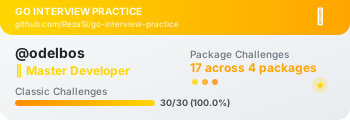
🏆 Master Level (Gold) - odelbos with 28/30 challenges:
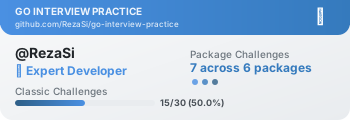
⚡ Advanced Level (Orange) - RezaSi with 14/30 challenges:
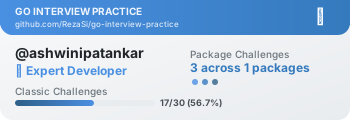
🎯 Expert Level (Blue) - ashwinipatankar with 17/30 challenges:
⚡ Compact Horizontal Style:

Your SVG Badge (Clickable):
[](https://github.com/RezaSi/go-interview-practice)Simple badges that anyone can use regardless of their progress:

[](https://github.com/RezaSi/go-interview-practice)Your badge automatically reflects your achievement level:
| Level | Requirements | Badge Color | Emoji |
|---|---|---|---|
| 🌱 Beginner | 1+ challenges | Green | 🌱 |
| ⚡ Advanced | 10+ challenges (30%+ completion) | Orange | ⚡ |
| 🎯 Expert | 15+ challenges (50%+ completion) | Blue | 🎯 |
| 🏆 Master | 20+ challenges (65%+ completion) | Gold | 🏆 |
Change the style parameter for different looks:
for-the-badge- Large, professional (recommended for profiles)flat- Minimal, cleanflat-square- Square cornersplastic- Glossy looksocial- Social media style
Available colors for static badges:
brightgreen,green,yellowgreen,yellow,orange,redlightgrey,blue,purple,pink- Custom hex colors:
#ff69b4
## 🏆 My Go Interview Practice Journey
[](https://github.com/RezaSi/go-interview-practice)
I've been practicing Go programming through the [Go Interview Practice](https://github.com/RezaSi/go-interview-practice) repository, where I've solved multiple coding challenges and improved my algorithmic thinking skills.<div class="badges">
<h3>My Coding Achievements</h3>
<img src="https://raw.githubusercontent.com/RezaSi/go-interview-practice/main/badges/YOUR_USERNAME.svg"
alt="Go Interview Practice Achievement" />
<p>Completed multiple Go programming challenges</p>
</div>- Download your SVG badge as an image (screenshot or convert to PNG)
- Upload as a "License & Certification" or in your summary section
- Link back to the repository:
https://github.com/RezaSi/go-interview-practice
Include the badge image and mention:
- "Completed X/30 Go programming challenges"
- "Achieved [Your Level] level in algorithmic problem solving"
- "Active contributor to open-source Go learning project"
Your dynamic badges automatically refresh when:
- ✅ You solve new challenges
- ✅ Your achievement level increases
- ✅ Scoreboard data is regenerated
- ✅ New challenges are added to the repository
- Badges are regenerated when scoreboards change
- GitHub Actions automatically run the badge generator
- Changes appear within minutes of scoreboard updates
## Technical Skills Demonstration
I actively practice algorithmic problem-solving through structured challenges:
[](https://github.com/RezaSi/go-interview-practice)
**Repository**: [Go Interview Practice](https://github.com/RezaSi/go-interview-practice)
**My Solutions**: [View my submissions](https://github.com/RezaSi/go-interview-practice/tree/main/challenge-*/submissions/YOUR_USERNAME)Use badges in:
- GitHub profile README
- Dev.to articles about your learning journey
- Twitter/LinkedIn posts about your progress
- Personal blog posts about Go programming
- Conference speaker bio slides
- Fork the Go Interview Practice repository
- Solve at least one challenge
- Submit your solution via pull request
- Wait for your solution to be merged
- Badges are auto-generated after merges
- Find your badge files in the
badges/directory
- Copy the markdown from
badges/YOUR_USERNAME_badges.md - Paste into your GitHub profile README
- Share your progress with the community!
Here are some real examples from our top contributors:


- Badge not found? Make sure you've submitted at least one solution
- Badge not updating? Wait a few minutes for GitHub's CDN to refresh
- Want different style? Modify the
styleparameter in the URL
- 📧 Email: rezashiri88@gmail.com
- 🐙 GitHub: @RezaSi
- 💬 Issues: Repository Issues
Start your Go journey today! 🚀
Join Go Interview Practice →
Show the world your coding skills with beautiful, automatically-updating achievement badges!