- Who am I
- Who are you
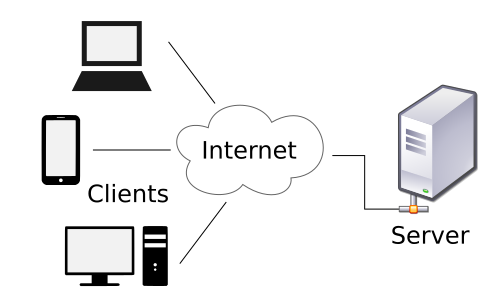
- The Internet
- HTML: The content and structure of a webpage
- CSS: How that page looks
- JavaScript: Making it fancy
- Editor with syntax highlighting
- Sublime Text: Great and free
- TextMate: Not free but has big fan base
- Dreamweaver etc.
- Test in as many combinations of browser versions and OSes as you can
- BrowserStack (Not free, but very cool)
- Chrome Dev Tools (Tools > Developer Tools)
- Firefox (Tools > Web Developer > Toggle Tools)
- Safari (Enable Develop menu from Advanced Preferences)
source: Wikimedia
- The World Wide Web Consortium (W3C) sets the rules for HTML and CSS
- Browsers don't always follow the rules
- index.html
- Good organization to have separate folders for CSS, images, JS, etc.
- Describes the elements in a document
- As well as containing the content
- More descriptive tags: article, section, header, etc.
- New media tags: audio, video
- Canvas
- Mozilla Developer Network is a great resource
- You need an opening and closing tag
This is a paragraph......
- Except when you don't (self-closing tags):

(HTML5 eliminates the need for the / at the end of the img tag)
<!DOCTYPE html>
    <head>

        <title>My webpage</title>


    </head>
    <body>
        This is a webpage
        And here is a paragraph
    </body>
</html>
- An ID uniquely identifies an element
- You can add a particular class to many elements
- You can assign multiple classes to an element
My Site!
Here's my life story: blah, blah, lorem ipsum etc. forever
Here's how I feel about HTML5: SOOO many feelings.  Let me tell you about them forever.
- HTML5 Boilerplate
- Includes basic index.html
- Also the standard folder structure
- Some helpful CSS
- Position elements
- Styling
- Designers have a huge advantage
- Author style sheets, user stylesheets, and user agent style sheets (from most to least weight)
- Conflicts are resolved in favor of most specific, and the later it appears in the stylesheet
- Example
- Apply some style to a tag or selectors
p {
    color: blue;
}
.warning {
    color: red;
    font-size: 1.2em;
}
- Internal: in a style section (part of the head section)
- Inline CSS: as style attribute of HTML tag
- External: include link to CSS file in head section of HTML file
<head>
<style>
#title-banner {
color: #444;
}
</style>
</head>
<h1 style="color: #444;">My Website</h1>
<head>
<link rel="stylesheet" type="text/css" href="yourfile.css">
</head>
#title-banner {
    color: blue;
    font-size: 3em;
}
.warning {
    color: red;
}
h1 a {
    color: green;
}
- 30 Selectors
- Tag, class and ID are the most common though
- :link
- :visited
- :hover
a:hover {
color: pink;
}
- Web safe fonts: meh
- Much better: @font-face
- Google Fonts, Typekit (Adobe), Fontdeck
- Having a good experience on different devices
- Progressive Enhancement
- Origin of the Term
- CSS allows you to size text using em, pixels, points, or percent
- em is the most accessible and scalable
- "When defining the font-size property, an em is equal to the size of the font that applies to the parent of the element in question. If you haven't set the font size anywhere on the page, then it is the browser default, which is probably 16px." -- Mozilla Developer Network
- Selectively apply styles (e.g. one for small screens, another for large)
- Example from MDN's comprehensive article on media queries:
<link rel="stylesheet" media="(max-width: 800px)" href="example.css" />


<style>
@media (max-width: 600px) {
  .facet_sidebar {
    display: none;
  }
}
</style>

source: W3.org
- Twitter Bootstrap
- Made by Twitter for easy prototyping
- Grid system, good base to start with
- Similar: Foundation
- Has nothing to do with Java
- Include in your HTML file
- Inline or external
- Either way, do it before the </body> tag
<script>
alert("JavaScript!");
</script>
<script type="text/javascript" src="yourfile.js"></script>
- Holds a value
- Can be a string, number, function, another variable, object
var myName = "Hannah";
- You can change them
- Example
- Single line: everything on that line after // is ignored
// This is a comment
- Multiline: everything between /* and this */ is ignored
/*
This comment
is two lines long
*/
- Think of them as list of variables
var myArray = ["cat","dog","wookie"];
- A "thing" with named properties
- Example
- Allows you to reuse chunks of code
- Example
- Object properties can be functions
- Example
- Sometimes you need to repeat yourself
- E.g., say you want to print all the items in an array
- Example
- Dynamically change the webpage
- Manipulate elements in your HTML
- Overwhelmingly popular JavaScript library
- Uses CSS selectors as a base
$("selector_goes_here").whatever
- Button clicks, window resize, etc.
- Example
Eloquent JavaScriptis a fantastic (and free) online, interactive book
- Tons of awesome open source libraries!
- Even runs server-side now
- Git & GitHub
- The Command Line
- Yeoman, Grunt, and Bower
- Ruby on Rails, Django, etc.
- Prefer one of the resources here to those found at W3Schools.
- Tons of fantastic blogs
- Experiment!
Feel free to contact me with any questions:
Twitter: @hlatkin
Email: hannah.atkinson@gmail.com