今天是第三十天,就大概來看一下我一直想看的Flux吧!
是由Facebook提出,且使用在React上,我不太理解為什麼GOF內沒有提到資料流的問題,可能我學術不精不懂吧呵呵。總之Flux並不是一個專屬React上的一個套件或框架,他是一設計模式,後來有跑出一Redux更為大家所愛,不過還是先從Flux開始吧!
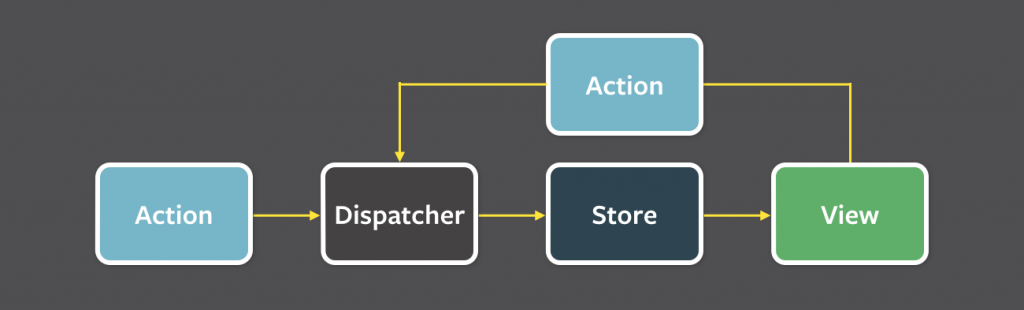
- Action發生時
- 觸發Dispatcher
- 更新Store
- 最後改變View
來分別解釋各個的意義!
Action : 動作、方法,可能是增加物件、刪除物件、變更物件、等等的動作物件化(Command Pattern?) Dispatcher : 中心單位,用於通知所有Store該更新資料,像是Observer Pattern內的Subject! Store : 儲存資料的地方,可能為多個Store註冊在同一Dispatcher,當資料變更時會是由Dispatcher變更! View : 顯示操作區域,只會接收資料並不會直接修改資料,修改資料得透過Action!
本範例僅使用Typescript基礎實現Flux概念,並非標準React使用狀況!概念為單向資料流!
//Store.ts
export class Store{
    //這邊就是我們儲存的狀態
    private state:string = '';

    //取得狀態 會由View來這邊取
    public getState():string{
        return this.state;
    }

    //更改狀態
    public changeState(str:string):void{
        this.state = str;
    }
}
Dispatcher範例為單一Store,複雜的狀況是多Store才是實際遇到的問題,單一Store哪會有這麼多問題哈哈。
import {Store} from './Store';

//在Pattern內就是一種Observer的概念,當數據發生變更時,會通知所有Store要變更,但這邊只有使用單一Store
export class Dispatcher{
    private store:Store;
    constructor(store:Store){
        this.store = store;
    }
    public dispatch(str:string):void{
        this.store.changeState(str);
    }
}
變更的方法物件化,看過其他範例有再多一層ActionType,用途應該就是讓Dispatcher不會直接依賴Action吧?
//Action.ts
import {Dispatcher} from './Dispatcher';
export class Action{
    private dispatcher:Dispatcher;
    //變更事件,綁一個Dispatcher
    constructor(dispatcher:Dispatcher){
        this.dispatcher = dispatcher;
    }

    public changeState(str:string){
        this.dispatcher.dispatch(str);
    }
}
顯示以及觸發方法的地方,如果在Real Time狀況下,View可監聽Store!監聽其實就是Observer的概念,通知Store變更時要跟View講的意思。範例沒有使用。
import {Action} from './Action';
import {Store} from './Store';

export class View{
    private action:Action;
    private store:Store;

    constructor(store:Store,action:Action){
        this.store = store;
        this.action = action;
    }

    //顯示狀態 會去call getState的方法
    public display():void{
        console.log("State: "+this.getState());
    }

    //如果要編更State需呼叫Action的變更
    public setMyState(str:string):void{
        this.action.changeState(str);
    }

    //getState會去抓Store的方法
    private getState():string{
        return this.store.getState();
    }

}
最後Demo囉!
//Demo.ts
import {Action} from './Action';
import {Dispatcher} from './Dispatcher';
import {Store} from './Store';
import {View} from './View';

let store:Store = new Store();
let dispatcher:Dispatcher = new Dispatcher(store);
let action:Action = new Action(dispatcher);
let view:View = new View(store,action);

view.setMyState('Flux');
view.display();
這一設計方法可以有效管理多資料在不同元件產生的問題,我個人認為這是前端框架遇到比較多的問題,因為需要RealTime同步更新多個資料,再不同元件很容易會產生一堆亂七八糟的資料流,所以才統一一個資料流的方式,我在之前撰寫聊天平台時有遇到這個問題,那我後來做法也是類似這樣,只是..Dispatcher直接變成Server,直接把資料倒進最上層的父元件,所有資料來源都是父元件的資料哈哈,但那專案不大,所以可能還撐得住,之後就可以用看看redux看看!
這一範例我覺得很好,有EventEmit監聽的方法 https://github.com/ruanyf/extremely-simple-flux-demo Facebook的範例教學,比較複雜https://github.com/facebook/flux/tree/master/examples/flux-todomvc