Lets compare Speedie vs a few other languages. Many languages seem good when viewing simple examples, but break down once you try anything slightly significant.
Here is a good example, from Rust. We are trying to search through a list. Due to how Rust overcomplicates everything... its quite a nightmare even to look at.
What this Rust code is doing, is creating a list containing the numbers "2", "1", "3". Then we search through the list for the number "2", and replace it's number with "42". Seems easy. But why is the code so long?
All those wierd things like box, mut, &, &' make the code hard to understand. You spend most of your time fighting your way past syntax instead of just... writing code.
struct Link<T> {
  val: T,
  next: List<T>,
}

enum List<T> {
  Empty,
  Link(Box<Link<T>>),
}

impl<T> List<T> where T: Eq {
  fn find_inner<'a>(mut list: &'a List<T>, t: T) -> Option<&'a T> {
    loop {
      let next;
      match *list {
        List::Empty => return None,
        List::Link(ref link) => {
          if t == link.val {
            return Some(&link.val)
          }
          next = &link.next;
        },
      }
      list = next;
    }
  }

  pub fn find_inner_mut<'a>(mut list: &mut List<T>, t: T) -> Option<&mut T> {
    loop {
      let next;
      let forcemove = list;
      match *forcemove {
        List::Empty => return None,
        List::Link(ref mut link) => {
          if t == link.val {
            return Some(&mut link.val)
          }
          next = &mut link.next;
        },
      }
      list = next;
    }
  }

  pub fn find<'a>(&'a self, t: T) -> Option<&'a T> {
    List::find_inner(self, t)
  }
}

fn main() {
  let mut list =
    List::Link(Box::new(Link {
      val: 3,
      next: List::Link(Box::new(Link {
        val: 1,
        next: List::Link(Box::new(Link {
          val: 2,
          next: List::Empty,
        })),
      })),
    }));
  *List::find_inner_mut(&mut list, 2).unwrap() = 42;
  println!("{:?}", list.find(2));
}
Now lets look at a Speedie version!!
// We'll just use the inbuilt list class. You would be mad not to.
// Linked-lists are hard to get right, far more complex than the Rust example hints at.

function list.FindPosition (|int| Match, |list|)
    for s in self
        if s.Position == match
            return s

main
    || L = list()
    L <~ list(3)
    L <~ list(1)
    L <~ list(2)
    || F = L.findposition(2)
        F.Position = 42
	printline L.findposition(2) // prints "(nil)" signifying that
	// the item was not found, which is what happens in rust also
Hooray we did it! Far simpler. Totally understandable. Honestly, the difference is shocking and really shows how bad Rust can be.
The funny thing here is that Speedie is safer than Rust, builds faster than Rust, and the programs runs faster too! Speedie beats Rust in the things Rust is meant to be good at!
Note, this Rust code makes no mention of being "unsafe"!! Wow.
For example, if you alter the line, to replace 2 with 5:
  // *List::find_inner_mut(&mut list, 2).unwrap() = 42;
  *List::find_inner_mut(&mut list, 5).unwrap() = 42;
You will get a crash. Yep... your "not marked as unsafe" code will crash. Cos you used unwrap. How terrible. (Apparantly, Rust considers crashing via unwrap to be "safe". 🤦♂️ 🤦🏽 🤦♀️.)
The speedie code above WON'T crash if the item can't be found! Or the same alteration is made!
|| F = L.findposition(5) // won't run this branch if "5" isn't found.
    F.Position = 42
Guess what else? Wanna try remove that test? Sure? See what happens. You think Speedie will crash like other languages?
Nope!
|| F = L.findposition(5)
F.Position = 42 // ERROR! "Accessing property on optional: F"
Speedie realises that F might not exist. And so this code won't compile. Speedie is very intelligent around figuring out what vars can be nil or not. So you literally get all the safety with none of the nightmare overhead of Rust.
On November 18 2025, Cloudflare, which runs 20% of websites, and has micro-services used by many other websites such as Twitter, and ChatGPT, went down. Specifically their code used .unwrap(), which can crash your app.
Rust can take down around 1/3rd of the internet and still be considered "Safe". Yeah its not safe. It could be more dangerous if a Rust program crashed on software running an airplane, or hospital or industrial machinery.
Youtuber Tsoding had this to say about Rust:
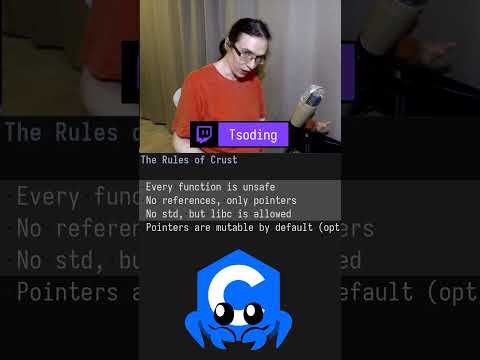
The problem with Rust, is that they achieved safety by sacrificing sanity of the the programmer. Thats how they acheived safety, it becomes an absolutely unusable annoying shitty language. "But at least its safe right?" Its like: "F*&^ programmers! F!!$ programmer health. Safety above all else! Think about the children! Think about the children!" So we gonna try to go in the opposite direction, lets cut out all that bullshit, lets actually for once think about the mental health of the programmer and just let them enjoy. And with the rise of vibe coding, its obvious that no one gives a sh%@ about safety anyway... so why should we?
Wow. Well... he basically expressed my emotional reaction to Rust better than I could.
Sometimes as a student, you are asked to do simple things, like perform some IO. Basically ask for something via stdin and print something into stdout.
Well... C is full of "gotchas". Absolutely full of them. Lets look at this C example:
#include <stdio.h>
#include <string.h>

int main() {
    char passcode[5];

    for(int i = 0; i < 3; i++){
        printf("Please enter the passcode, you have %d attempts : ", (3 - i));
        fgets(passcode, sizeof(passcode), stdin);
        passcode[strlen(passcode) - 1] = '\0';

        if(strcmp(passcode, "1539")){
            if(i == 2){
                printf("Wrong passcode! Your server has now been locked!\n");
                break;
            }
            printf("Wrong passcode!\n");
        }
        else{
            printf("Success!\n");
            break;
        }
    }
    return 0;
}
Unfortunately, this code has a subtle bug despite the best intentions. Finding gotchas is the kind of experience that C-students have to suffer from. The code "looks right" and you really tried your best, and yet theres some simple bug hiding in here... somewhere.
In this case, the bug is that fgets ends its strings with "\n". Which isn't what you expected!
In addition, this code only allows for 4 byte inputs. What if the user typed in "15391" as his password? It is still wrong. But this code would accept it. To get around this, now you need more advanced memory management systems. Its not fun.
You aren't really learning to code. Just learning how to be frustrated.
Lets try do the same assignment in Speedie:
main
    for i in 3
        "Please enter the passcode, you have ${3-i} attempts"
        || passcode = app.input
        if passcode == "1539"
            "Success!"
            return 0
        "Wrong passcode!"

    "Wrong passcode! Your server has now been locked!"
    return -1
Perfect! it looks simple, it is simple. It works... and it looks nice. Its understandable and easy to debug.
As an added bonus, you are writing in a fast language (Speedie). So this isn't like "well I did my assignment in a slow language like python or javascript". Speedie is usually as fast as C.
Often speedie is faster than C code, because it has better libraries that look as if they were designed by people who are the elite of elites.
The fact that there are no wierd issues by including the "\n" in the string via app.input... helps demonstrate this.
Of all the languages, Go is one of them.
Heres an example of error-handling with files in Go:
package main

import (
	"errors"
	"fmt"
	"io"
	"os"
)

func ReadFile(path string) ([]byte, error) {
	if path == "" {
		return nil, errors.New("path is empty")
	}
	f, err := os.Open(path)
	if err != nil {
		return nil, fmt.Errorf("open failed: %w", err)
	}
	defer f.Close()

	buf, err := io.ReadAll(f)
	if err != nil {
		return nil, fmt.Errorf("read failed: %w", err)
	}
	return buf, nil
}

func main() {
	f, err := ReadFile("file.txt")
	if err != nil {
		fmt.Fprintln(os.Stderr, err)
		return
	}
	fmt.Println(f)
}
Heres the same in speedie:
function ReadFileExample (|string| path, |StringThatWasReadSafely|)
    || f = path.file
    return f.ReadAll(File.ExpectExists)
    // File.ExpectExists is a bit flag telling speedie to report missing files as errors.
    // If we removed this param and left it as its default of 0, upon calling f.Readall, any missing file would create an error, and return "" (non-nil).

main
    || f = ReadFileExample("file.txt")
        printline f
Its a little different, because Speedie's inbuilt file functions already test for problems, and then reports the errors. Also, we pass File.ExpectExists (an integer constant containing bit-flags) to tell Speedie to create an error if the file does not.
Or we can just do this (use the function string.ReadFile):
main
    || f = "file.txt".ReadFile(File.ExpectExists)
        printline f
Neat huh?