getting agsget to work #1

Description

For now, agsget needs dotnet core 2.1 to build. From it's top folder you can generate releases:
dotnet publish --self-contained -c Release -r win10-x64
This will generate an exe and a bunch of dlls on the folder, which is not very nice. Once dotnet core 3.0 is released, it will enable generating a single self contained .exe with
dotnet publish --self-contained /p:PublishSingleFile=true -c Release -r win10-x64
The code is also platform independent, so you can do -r ubuntu.16.04-x64 for Ubuntu 16.04 Linux builds and on.
To be able to extract .scm to .asc and .ash pairs and insert them into the ags game project, I decided to use original AGS code, with will decide the license of this code too, using a trim down version of ImportExport.cs that only does the .scm to .asc and .ash pair, and use AGS.Types for Game.agf serialization/deserialization. This first sketch is provided below.
Now to convert from current .NET 4.5 to dotnet core, I am following Scott Henselman video here and using CsprojToVs2017. By looking into ags repo itself (imagining I would add ags as a git submodule), I got the project below.
This file would exist just outside of a git clone or submodule of ags.
Now, the issues:
-
the resulting csproj need to be able to exclude the other parts of ags for building on AGS.Types, unless I just insert AGS.Types directly here and manually upgrade them as needed. This is a possibility because there are currently some .NET / dotnet core incompatibilities on the project.
-
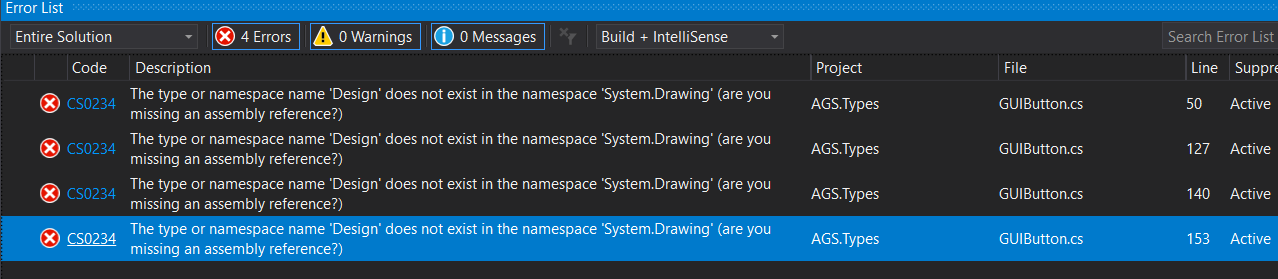
when you try to build this new csproj with dotnet core 2.1, you will get errors related to
System.Drawing. This class is far from complete on compatibility with .NET 4.x
- But for dotnet core 3.0, System.Drawing actually IS fully compatible with .NET 4.7.2 implementation of System.Drawing!
So now, except for the issue of figuring out how AGS.Types will integrate in agsget project, it's best to just wait for dotnet core 3.0 release.