1-What does it mean that web sockets are bidirectional? Why is this useful?
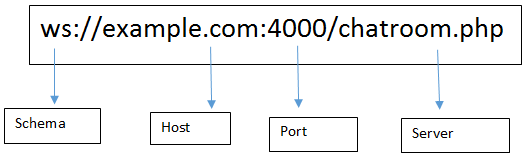
WebSocket is bidirectional, a full-duplex protocol that is used in the same scenario of client-server communication, unlike HTTP it starts from ws:// or wss://. It is a stateful protocol, which means the connection between client and server will keep alive until it is terminated by either party (client or server). after closing the connection by either of the client and server, the connection is terminated from both the end.
allow an application program to send and receive information concurrently.
An example of a full-duplex device is plain old telephone service; the parties at both ends of a call can speak and be heard by the other party simultaneously. ... In a half-duplex or semiduplex system, both parties can communicate with each other, but not simultaneously; the communication is one direction at a time

means data flows in both directions, whereas Unidirectional means data flows in only one direction.
Bidirectional is a communications mode that is capable of transmitting data in both directions (send and receive), but not at the same time.
2-Does socket.io use HTTP? Why?
Even when websockets can be used, the initial connection setup it done over HTTP. Also, a socket.io server will attach to an HTTP server so it can serve its own client code through /socket.io/socket.io.js.
What happens when a server emits an event?
Anything that listens to this event executes the way it carries it
What happens if a client “misses” an event?
can not see anything
How can we mitigate this?
using queues
WebSocket
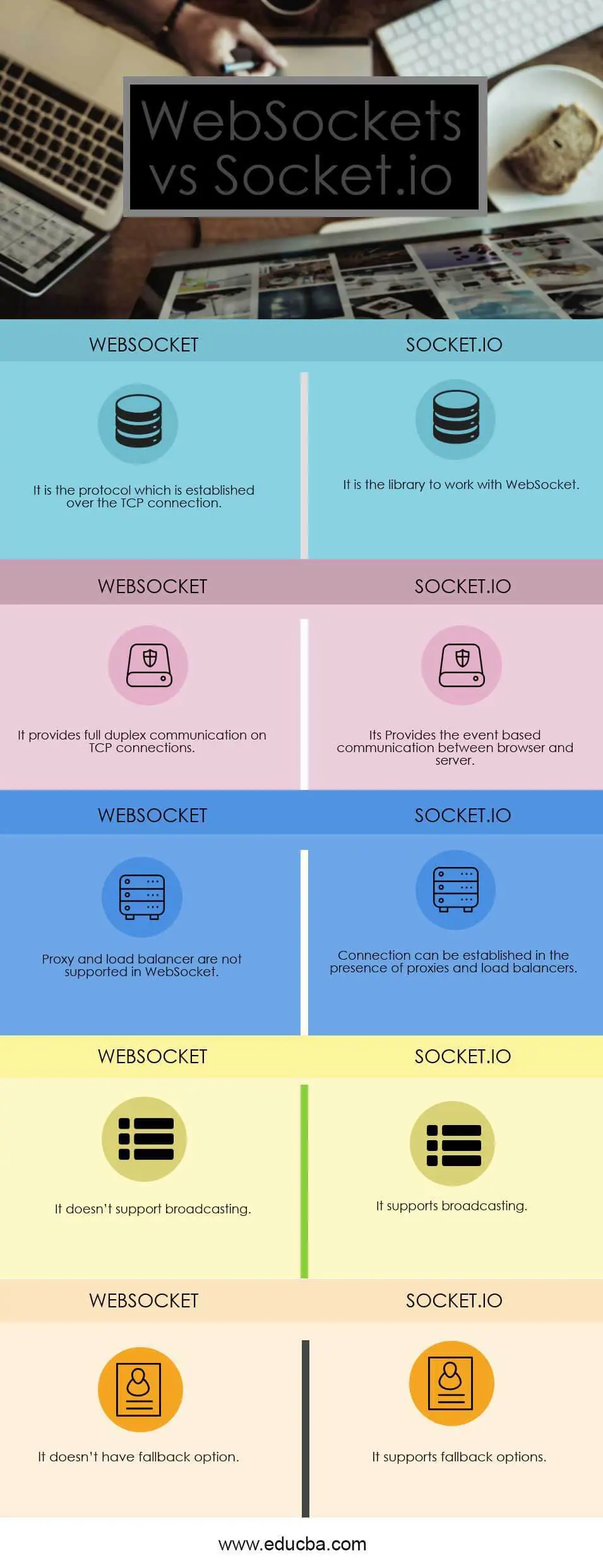
is the communication Protocol that provides bidirectional communication between the Client and the Server over a TCP connection; WebSocket remains open all the time, so they allow real-time data transfer. When clients trigger the request to the server, it does not close the connection on receiving the response; it rather persists and waits for the Client or server to terminate the request.
Socket.IO is a library that enables real-time and full-duplex communication between the Client and the Web servers. It uses the WebSocket protocol to provide the interface. Generally, it is divided into two parts; both WebSocket vs Socket.io are event-driven libraries.
Client-Side: it is the library that runs inside the browser
Server Side: It is the library for Node.js
What Does Data Packet Mean?
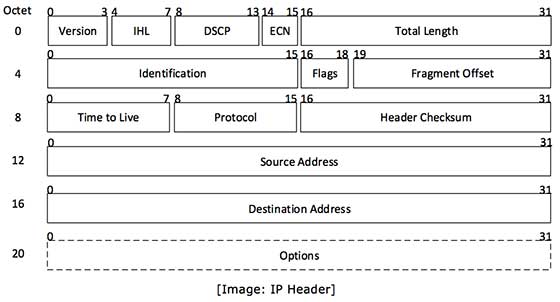
A data packet is a unit of data made into a single package that travels along a given network path. Data packets are used in Internet Protocol (IP) transmissions for data that navigates the Web, and in other kinds of networks.
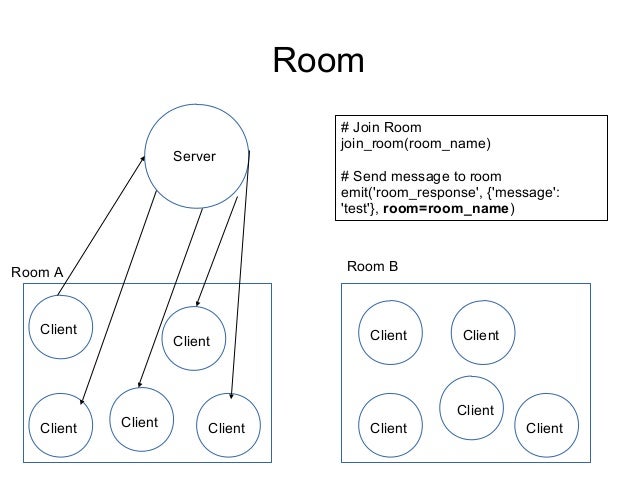
Both namespaces (io.of('/nsp')) and rooms (socket.join('room')) are created on the server side
Multiple namespaces and multiple rooms share the same (WebSocket) connection
The differences:
namespaces are connected to by the client using io.connect(urlAndNsp) (the client will be added to that namespace only if it already exists on the server)
rooms can be joined only on the server side (although creating an API on the server side to enable clients to join is straightforward)
namespaces can be authorization protected
authorization is not available with rooms, but custom authorization could be added to the aforementioned, easy-to-create API on the server, in case one is bent on using rooms rooms are part of a namespace (defaulting to the 'global' namespace) namespaces are always rooted in the global scope
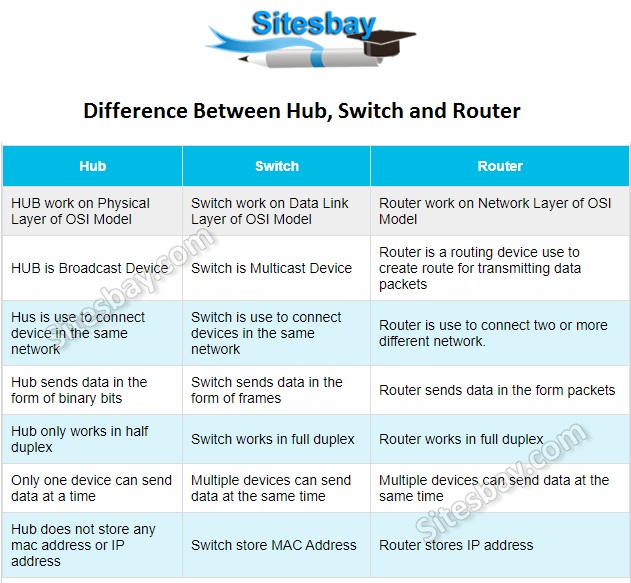
How network hubs work
Network hubs are categorized as Layer 1 devices in the Open Systems Interconnection (OSI) reference model. They connect multiple computers together, transmitting data received at one port to all of its other ports without restriction. Hubs operate in half-duplex.
There are two types of network hubs: active and passive. A third designation, intelligent hubs, is synonymous with a switch.
Active hubs repeat and strengthen incoming transmissions. They are also sometimes referred to as repeaters. Passive hubs simply serve as a point of connectivity, without any additional capabilities.
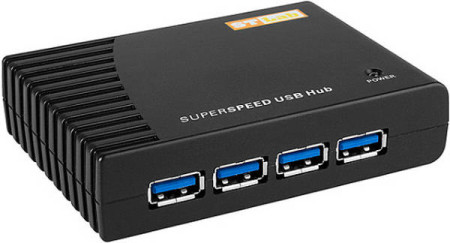
n general, a hub refers to a hardware device that enables multiple devices or connections to connect to a computer. An example is a USB hub, which allows multiple USB devices to connect to one computer, even though that computer may only have a few USB connections. Pictured is an example of a USB hub.
Hub is use to connect device in the same network Switch is use to connect devices in the same network Router is use to connect two or more different network. Hub Only one device can send data at a time, In Switch Multiple devices can send data at the same time, In Router Multiple devices can send data at the same time.
connects devices (such as computers, printers, wireless access points) in a network to each other,