
Replies: 3 comments 10 replies

-
|
please, try restarting the terminal and report back. |
Beta Was this translation helpful? Give feedback.

-
|
how can i restart the terminal ? |
Beta Was this translation helpful? Give feedback.

-
|
@maureryakov quit the Terminal app and reopen it, or source your profile file with |
Beta Was this translation helpful? Give feedback.
-
|
I rebooted my macbook this way, it did not lead to anything. Anyway, after installing the CLI, the terminal writes command not found. |
Beta Was this translation helpful? Give feedback.
-
|
Do I understand correctly that I download applications on DETA according to the same principle as on HEROKU? |
Beta Was this translation helpful? Give feedback.
-
|
|
Beta Was this translation helpful? Give feedback.

-
|
@maureryakov That happened to me but I managed to fix it by adding the deta cli manually in .bash_profile.
|
Beta Was this translation helpful? Give feedback.
-
|
It worked, but now the process does not open in safari and asks for another browser , why? |
Beta Was this translation helpful? Give feedback.

-
|
It opens your default browser. For example, I am using Brave as default browser, when I input deta login, a new Brave tab/window opens. Cheers! |
Beta Was this translation helpful? Give feedback.
-
|
I realized that the default browser opens, but safari does not work, and I will not install another browser to use deta. In general, I did not like the deta service. thank you all for your help, you are awesome! |
Beta Was this translation helpful? Give feedback.

-
|
@rareseu I am using an M1 Macbook and I do not have a .bash_profile file in my /Users/x directory. I tried updating the .zshrc file but it did not work. Can you please advise? |
Beta Was this translation helpful? Give feedback.
-
|
@bimberman That's ok! That means you haven't had aliases added yet! You can simply create it with Terminal too: open it, type cd, type pwd, make sure you're in /Users/USERNAME and then touch .bash_profile |
Beta Was this translation helpful? Give feedback.

-
|
Thank you. |
Beta Was this translation helpful? Give feedback.


Uh oh!
There was an error while loading. Please reload this page.
-
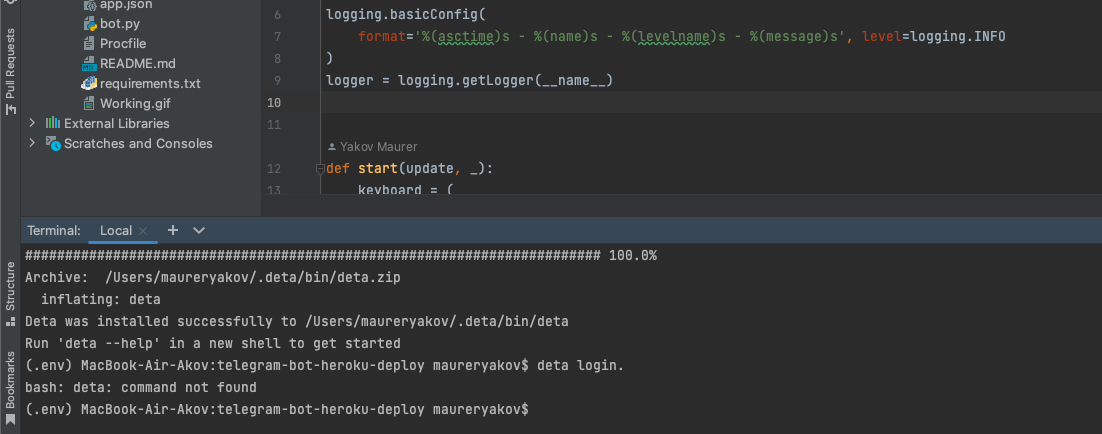
I write in terminal 👉 curl -fsSL https://get.deta.dev/cli.sh | sh
installation is in progress and everything seems to be fine but ...
at the next step deta login the terminal writes an error command not found
Beta Was this translation helpful? Give feedback.
All reactions