Node version seems to be 12.16, even if created with runtime 14.x #515

Replies: 2 comments 3 replies

-
|
create it a new micro and force node14: |
Beta Was this translation helpful? Give feedback.

-
|
Thank you for the reply. Sadly, this did not change the behaviour. Still getting the error, which indicates that node 12.16 is installed instead of 14:
For further investigation, here is the used project. Minimal steps to reproduce:
note: This is only for the installation failure issue, for a fully functioning API there are also the .env variables needed |
Beta Was this translation helpful? Give feedback.

-
|
no idea how the sharp library is getting this version number. i'm printing out |
Beta Was this translation helpful? Give feedback.

-
|
Indeed, it seems that, at least when the server is running, the node version is 14.20.0. I also inspected the installation script of sharp, which confuses me even more, because the thrown error also uses the Snippet from the sharp installation script: const supportedNodeVersion = process.env.npm_package_engines_node || require('../package.json').engines.node;
if (!semverSatisfies(process.versions.node, supportedNodeVersion)) {
handleError(new Error(`Expected Node.js version ${supportedNodeVersion} but found ${process.versions.node}`));
}
// this will throw sharp: Installation error: Expected Node.js version >=14.15.0 but found 12.16.1 during the installationThe only reason causing this is (IMHO) that the micro uses another version (12.16.1) for the installation, which does not make any sense, because the running version is 14.20 and got all dependencies installed, which indicates that the installation was also on v14.20. The installation of sharp (or all dependencies in general) works on my machine with node 14.20., however, this is on a Windows OS. I can (probably tomorrow) set up a Linux VM and try to mimic the micros OS and see if it installs there without any issues, or if sharp will throw an error on a Linux OS, which I think will be unlikely. Is there any option to provide a script, which will be executed during the installation, or at least print the node version during that process? As far as I know, this is all handled by the micro and not in the usual "node" way (using package.json install with according post/pre install scripts). In general, I personally think this would be a nice addition (printing node version number when starting installing dependencies) shown in the CLI when running deta deploy for easier error tracking. |
Beta Was this translation helpful? Give feedback.
-
|
Small update: Running this setting (node v14.20.0) on a Linux VM, everything works fine. Error is still on the deta micro. For now, I am running sharp version 0.26, since this needs node12 and worked fine on the micro in the past. But still interested in why this issue comes in the micro 🤷🏻♂️ |
Beta Was this translation helpful? Give feedback.


Uh oh!
There was an error while loading. Please reload this page.
-
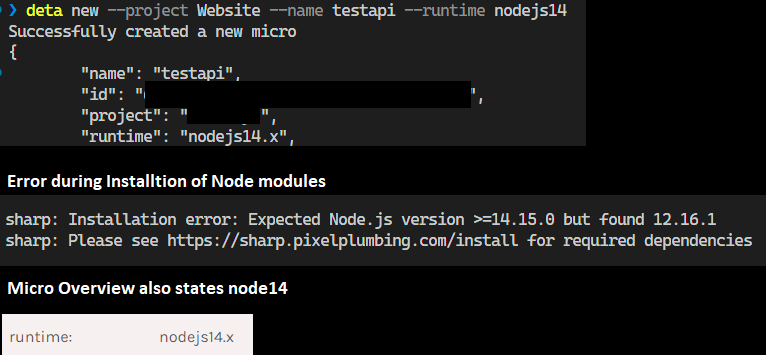
I've run into a weird issue today, when I wanted to create a new micro.
It's using the default settings, when visiting it over the web interface or using
deta detailsthe runtime displayed is "nodejs14.x".But when the dependencies are installed, the installation of sharp fails with the error message
Installation error: Expected Node.js version >=14.15.0 but found 12.16.1which indicates that there seem to be nodejs12.x installed instead of 14.x. Is this a known issue, or how can I fix it and force my micro to use 14.x, other than specifying it in the settings?Beta Was this translation helpful? Give feedback.
All reactions