[S32K3] 自制简单的Bootloader程序 #250


Description

在一块S32K312的板子上启动bootloader,再由bootloader引导app,这样分立的设计从工程角度提供更丰富的实现需求的可能性。我们可以在bootloader里开启固件刷写,可以支持多app的AB分区,可以拯救App,甚至为secure boot打下基础。
本文分为2个部分:
- boot工程: https://github.com/carloscn/s32k_easy_boot/tree/v0
- app工程: https://github.com/carloscn/s32k_demo/tree/v0
业务功能简述为:S32K312设备启动之后会先启动boot程序,由boot引导app启动。
App工程
App工程这里使用了非常简单的程序,包含LEDs的闪烁和串口发送ASCII字符串,以通过肉眼可以观察到App启动。App工程的关键在于:
- App放置pflash的区域的首地址(在S32DS上需要修改linker文件)
- App编译的格式需要是raw binary
App linker文件修改
我们需要把app原有的0x0040_0000向高位移动了0x0004_0000 (大约256 KB的内存)这个位置需要让给bootloader程序。
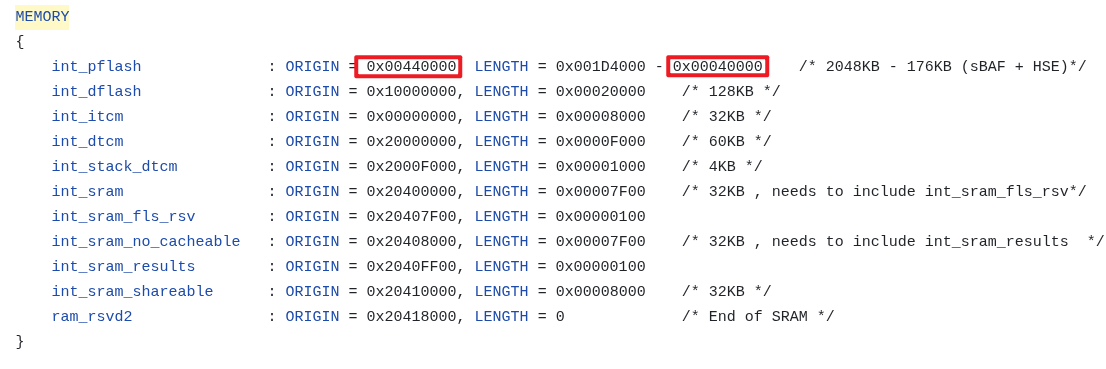
因此,App工程的首地址变为0x0044_0000,这个数值非常关键,我们会在boot中访问这个地址的寄存器以找到App的Stack Pointer的值。
App 输出格式为raw binary
S32DS编译输出的默认格式为elf文件,而elf文件是需要elf加载器的。在嵌入式设备上并没有elf加载器,只能加载raw binary。
请参考 How to convert .elf to .hex file 在s32ds中转化编译的输出文件格式为raw binary。默认输出扩展名为bin文件。
编译成功后的bin文件请记录文件的路径,我们还需要用。
Boot工程
Boot工程和一般App工程没有任何区别,只是增加了程序的跳转。为了区别App,我们在Boot中让蓝色的LED闪烁5次,之后引导App启动。Boot工程的关键在于:
- Boot的pflash布局,需要包含App的bin文件
- 对输出的格式不限制
Boot的linker修改
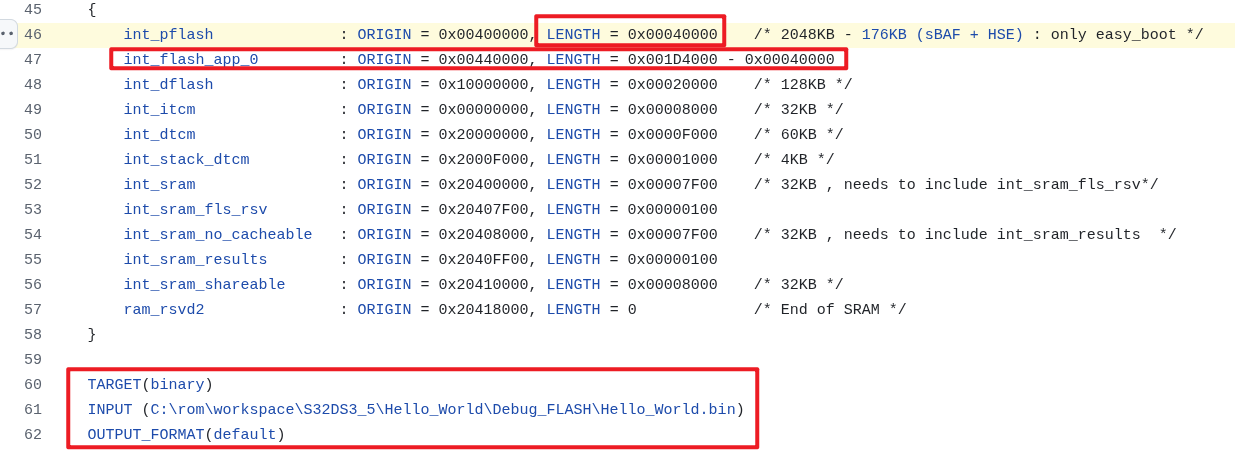
在App的linker文件中,我们让出了0x0004_0000给boot程序,那么在boot程序上则需要修改该位置大小。另外,我们需要分 int_flash_app_0地址空间给App文件,如图所示。
我们这里使用一个Linker文件额外增加二进制文件的功能,把App的binary映射到pflash空间,以达到App和Bootloader绑定在同一个固件的里面的目的。 https://github.com/carloscn/s32k_easy_boot/blob/v0/Project_Settings/Linker_Files/linker_flash_s32k312.ld#L60
App的绝对路径请放在这里:
除此之外还需要在sections里面添加映射:
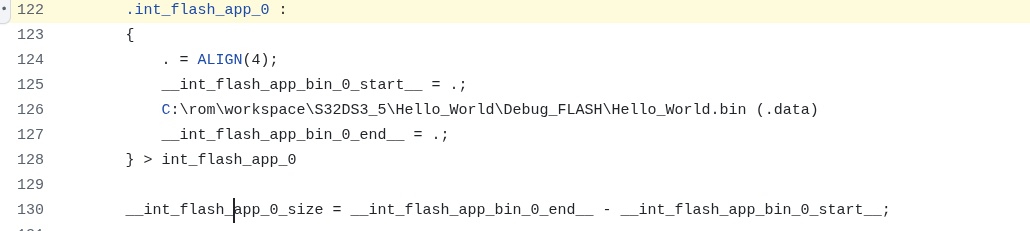
当我们完成编译Boot的时候,App的Binary会被自动集成到bootloader的固件里面,随着bootloader的烧写烧录到pflash中。
程序跳转
S32K3使用的是 Cortex-M7, stack地址需要头地址偏移 0xc:
https://github.com/carloscn/s32k_easy_boot/blob/v0/src/main.c#L54
#include "S32K312_SCB.h"

#define EASY_BOOT_START_ADDR 		0x00400000U
#define AppStartAddress 		 	0x00440000U

static void (*JumpTpApplication)(void) = NULL;
static uint32_t stack_point;

void boot_app(void)
{
	__asm("cpsid i");
	uint32_t JumpAddress = 0;

	stack_point = *(volatile uint32_t *)(AppStartAddress+0x0c);
	JumpAddress = *(volatile uint32_t *)(stack_point+0x04);
	JumpTpApplication = (void (*)(void))JumpAddress;
	S32_SCB->VTOR = *(volatile uint32_t *)(AppStartAddress+0x0c);
	__asm volatile("MSR msp, %0\n":: "r" (stack_point));
	__asm volatile("MSR psp, %0\n":: "r" (stack_point));
	JumpTpApplication();
}
如果App不正确的话,会得到一个错误的stack_pointer,S32K312芯片会进入HW异常的handler。