
Replies: 4 comments 2 replies

-
|
Okay, I figured it out myself. I did a clean leveling (everything redone, Bed, Mesh and Z Height). After that it will print again. |
Beta Was this translation helpful? Give feedback.

-
|
hey im just wondering how do you do a clean leveling? ive encountered the same problem and its driving me crazy. Please help me out rpm8200 |
Beta Was this translation helpful? Give feedback.

-
|
Hey WhizxX! I meant that I completely did setup again (from start to end). I assume you are still running FLSUN original Klipper? But I assume you are still on FLSUN Klipper - in that case, you need to start off with the Z-Height, then do the bed leveling + mesh again (dont get annoyed by my preposition "clean"), just go in the order you find that in your calibration tab... With original klipper you have even more stuff you can easily do to improve quality. |
Beta Was this translation helpful? Give feedback.

-
|
Hey so it turned out it was a error message due to the time lapse pluggin I
had on cura. I'm pretty sure the printer comes with some memory and they
are downloadable. Initially it was just the Y, it was at Y190 when it
should be at Y:150mm. The time lapse automatically did that. I will still
check put your videos I might learn more.
Thank you for the kind message blackfyre. Out of 6.4k peopel in the group
only you and another guy helped me. I'll be taking it down from the post
today.
…On Mon, Apr 10, 2023, 4:15 a.m. rpm8200 ***@***.***> wrote:
Hey WhizxX!
I meant that I completely did setup again (from start to end).
I assume you are still running FLSUN original Klipper?
Meanwhile I completely dumped the FLSUN Klipper version and did upgrade to
"original" Klipper - which has three times more options to tinker with. I
even did a video on YT how to do the update - you may take a look if you
are interested (my name there is "craftig mat" and the video title is
"Install original Klipper on FLSUN V400 3d Printer (GitHub)". I am atm
doing another video showing how to setup your printer with original
Klipper... and there is also two or three additional videos on the V400.
But I assume you are still on FLSUN Klipper - in that case, you need to
start off with the Z-Height, then do the bed leveling + mesh again (dont
get annoyed by my preposition "clean"), just go in the order you find that
in your calibration tab...
With original klipper you have even more stuff you can easily do to
improve quality.
—
Reply to this email directly, view it on GitHub
<#79 (reply in thread)>,
or unsubscribe
<https://github.com/notifications/unsubscribe-auth/AXTG55ZM4ZD3A3GZOX3NN4DXAPMVHANCNFSM6AAAAAAUYEYPLA>
.
You are receiving this because you commented.Message ID: <blackfyre/flsun.
***@***.***>
|
Beta Was this translation helpful? Give feedback.

-
|
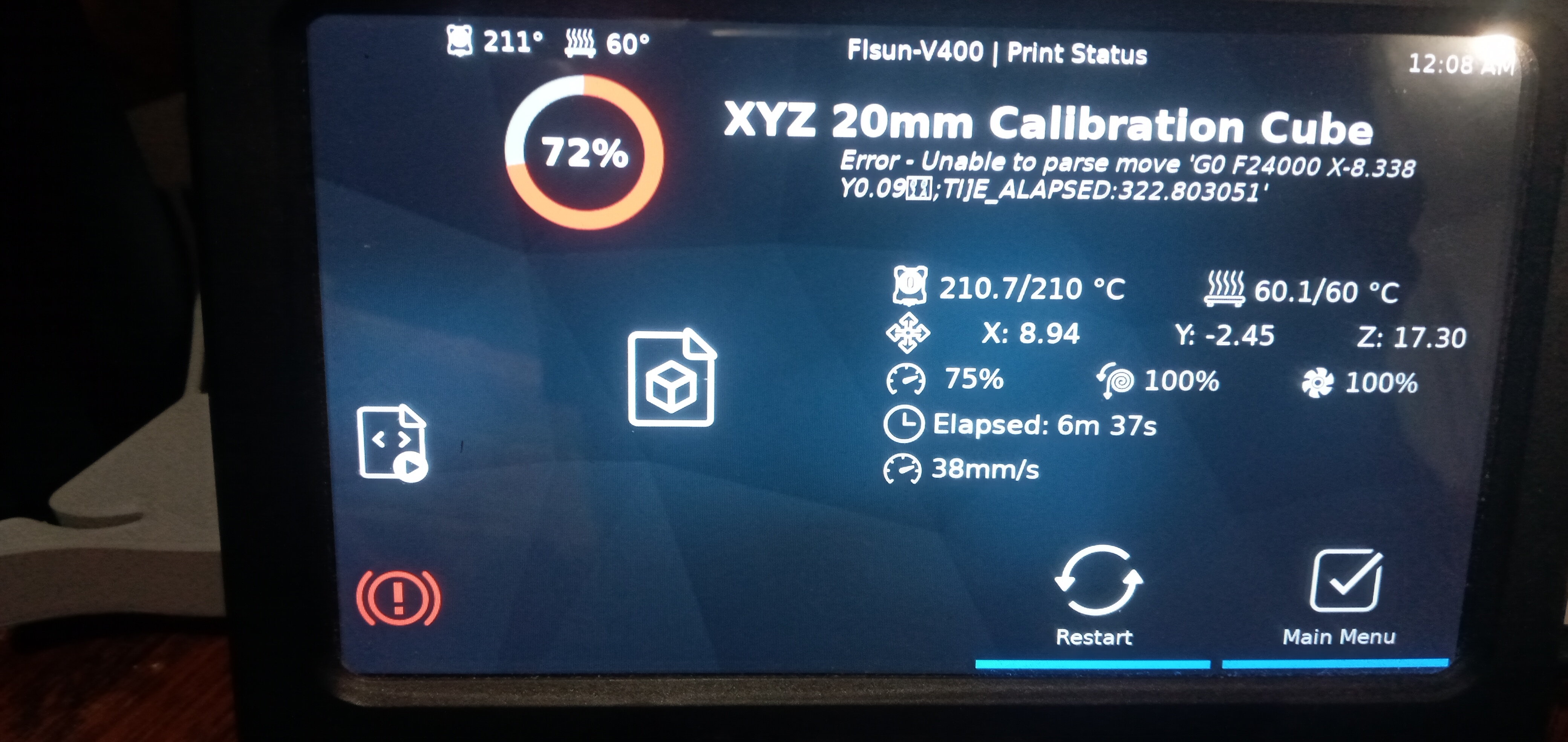
Sorry to post in this topic. I am printing a calibration cube with my V400. I got this error message, then the printer stopped.
|

Beta Was this translation helpful? Give feedback.
-
|
No worries, what is your retraction speed at?
…On Mon, May 22, 2023, 7:30 a.m. matnikon ***@***.***> wrote:
Sorry to post in this topic.
I am printing a calibration cube with my V400. I got this error message,
then the printer stopped.
[image: FlsunV400error]
<https://user-images.githubusercontent.com/134294512/239923137-52b85fe1-d316-4875-9076-c7fab6bef5ec.jpg>
—
Reply to this email directly, view it on GitHub
<#79 (comment)>,
or unsubscribe
<https://github.com/notifications/unsubscribe-auth/AXTG55Y4WBJOJ5OM7VSXRD3XHNS6XANCNFSM6AAAAAAUYEYPLA>
.
You are receiving this because you commented.Message ID: <blackfyre/flsun.
***@***.***>
|
Beta Was this translation helpful? Give feedback.


Uh oh!
There was an error while loading. Please reload this page.
-
I can only assume that my V400 had a crash today with some built up PETG from an attempt to print the MasterSpool. I assume it collided somehow. From that moment on, the print plane was no longer parallel to the PrintBed.
After collision and strange behavior described above I cancelled print and it did home as usual. Also I can move the axis as usual manually.
But when I want to start a new print, it wont let me:
Red Error Message on top: "Move out of Range 0.899 0.756 -8.824 [0000]". Also I noticed that the Z Value is no longer close to zero as it was before, it is 427.26 when all axis are in home/ start position.
Any idea on how I can fix this? Any input really appreciated!
Beta Was this translation helpful? Give feedback.
All reactions