AWS EC2 내부에 MariaDB 설치 및 커넥션 관련 정리 #12

Description

1. EC2 내에 MariaDB를 설치
EC2 + RDS 가격이 너무 부담되어 EC2 내에 DB를 설치하기로 결정(RDS 6일 켜놨는데 5천원 나감..)
RDS에서는 많은 기능을 지원하지만 거의 사용하지 않을 예정이며 EC2에도 메모리가 충분히 남는다.
참고 자료
- https://daddyprogrammer.org/post/2348/aws-ec2-install-nginx-mariadb/
- https://velog.io/@ckstn0777/AWS-EC2-DB-%EA%B5%AC%EC%B6%95MariaDB
MariaDB 설치
$ sudo yum install mariadb-server
...
$ sudo service mariadb start
Redirecting to /bin/systemctl start mariadb.service
$ mysql -V
mysql  Ver 15.1 Distrib 5.5.68-MariaDB, for Linux (x86_64) using readline 5.1
root 패스워드 변경
$ mysqladmin -u root -p password 'E*********7'
Enter password:
$ mysql -u root -p
Enter password:
Welcome to the MariaDB monitor.  Commands end with ; or \g.
Your MariaDB connection id is 4
Server version: 5.5.68-MariaDB MariaDB Server
database 생성
MariaDB [(none)]> create database samsam_wing;
MariaDB [(none)]> show databases;
+--------------------+
| Database           |
+--------------------+
| information_schema |
| mysql              |
| performance_schema |
| samsam_wing        |
| test               |
+--------------------+
5 rows in set (0.00 sec)
운영 계정 생성
MariaDB [(none)]> use mysql;
MariaDB [mysql]> create user 'samsam'@'localhost' identified by 'E*********7';
MariaDB [mysql]> grant all privileges on samsam_wing.* to samsam@'localhost';
MariaDB [mysql]> flush privileges;
MariaDB [mysql]> select user, host, plugin from user;
+--------+--------------------------------------------------+--------+
| user   | host                                             | plugin |
+--------+--------------------------------------------------+--------+
| root   | localhost                                        |        |
| root   | ip-172-31-11-231.ap-northeast-2.compute.internal |        |
| root   | 127.0.0.1                                        |        |
| root   | ::1                                              |        |
|        | localhost                                        |        |
|        | ip-172-31-11-231.ap-northeast-2.compute.internal |        |
| samsam | localhost                                        |        |
+--------+--------------------------------------------------+--------+
7 rows in set (0.00 sec)

...
// samsam@localhost 접속 확인
$ mysql -u samsam -p
Enter password:
Welcome to the MariaDB monitor.  Commands end with ; or \g.
외부 접속 권한 부여
어차피 ec2 보안 그룹에 인바운드에 내 IP를 지정할 수 있으므로 IP를 '%'으로 모두 열어둔다.
MariaDB [mysql]> grant all privileges on samsam_wing.* to samsam@'%' identified by 'E*********7';
MariaDB [mysql]> select user, host, plugin from user;
+--------+--------------------------------------------------+--------+
| user   | host                                             | plugin |
+--------+--------------------------------------------------+--------+
| root   | localhost                                        |        |
| root   | ip-172-31-11-231.ap-northeast-2.compute.internal |        |
| root   | 127.0.0.1                                        |        |
| root   | ::1                                              |        |
|        | localhost                                        |        |
|        | ip-172-31-11-231.ap-northeast-2.compute.internal |        |
| samsam | localhost                                        |        |
| samsam | %                                                |        |
+--------+--------------------------------------------------+--------+

MariaDB [mysql]> flush privileges;
port 번호 변경
보안을 위해서 3306이 아닌 다른 포트를 이용한다.
$ sudo vim /etc/my.cnf
// port 번호 추가
$ sudo service mariadb restart
외부 접속 허용
ec2 보안 그룹에 인바운드 추가
Type : 사용자 지정 TCP
Protocal : TCP
Port range : 위에서 지정한 port 번호
Source : 내 IP
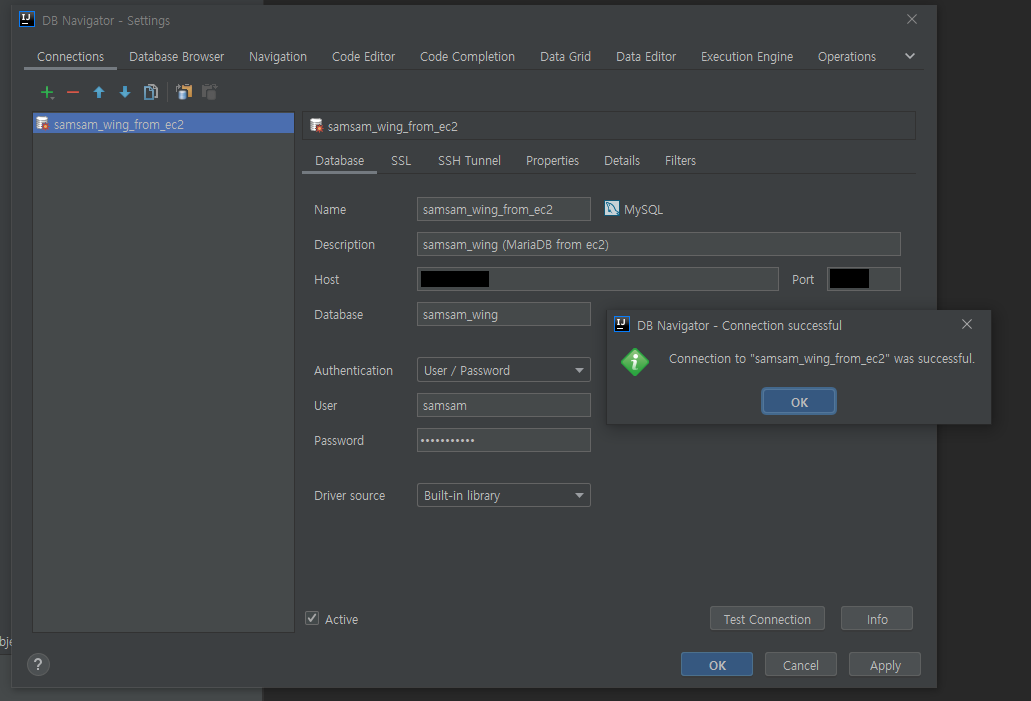
인텔리제이에서 접속 확인
에러1. The server time zone value 'KST' is unrecognized or represents more than one time zone. You must configure either the server or JDBC driver (via the 'serverTimezone' configuration property) to use a more specifc time zone value if you want to utilize time zone support.
- 해결 : mysql 서버의 타임존을 일치시킨다. ('+9:00')
- https://sungwookkang.com/1325
접속에 성공
기타 주의사항
이제 인스턴스 재부팅 시 db 서버를 켜야함
$ sudo service mariadb start