- “Focus on your application, not the infrastructure”
- Serverless applications are event-driven cloud-based systems where application development rely solely on a combination of third-party services, client-side logic and cloud-hosted remote procedure calls (Functions as a Service).
- Traditional vs. Serverless Architecture
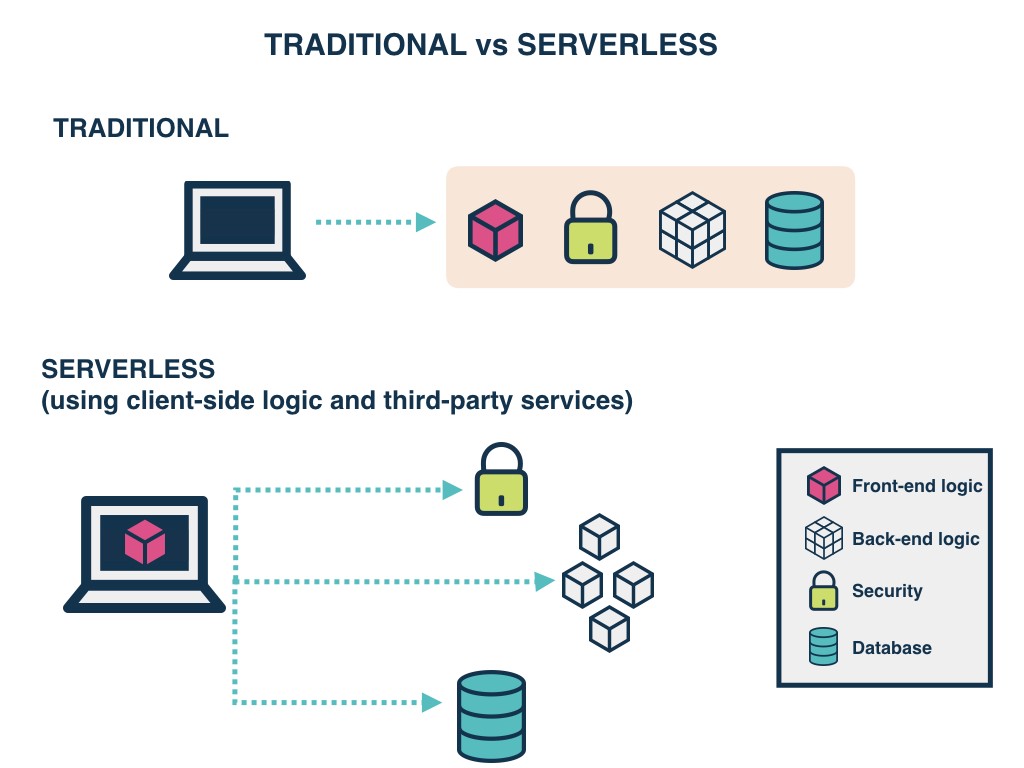
- The cost model of Serverless is execution-based: you’re charged for the number of executions.
- The downside is that Serverless functions are accessed only as private APIs. To access these you must set up an API Gateway. This doesn’t have an impact on your pricing or process, but it means you cannot directly access them through the usual IP.
- The winner here is based on the context. For simple applications with few dependencies, Serverless is the winner; for anything more complex, Traditional Architecture is the winner.
Setting up different environments for Serverless is as easy as setting up a single environment.
With Serverless computing, there’s a hard 300-second timeout limit. Too complex or long-running functions aren’t good for Serverless
It’s a tie between Serverless and Traditional Architecture.
FaaS is an implementation of Serverless architectures where engineers can deploy an individual function or a piece of business logic.
With Serverless, everything is stateless, you can’t save a file to disk on one execution of your function and expect it to be there at the next.
FaaS are designed to spin up quickly, do their work and then shut down again.
Although functions can be invoked directly, yet they are usually triggered by events from other cloud services such as HTTP requests, new database entries or inbound message notifications.
- Client Application
- Web Server
- Lambda functions (FaaS)
- Security Token Service (STS)
- User Authentication
- Database
- cost
- Cost of hiring backend
- Reduced operational costs
- Process agility
- Reduced liability, no backend infrastructure to be responsible for.
- Zero system administration.
- Easier operational management.
- Fosters adoption of Nanoservices, Microservices, SOA Principles.
- Faster set up.
- Scalable, no need to worry about the number of concurrent requests.
- Monitoring out of the box.
- Fosters innovation.
- Reduced overall control.
- Vendor lock-in requires more trust for a third-party provider.
- Additional exposure to risk requires more trust for a third party provider.
- Security risk.
- Disaster recovery risk
- Cost is unpredictable because the number of executions is not predefined
- All of these drawbacks can be mitigated with open-source alternatives but at the expense of cost benefits mentioned previously
- Immature technology results in component fragmentation, unclear best-practices.
- Architectural complexity.
- The discipline required against function sprawl.
- Multi-tenancy means it’s technically possible that neighbor functions could hog the system resources behind the scenes.
- Testing locally becomes tricky.
- Significant restrictions on the local state.
- Execution duration is capped.
- Lack of operational tools
- Unless architected correctly, an app could provide a poor user experience as a result of increased request latency.
- With Amplify, you can configure app backends and connect your app in minutes, deploy static web apps in a few clicks, and easily manage app content outside the AWS console.
- Benefits
- Configure backends fast
- Seamlessly connect frontends
- Deploy in a few clicks
- Easily manage content
- Features & Tools
- Authentication
- API (GraphQL, REST)
- Storage
- Interactions
- PubSub
- DataStore
- Functions
- Analytics
- AI/ML Predictions
- Push Notifications
- Deliver
- Manage
- The GraphQL Transform provides a simple to use abstraction that helps you quickly create backends for your web and mobile applications on AWS.
- The GraphQL Transform simplifies the process of developing, deploying, and maintaining GraphQL APIs.
-
run:
amplify init -
After finishing the wizard run:
amplify add api -
Select the following options:
- Select GraphQL
- When asked if you have a schema, say No
- Select one of the default samples; you can change this later
- Choose to edit the schema and it will open the new schema.graphql in your editor
-
deploy your new API:
amplify push
- If you want to update your API, open your project’s
backend/api/~apiname~/schema.graphqlfile (NOT the one in thebackend/api/~apiname~/buildfolder) and edit it in your favorite code editor. You can compile thebackend/api/~apiname~/schema.graphqlby running:amplify api gql-compile
-
Object types that are annotated with @model are top-level entities in the generated API.
-
Objects annotated with @model are stored in Amazon DynamoDB and are capable of being protected via @auth, related to other objects via @connection, and streamed into Amazon OpenSearch via @searchable
-
Usage
- Define a GraphQL object type and annotate it with the @model directive to store objects of that type in DynamoDB and automatically configure CRUDL queries and mutations.
- You may also override the names of any generated queries, mutations and subscriptions, or remove operations entirely.
- A single @model directive configures the following AWS resources:
- An Amazon DynamoDB table with PAY_PER_REQUEST billing mode enabled by default.
- An AWS AppSync DataSource configured to access the table above.
- An AWS IAM role attached to the DataSource that allows AWS AppSync to call the above table on your behalf.
- Up to 8 resolvers (create, update, delete, get, list, onCreate, onUpdate, onDelete) but this is configurable via the queries, mutations, and subscriptions arguments on the @model directive.
- Input objects for create, update, and delete mutations.
- Filter input objects that allow you to filter objects in list queries and connection fields.
- For list queries the default number of objects returned is 100.