You signed in with another tab or window. Reload to refresh your session.You signed out in another tab or window. Reload to refresh your session.You switched accounts on another tab or window. Reload to refresh your session.Dismiss alert
Software objects are conceptually similar to real-world objects: they too consist of state and related behavior.
An object stores its state in fields (variables in some programming languages) and exposes its behavior through methods (functions in some programming languages).
Hiding internal state and requiring all interaction to be performed through an object's methods is known as data encapsulation
Bundling code into individual software objects provides a number of benefits, including:
Modularity: The source code for an object can be written and maintained independently of the source code for other objects
Information-hiding: By interacting only with an object's methods, the details of its internal implementation remain hidden from the outside world.
Code re-use: If an object already exists (perhaps written by another software developer), you can use that object in your program
Pluggability and debugging ease: If a particular object turns out to be problematic, you can simply remove it from your application and plug in a different object as its replacement
Classes
A class is the blueprint from which individual objects are created.
class does not contain a main method that's because it's not a complete application; it's just the blueprint for bicycles that might be used in an application
The class body (the area between the braces) contains:
all the code that provides for the life cycle of the objects created from the class
methods to implement the behavior of the class and its objects.
You can provide more information about the class, such as the name of its superclass, whether it implements any interfaces, and so on, at the start of the class declaration.
MyClass is a subclass of MySuperClass and that it implements the YourInterface interface
class declarations can include these components:
Modifiers such as public, private. (However, note that the private modifier can only be applied to Nested Classes.)
The class name, with the initial letter capitalized by convention.
The name of the class's parent (superclass), if any, preceded by the keyword extends. A class can only extend (subclass) one parent.
A comma-separated list of interfaces implemented by the class, if any, preceded by the keyword implements. A class can implement more than one interface.
The class body, surrounded by braces, {}.
Declaring Member Variables
kinds of variables:
Member variables in a class—these are called fields.
Variables in a method or block of code—these are called local variables.
Variables in method declarations—these are called parameters.
public modifier—the field is accessible from all classes.
private modifier—the field is accessible only within its own class.
the first letter of a class name should be capitalized, and
the first (or only) word in a method name should be a verb.
Defining Methods
method declarations components, in order:
Modifiers—such as public, private.
The return type—the data type of the value returned by the method, or void if the method does not return a value.
The method name—the rules for field names apply to method names as well, but the convention is a little different.
The parameter list in parenthesis—a comma-delimited list of input parameters, preceded by their data types, enclosed by parentheses, (). If there are no parameters, you must use empty parentheses.
The method body, enclosed between braces—the method's code, including the declaration of local variables, goes here
method names should be a verb in lowercase or a multi-word name that begins with a verb in lowercase, followed by adjectives, nouns, etc. In multi-word names, the first letter of each of the second and following words should be capitalized.
This means that methods within a class can have the same name if they have different parameter lists
Overloaded methods are differentiated by the number and the type of the arguments passed into the method.
The compiler does not consider return type when differentiating methods, so you cannot declare two methods with the same signature even if they have a different return type.
Providing Constructors for Your Classes
A class contains constructors that are invoked to create objects from the class blueprint. Constructor declarations look like method declarations—except that they use the name of the class and have no return type
a constructor is called by the new operator:
As with methods, the Java platform differentiates constructors on the basis of the number of arguments in the list and their types
The compiler automatically provides a no-argument, default constructor for any class without constructors.
You can use access modifiers in a constructor's declaration to control which other classes can call the constructor.
Passing Information to a Method or a Constructor
You can use any data type for a parameter of a method or a constructor. This includes primitive and reference data types
You can use a construct called varargs to pass an arbitrary number of values to a method.
to use varargs, you follow the type of the last parameter by an ellipsis (three dots, ...)
The name of a parameter must be unique in its scope.
A parameter can have the same name as one of the class's fields. If this is the case, the parameter is said to shadow the field. Shadowing fields can make your code difficult to read and is conventionally used only within constructors and methods that set a particular field.
Reference data type parameters, such as objects, are also passed into methods by value.
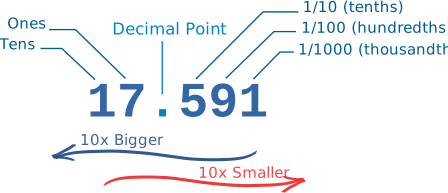
Decimals
Every digit in a decimal number has a "position", and the decimal point helps us to know which position is which
Bases
there is 10 symbols:
0, 1, 2, 3, 4, 5, 6, 7, 8 and 9
In binary you count "0,1,..." but then you run out of symbols! So you add 1 on the left and then start again at 0: 10,11 ...
general rule is Count up until just before the "Base Number", then start at 0 again, but first you add 1 to the number on your left.
Binary Numbers
Binary Numbers are just "Base 2" instead of "Base 10". So you start counting at 0, then 1, then you run out of digits
Hexadecimal Numbers
They look the same as the decimal numbers up to 9, but then there are the letters ("A',"B","C","D","E","F") in place of the decimal numbers 10 to 15.