Domain modeling is the process of creating a conceptual model in code for a specific problem. A model describes the various entities, their attributes and behaviors, as well as the constraints that govern the problem domain. An entity that stores data in properties and encapsulates behaviors in methods is commonly referred to as an object-oriented model.
A domain model that's articulated well can verify and validate the understanding of a specific problem among various stakeholders. As a communication tool, it defines a vocabulary that can be used within and between both technical and business teams.
- The new keyword instantiates (i.e. creates) an object.
- The constructor function initializes properties inside that object using the this variable.
- The object is stored in a variable for later use.
To model the random nature of user behavior, you'll need the help of a random number generator. Fortunately, the JavaScript standard library includes a Math.random() function for just this sort of occasion.
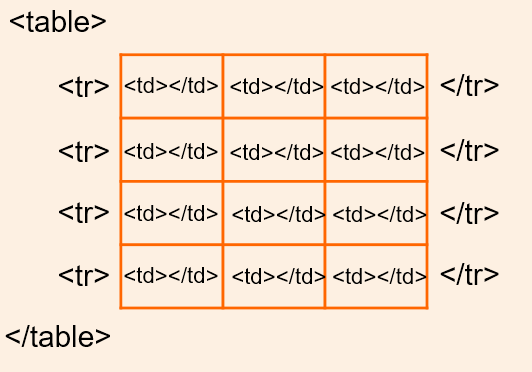
A table represents information in a grid format . Examples of tables include financial reports , TV schedules , and sports .results
- <table>
- The <table> element is used to create a table. The contents of the table are written out row by row.
- <tr>
- You indicate the start of each row using the opening <tr> tag (The tr stands for table row.) followed by one or more <td> elements (one for each cell in that row) At the end of the row you use a closing C/tr> tag
*<td>
- You indicate the start of each row using the opening <tr> tag (The tr stands for table row.) followed by one or more <td> elements (one for each cell in that row) At the end of the row you use a closing C/tr> tag
- Each cell of a table is represented using a cta> element. (The td stands for table data At the end of each cell you use a element
<th> The Cth> element is used just like the <td> element but its purpose is to represent the heading for either a column or a row. (The th stands for table heading)
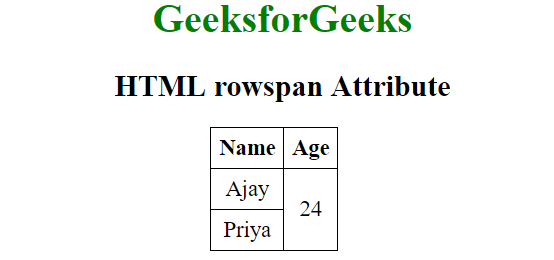
The rowspan attribute can be used on a cth> or ctd element to indicate how many rows a cell should span down the table
ex :
There are three elements that help distinguish between the main content of the table and the first and tast rows (which can contain different content).
- <thead> The headings of the table should sit inside the Cthead> element.
- <tbody> The body should sit inside the (tbody> elemen
- <tfoot> The footer belongs inside the <tfoot> element.