🦙🚨 Bug - TinaCMS Dependency - Images uploaded via TinaCMS editor are not synced to source control #2400

Description

Requested by: @KostaMadorsky via YakShaver.ai 🦬
cc: @KostaMadorsky, @KahaMason, @Marxoz, @PothieuG, @Freego1783, @jakebayliss, @JackDevAU, @brookjeynes-ssw , @wicksipedia
Hi Team!
🟥 Watch the video (6 min 35 sec)
Url from screen share: SSWConsulting/SSW.Rules.Content#1178
Pain
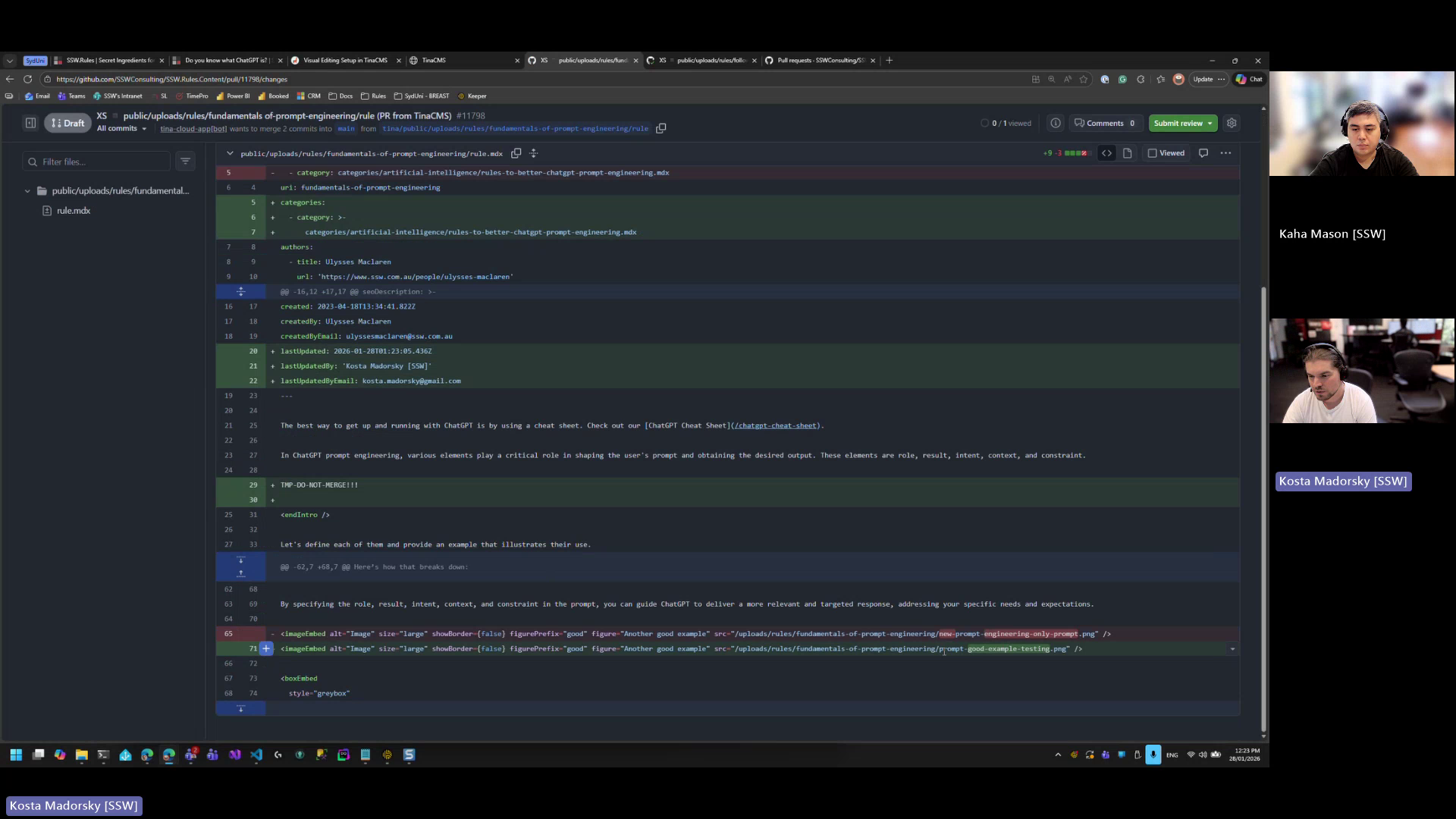
When editing Rules V3 (TinaCMS) content using the TinaCMS editor, images uploaded via the Media Manager (drag & drop or upload) are stored only in TinaCloud and are not committed to the Git repository. Although the editor warns that a pull request is required, the image still appears selectable and can be inserted and saved. After refresh or deployment, the rule references an image that does not exist in source control, causing images to be missing locally and in non-production environments. Uploading images through a GitHub pull request works correctly, highlighting an inconsistency and risk of content/image loss when using the UI-only workflow.
Acceptance Criteria
- Images uploaded via the TinaCMS editor are committed to the connected Git repository as part of a pull request
- The editor prevents saving or inserting images that are not synced to source control
- Media Manager only shows images that exist in source control or clearly indicates their sync status
- After refresh, deployment, or environment switch, images referenced in rules continue to render correctly
- Behavior is consistent between UI-only edits and pull-request-based workflows
- No images remain stored only in TinaCloud without a corresponding Git commit
Reproduce Steps
- Start editing a rule via Rules V3 (TinaCMS) editor and Save so it creates a pull request
- Edit an image and open the Media Manager
- Drag and drop or upload a new image via the editor UI
- Dismiss the warning indicating a pull request is required
- Insert the uploaded image into the rule and click Save
- Refresh the page or check the GitHub repository
- Observe that the rule references the image but the image file does not exist in the pull request
Screenshot
Figure: Image uploaded via editor exists only in TinaCloud and is missing from source control after refresh