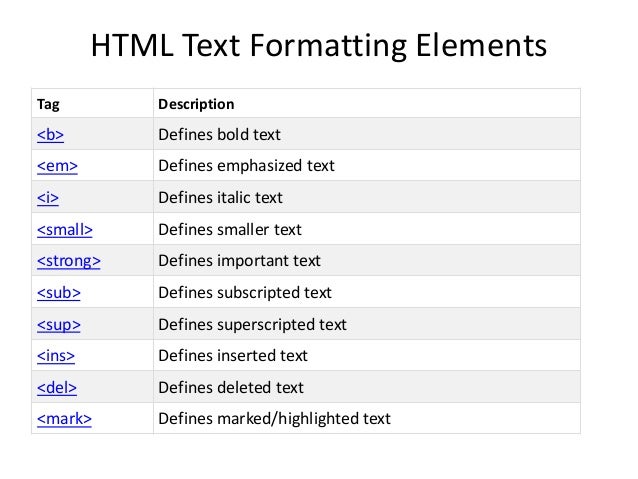
- HTML elements are used to describe the structure of the page (e.g. headings, subheadings, paragraphs).
1- Headings : HTML has six "levels" of headings from h1 to h6
2- Paragraphs : To create a paragraph, surround the words that make up the paragraph with an opening < p > tag and closing < /p > tag
3- Bold & Italic : Line Breaks & Horizontal Rules
. . .
- They also provide semantic information (e.g. where emphasis should be placed, the definition of any acronyms used, when given text is a quotation)
-
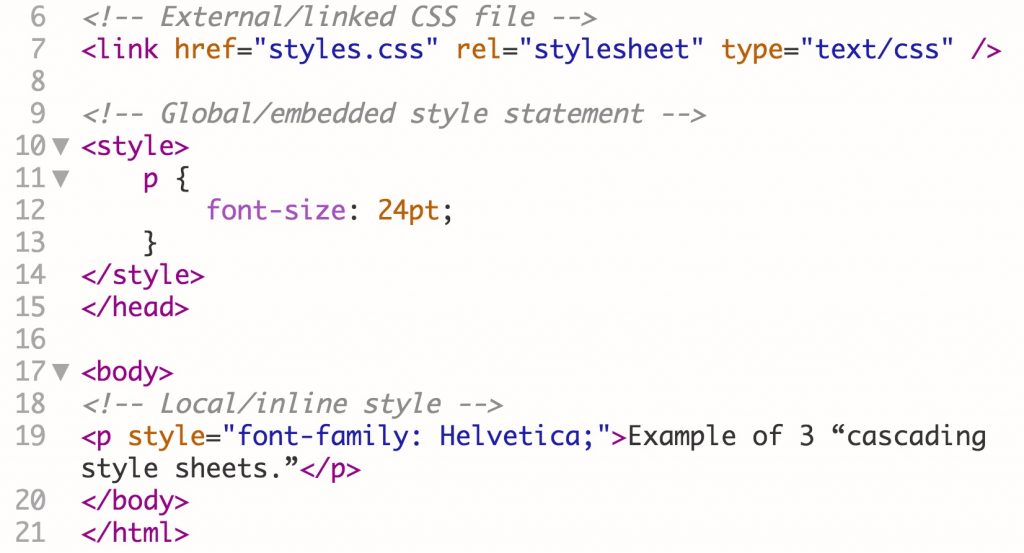
CSS treats each HTML element as if it appears inside its own box and uses rules to indicate how that element should look.
-
Rules are made up of selectors (that specify the elements the rule applies to) and declarations (that indicate what these elements should look like).
-
Different types of selectors allow you to target your rules at different elements.
-
Declarations are made up of two parts: the properties of the element that you want to change, and the values of those properties. For example, the font-family property sets the choice of font, and the value arial specifies Arial as the preferred typeface.
-
CSS rules usually appear in a separate document, although they may appear within an HTML page
-
A script is made up of a series of statements. Each statement is like a step in a recipe.
-
Scripts contain very precise instructions. For example, you might specify that a value must be remembered before creating a calculation using that value.
-
Variables are used to temporarily store pieces of information used in the script.
-
Arrays are special types of variables that store more than one piece of related information.
-
JavaScript distinguishes between numbers (0-9), strings (text), and Boolean values (true or false).
-
Expressions evaluate into a single value.
-
Expressions rely on operators to calculate a value.
-
Conditional statements allow your code to make decisions about what to do next.
-
Comparison operators (===, ! ==, ==, ! =, <, >, <=, =>) are used to compare two operands.
-
Logical operators allow you to combine more than one set of comparison operators.
-
if ... else statements allow you to run one set of code if a condition is true, and another if it is false.
-
switch statements allow you to compare a value against possible outcomes (and also provides a default option if none match).