'Modbus MQTT Bridge' is a Home Assistant add-on that allows users to easily add Modbus devices to their Home Assistant instance using a simple user interface. This add-on provides a way to connect USB Modbus devices to Home Assistant via MQTT, which can be easily integrated with other devices and sensors.
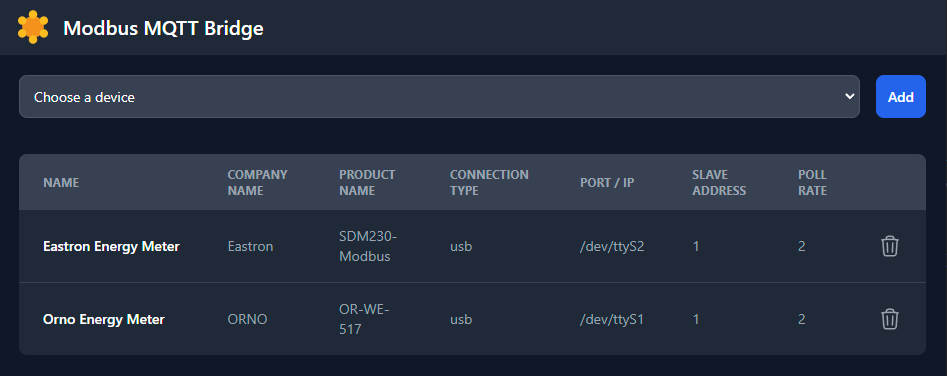
To install this add-on, follow these steps:
-
Open the Home Assistant web interface
-
Click on the Settings tab
-
Click on Add-ons
-
Click on Add-on Store
-
Open the menu on the top right and click on Repositories
-
Add the following URL to the input field: https://github.com/MerzSebastian/hassio-ModbusMQTTBridge
-
Click on the "Add" button
-
Find the Modbus MQTT Bridge Addon and click on it
-
Click on the "Install" button
Once the add-on is installed and configured, open up the provided ui and add your devices.
-
Select a device from the devices list

-
Fill out the additional inputs and press on Add

Info: Using multiple slaves on the same usb device is curretly untested because I only have a single modbus device on hand.
ORNO
- OR-WE-517 (tested)
Eastron
-
sdm120 (untested)
-
sdm230 (untested)
-
sdm630 V2 (untested)
If a device is not yet supported by Modbus MQTT Bridge, you can create a custom device by adding a folder named "custom-modbus-devices" and adding a custom YAML configuration for your device. The folder should be added to the /config directory in your Home Assistant installation.
The structure of the YAML configuration file can be seen here:
name: Orno Energy Meter
unique_id: orno_or-we-517
company_name: ORNO
product_name: OR-WE-517
serial:
  baudrate: 9600
  bytesize: 8
  parity: E
  stopbits: 1
  timeout: 0.6
  mode: rtu
  debug: False
  clear_buffers_before_each_transaction: True
  functioncode: 3
sensors:
  - name: voltage l1
    icon: mdi:lightning-bolt # optional
    decimal_places: 2 # optional (default: 2)
    address: 14
unit: VIf you have any issues or feature requests, please open an issue on the GitHub repository.