In this section, it describes how to set up virtual Kubernetes cluster using single physical host system. Following host system is used to set up virtualized Kubernetes cluster, the hostname and IP addresses need to be aligned with your environment.
| Hostname | IP Address | OS | architecture | Node Type |
|---|---|---|---|---|
| tomoyafujita-HP-Compaq-Elite-8300-SFF | 192.168.1.248 | Ubuntu 20.04.5 LTS | x86_64 | Primary(Master) |
Kubernetes IN Docker called kind is command line tool to create virtualized kubernetes cluster on single physical host system.
It creates docker containers as cluster host system with using linux namespaces, and starts systemd, kubelet and kubernetes api-server in those containers.
In one word, kind uses docker containers in the host docker system, so that it just appears to be virtual host systems are running as containers.
Command operation using kubectl will be port forwarded to the virtualized cluster node to conceal the abstraction as user experience.
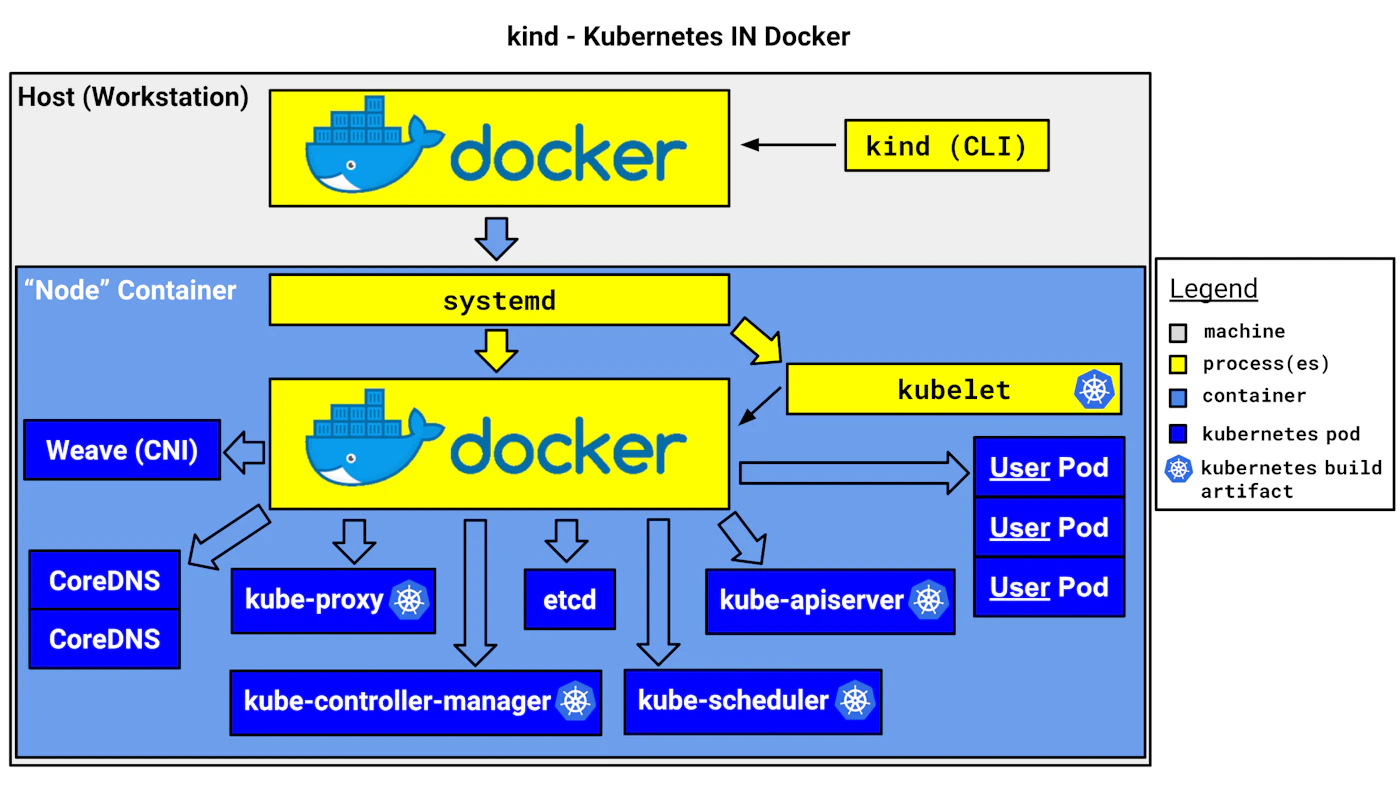
Once kubernetes virtualized cluster is ready, everything else will be the same with physical cluster operation with using kubectl command.
See Install Kubernetes Packages If the installation has been completed, we can see the kind version as following.
# No root permission is required to use KIND
tomoyafujita@~ >kind version
kind v0.16.0 go1.19.5 linux/amd64KIND node docker image does not contain some CNI plugin binaries under /opt/cni/bin, this is because KIND provides default network interface which is called kindnet.
User can disable default kindnet but using specific CNI plugin such as flannel requires other CNI plugins under the /opt/cni/bin.
The following operation to build the all CNI plugins in the host system to bind the docker container which is actually KIND node instance.
git clone https://github.com/containernetworking/plugins.git
cd plugins
./build_linux.sh
export OPT_CNI_BIN_PATH=$(realpath -s bin)
cd <ros_k8s>/yaml
sed 's/OPT_CNI_BIN_PATH/${OPT_CNI_BIN_PATH}/' kind-multiple-node.yaml.template | envsubst > kind-multiple-node.yaml- Start kind cluster
tomoyafujita@~ >kind create cluster
Creating cluster "kind" ...
 ✓ Ensuring node image (kindest/node:v1.25.2) 🖼
 ✓ Preparing nodes 📦
 ✓ Writing configuration 📜
 ✓ Starting control-plane 🕹️
 ✓ Installing CNI 🔌
 ✓ Installing StorageClass 💾
Set kubectl context to "kind-kind"
You can now use your cluster with:

kubectl cluster-info --context kind-kind

Have a nice day! 👋

tomoyafujita@~ >kubectl config get-contexts
CURRENT   NAME        CLUSTER     AUTHINFO    NAMESPACE
*         kind-kind   kind-kind   kind-kind

tomoyafujita@~ >kubectl cluster-info --context kind-kind
Kubernetes control plane is running at https://127.0.0.1:33691
CoreDNS is running at https://127.0.0.1:33691/api/v1/namespaces/kube-system/services/kube-dns:dns/proxy

To further debug and diagnose cluster problems, use 'kubectl cluster-info dump'.
that is all to setup the Kubernetes Cluster, as you can see below, cluster is ready.
during cluster creation, kind adds the cluster configuration to ${HOME}/.kube/config, so that user can access the cluster system via kubectl command.
at the same time, it binds one of the host port to container runtime which runs Kubernetes api-server.
- Check cluster information
tomoyafujita@~ >kubectl get nodes -o wide
NAME                 STATUS   ROLES           AGE    VERSION   INTERNAL-IP   EXTERNAL-IP   OS-IMAGE             KERNEL-VERSION      CONTAINER-RUNTIME
kind-control-plane   Ready    control-plane   5m1s   v1.25.2   172.18.0.2    <none>        Ubuntu 22.04.1 LTS   5.15.0-60-generic   containerd://1.6.8

tomoyafujita@~ >docker ps
CONTAINER ID   IMAGE                  COMMAND                  CREATED         STATUS         PORTS                       NAMES
74f62b76ac50 kindest/node:v1.25.2 "/usr/local/bin/entr…" 7 minutes ago Up 7 minutes 127.0.0.1:33691->6443/tcp kind-control-plane- Delete kind cluster
tomoyafujita@~ >kind delete cluster
Deleting cluster "kind" ...It is likely that we need multiple nodes in virtual cluster to check pods and services connectivity for verification. To create multiple nodes cluster system with kind, yaml description is required to load to kind when it creates the virtual cluster.
we can also see Kind Advanced Tutorial.
- Start kind cluster
using KIND multiple node description, kind can creates the virtual cluster with 3 virtual nodes as following.
tomoyafujita@~/ros_k8s/yaml >kind create cluster --config=kind-multiple-node.yaml
Creating cluster "kind" ...
 ✓ Ensuring node image (kindest/node:v1.25.2) 🖼
 ✓ Preparing nodes 📦 📦 📦
 ✓ Writing configuration 📜
 ✓ Starting control-plane 🕹️
 ✓ Installing CNI 🔌
 ✓ Installing StorageClass 💾
 ✓ Joining worker nodes 🚜
Set kubectl context to "kind-kind"
You can now use your cluster with:

kubectl cluster-info --context kind-kind

Have a nice day! 👋

tomoyafujita@~ >kubectl cluster-info --context kind-kind
Kubernetes control plane is running at https://127.0.0.1:46403
CoreDNS is running at https://127.0.0.1:46403/api/v1/namespaces/kube-system/services/kube-dns:dns/proxy

To further debug and diagnose cluster problems, use 'kubectl cluster-info dump'.

tomoyafujita@~ >kubectl get nodes -o wide
NAME                 STATUS   ROLES           AGE   VERSION   INTERNAL-IP   EXTERNAL-IP   OS-IMAGE             KERNEL-VERSION      CONTAINER-RUNTIME
kind-control-plane   Ready    control-plane   76s   v1.25.2   172.18.0.3    <none>        Ubuntu 22.04.1 LTS   5.15.0-60-generic   containerd://1.6.8
kind-worker          Ready    <none>          55s   v1.25.2   172.18.0.2    <none>        Ubuntu 22.04.1 LTS   5.15.0-60-generic   containerd://1.6.8
kind-worker2 Ready <none> 55s v1.25.2 172.18.0.4 <none> Ubuntu 22.04.1 LTS 5.15.0-60-generic containerd://1.6.8- Delete kind cluster
tomoyafujita@~ >kind delete cluster
Deleting cluster "kind" ...