forked from BayraktarLab/cell2location
-
Notifications
You must be signed in to change notification settings - Fork 0
Expand file tree
/
Copy pathcell2location_tutorial.py
More file actions
623 lines (444 loc) · 32.5 KB
/
cell2location_tutorial.py
File metadata and controls
623 lines (444 loc) · 32.5 KB
1
2
3
4
5
6
7
8
9
10
11
12
13
14
15
16
17
18
19
20
21
22
23
24
25
26
27
28
29
30
31
32
33
34
35
36
37
38
39
40
41
42
43
44
45
46
47
48
49
50
51
52
53
54
55
56
57
58
59
60
61
62
63
64
65
66
67
68
69
70
71
72
73
74
75
76
77
78
79
80
81
82
83
84
85
86
87
88
89
90
91
92
93
94
95
96
97
98
99
100
101
102
103
104
105
106
107
108
109
110
111
112
113
114
115
116
117
118
119
120
121
122
123
124
125
126
127
128
129
130
131
132
133
134
135
136
137
138
139
140
141
142
143
144
145
146
147
148
149
150
151
152
153
154
155
156
157
158
159
160
161
162
163
164
165
166
167
168
169
170
171
172
173
174
175
176
177
178
179
180
181
182
183
184
185
186
187
188
189
190
191
192
193
194
195
196
197
198
199
200
201
202
203
204
205
206
207
208
209
210
211
212
213
214
215
216
217
218
219
220
221
222
223
224
225
226
227
228
229
230
231
232
233
234
235
236
237
238
239
240
241
242
243
244
245
246
247
248
249
250
251
252
253
254
255
256
257
258
259
260
261
262
263
264
265
266
267
268
269
270
271
272
273
274
275
276
277
278
279
280
281
282
283
284
285
286
287
288
289
290
291
292
293
294
295
296
297
298
299
300
301
302
303
304
305
306
307
308
309
310
311
312
313
314
315
316
317
318
319
320
321
322
323
324
325
326
327
328
329
330
331
332
333
334
335
336
337
338
339
340
341
342
343
344
345
346
347
348
349
350
351
352
353
354
355
356
357
358
359
360
361
362
363
364
365
366
367
368
369
370
371
372
373
374
375
376
377
378
379
380
381
382
383
384
385
386
387
388
389
390
391
392
393
394
395
396
397
398
399
400
401
402
403
404
405
406
407
408
409
410
411
412
413
414
415
416
417
418
419
420
421
422
423
424
425
426
427
428
429
430
431
432
433
434
435
436
437
438
439
440
441
442
443
444
445
446
447
448
449
450
451
452
453
454
455
456
457
458
459
460
461
462
463
464
465
466
467
468
469
470
471
472
473
474
475
476
477
478
479
480
481
482
483
484
485
486
487
488
489
490
491
492
493
494
495
496
497
498
499
500
501
502
503
504
505
506
507
508
509
510
511
512
513
514
515
516
517
518
519
520
521
522
523
524
525
526
527
528
529
530
531
532
533
534
535
536
537
538
539
540
541
542
543
544
545
546
547
548
549
550
551
552
553
554
555
556
557
558
559
560
561
562
563
564
565
566
567
568
569
570
571
572
573
574
575
576
577
578
579
580
581
582
583
584
585
586
587
588
589
590
591
592
593
594
595
596
597
598
599
600
601
602
603
604
605
606
607
608
609
610
611
612
613
614
615
616
617
618
619
620
621
622
# -*- coding: utf-8 -*-
"""cell2location_tutorial.ipynb
Automatically generated by Colab.
Original file is located at
https://colab.research.google.com/github/BayraktarLab/cell2location/blob/master/docs/notebooks/cell2location_tutorial.ipynb
# Mapping human lymph node cell types to 10X Visium with Cell2location
This tutorial shows how to use cell2location method for spatially resolving fine-grained cell types by integrating 10X Visium data with scRNA-seq reference of cell types. Cell2location is a principled Bayesian model that estimates which combination of cell types in which cell abundance could have given the mRNA counts in the spatial data, while modelling technical effects (platform/technology effect, contaminating RNA, unexplained variance).
<div class="alert alert-info">
<b>Note!</b>
Cell2location is an independent package, but is powered by scvi-tools. If you have questions about cell2location, Visium data or scvi-tools please visit https://discourse.scverse.org/c/ecosytem/cell2location/42, https://discourse.scverse.org/c/general/visium/32 or https://discourse.scverse.org/c/help/scvi-tools/7 correspondingly.
</div>
[](https://colab.research.google.com/github/BayraktarLab/cell2location/blob/master/docs/notebooks/cell2location_tutorial.ipynb)
In this tutorial, we analyse a publicly available Visium dataset of the human lymph node from 10X Genomics, and spatially map a comprehensive atlas of 34 reference cell types derived by integration of scRNA-seq datasets from human secondary lymphoid organs.
- Cell2location provides high sensitivity and resolution by borrowing statistical strength across locations. This is achieved by modelling similarity of location patterns between cell types using a hierarchical factorisation of cell abundance into tissue zones as a prior (see paper methods).
- Using our statistical method based on Negative Binomial regression to robustly combine scRNA-seq reference data across technologies and batches results in improved spatial mapping accuracy. Given cell type annotation for each cell, the corresponding reference cell type signatures $g_{f,g}$, which represent the average mRNA count of each gene $g$ in each cell type $f$, can be estimated from sc/snRNA-seq data using either 1) NB regression or 2) a hard-coded computation of per-cluster average mRNA counts for individual genes. We generally recommend using NB regression. This notebook shows use a dataset composed on multiple batches and technologies.When the batch effects are small, a faster hard-coded method of computing per cluster averages provides similarly high accuracy. We also recommend the hard-coded method for non-UMI technologies such as Smart-Seq 2.
- Cell2location needs untransformed unnormalised spatial mRNA counts as input.
- You also need to provide cell2location with the expected average cell abundance per location which is used as a prior to guide estimation of absolute cell abundance. This value depends on the tissue and can be estimated by counting nuclei for a few locations in the paired histology image but can be approximate (see [paper methods for more guidance](https://github.com/BayraktarLab/cell2location/blob/master/docs/images/Note_on_selecting_hyperparameters.pdf)).
## Workflow diagram
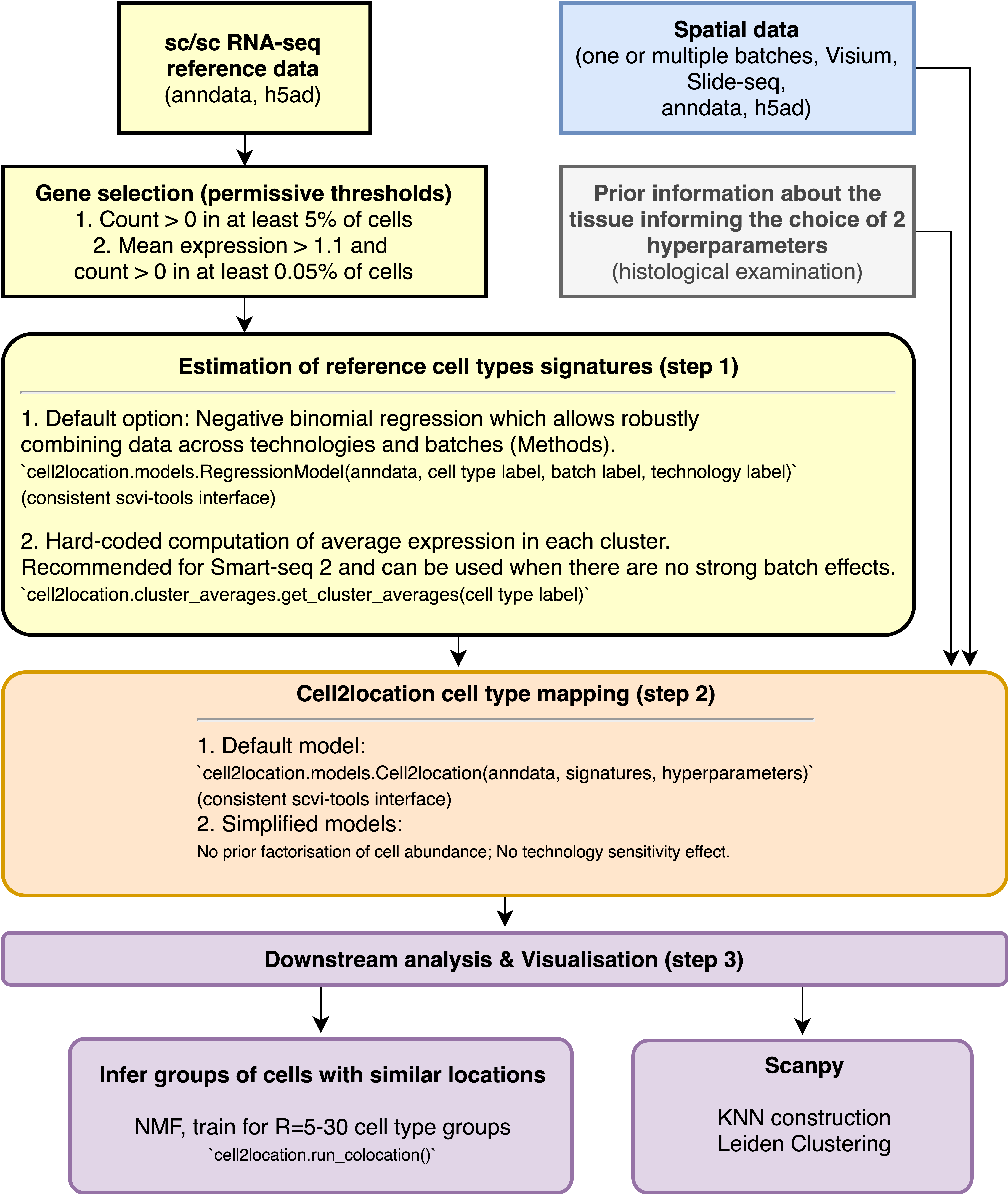
## Contents
* [Loading packages](#Loading-packages)
* [Loading Visium and single cell data data](#Loading-Visium-and-scRNA-seq-reference-data)
1. [Estimating cell type signatures (NB regression)](#Estimation-of-reference-cell-type-signatures-(NB-regression))
2. [Cell2location: spatial mapping](#Cell2location:-spatial-mapping)
3. [Visualising cell abundance in spatial coordinates](#Visualising-cell-abundance-in-spatial-coordinates)
4. [Downstream analysis](#Downstream-analysis)
* [Leiden clustering of cell abundance](#Identifying-discrete-tissue-regions-by-Leiden-clustering)
* [Identifying cellular compartments / tissue zones using matrix factorisation (NMF)](#Identifying-cellular-compartments-/-tissue-zones-using-matrix-factorisation-(NMF))
* [Estimate cell-type specific expression of every gene in the spatial data (needed for NCEM)](#Estimate-cell-type-specific-expression-of-every-gene-in-the-spatial-data-(needed-for-NCEM))
5. [Advanced use](#Advanced-use)
* [Working with the posterior distribution and computing arbitrary quantiles](#Working-with-the-posterior-distribution-and-computing-arbitrary-quantiles)
## Loading packages <a class="anchor" id="Loading-packages"></a>
"""
import sys
IN_COLAB = "google.colab" in sys.modules
if IN_COLAB:
!pip install --quiet scvi-colab
from scvi_colab import install
install()
!pip install --quiet git+https://github.com/BayraktarLab/cell2location#egg=cell2location[tutorials]
import scanpy as sc
import numpy as np
import matplotlib.pyplot as plt
import matplotlib as mpl
import cell2location
from matplotlib import rcParams
rcParams['pdf.fonttype'] = 42 # enables correct plotting of text for PDFs
"""First, let's define where we save the results of our analysis:"""
results_folder = './results/lymph_nodes_analysis/'
# For the same Visium + reference data, export training artifacts, run the Rust `cell2location-cli pipeline`,
# and save AnnData with `obsm` keys matching `export_posterior` (means/stds/q05/q95_cell_abundance_w_sf), see:
# python scripts/run_tutorial_data_through_rust_pipeline.py --out-dir results/tutorial_rust_run
# create paths and names to results folders for reference regression and cell2location models
ref_run_name = f'{results_folder}/reference_signatures'
run_name = f'{results_folder}/cell2location_map'
"""## Loading Visium and scRNA-seq reference data <a class="anchor" id="Loading-Visium-and-scRNA-seq-reference-data"></a>
First let's read spatial Visium data from 10X Space Ranger output. Here we use lymph node data generated by 10X and presented in [Kleshchevnikov et al (section 4, Fig 4)](https://www.biorxiv.org/content/10.1101/2020.11.15.378125v1). This dataset can be conveniently downloaded and imported using scanpy. See [this tutorial](https://cell2location.readthedocs.io/en/latest/notebooks/cell2location_short_demo.html) for a more extensive and practical example of data loading (multiple visium samples).
"""
adata_vis = sc.datasets.visium_sge(sample_id="V1_Human_Lymph_Node")
adata_vis.obs['sample'] = list(adata_vis.uns['spatial'].keys())[0]
"""<div class="alert alert-info">
<b>Note!</b>
Here we rename genes to ENSEMBL ID for correct matching between single cell and spatial data - so you can ignore the scanpy suggestion to call `.var_names_make_unique`.
</div>
"""
adata_vis.var['SYMBOL'] = adata_vis.var_names
adata_vis.var.set_index('gene_ids', drop=True, inplace=True)
"""You can still plot gene expression by name using standard scanpy functions as follows:
```python
sc.pl.spatial(color='PTPRC', gene_symbols='SYMBOL', ...)
```
<div class="alert alert-info">
<b>Note!</b>
Mitochondia-encoded genes (gene names start with prefix mt- or MT-) are irrelevant for spatial mapping because their expression represents technical artifacts in the single cell and nucleus data rather than biological abundance of mitochondria. Yet these genes compose 15-40% of mRNA in each location. Hence, to avoid mapping artifacts we strongly recommend removing mitochondrial genes.
</div>
"""
# find mitochondria-encoded (MT) genes
adata_vis.var['MT_gene'] = [gene.startswith('MT-') for gene in adata_vis.var['SYMBOL']]
# remove MT genes for spatial mapping (keeping their counts in the object)
adata_vis.obsm['MT'] = adata_vis[:, adata_vis.var['MT_gene'].values].X.toarray()
adata_vis = adata_vis[:, ~adata_vis.var['MT_gene'].values]
"""Published scRNA-seq datasets of lymph nodes have typically lacked an adequate representation of germinal centre-associated immune cell populations due to age of patient donors. We, therefore, include scRNA-seq datasets spanning lymph nodes, spleen and tonsils in our single-cell reference to ensure that we captured the full diversity of immune cell states likely to exist in the spatial transcriptomic dataset.
Here we download this dataset, import into anndata and change variable names to ENSEMBL gene identifiers.
"""
# Read data
adata_ref = sc.read(
f'./data/sc.h5ad',
backup_url='https://cell2location.cog.sanger.ac.uk/paper/integrated_lymphoid_organ_scrna/RegressionNBV4Torch_57covariates_73260cells_10237genes/sc.h5ad'
)
"""<div class="alert alert-warning">
<b>Warning</b>
Here we rename genes to ENSEMBL ID for correct matching between single cell and spatial data.
</div>
"""
adata_ref.var['SYMBOL'] = adata_ref.var.index
# rename 'GeneID-2' as necessary for your data
adata_ref.var.set_index('GeneID-2', drop=True, inplace=True)
# delete unnecessary raw slot (to be removed in a future version of the tutorial)
del adata_ref.raw
"""<div class="alert alert-info">
<b>Note!</b>
Before we estimate the reference cell type signature we recommend to perform very permissive genes selection. We prefer this to standard highly-variable-gene selection because our procedure keeps markers of rare genes while removing most of the uninformative genes.
</div>
The default parameters `cell_count_cutoff=5, cell_percentage_cutoff2=0.03, nonz_mean_cutoff=1.12` are a good starting point, however, you can increase the cut-off to exclude more genes. To preserve marker genes of rare cell types we recommend low `cell_count_cutoff=5`, however, `cell_percentage_cutoff2` and `nonz_mean_cutoff` can be increased to select between 8k-16k genes.
In this 2D histogram, orange rectangle highlights genes excluded based on the combination of number of cells expressing that gene (Y-axis) and average RNA count for cells where the gene was detected (X-axis).
In this case, the downloaded dataset was already filtered using this method, hence no density under the orange rectangle (to be changed in the future version of the tutorial).
"""
from cell2location.utils.filtering import filter_genes
selected = filter_genes(adata_ref, cell_count_cutoff=5, cell_percentage_cutoff2=0.03, nonz_mean_cutoff=1.12)
# filter the object
adata_ref = adata_ref[:, selected].copy()
"""## Estimation of reference cell type signatures (NB regression) <a class="anchor" id="Estimation-of-reference-cell-type-signatures-(NB-regression)"></a>
The signatures are estimated from scRNA-seq data, accounting for batch effect, using a Negative binomial regression model.
<div class="alert alert-block alert-message">
<b>Preparing anndata.</b>
First, prepare anndata object for the regression model:
</div>
"""
# prepare anndata for the regression model
cell2location.models.RegressionModel.setup_anndata(adata=adata_ref,
# 10X reaction / sample / batch
batch_key='Sample',
# cell type, covariate used for constructing signatures
labels_key='Subset',
# multiplicative technical effects (platform, 3' vs 5', donor effect)
categorical_covariate_keys=['Method']
)
# create the regression model
from cell2location.models import RegressionModel
mod = RegressionModel(adata_ref)
# view anndata_setup as a sanity check
mod.view_anndata_setup()
"""<div class="alert alert-block alert-message">
<b>Training model.</b>
Now we train the model to estimate the reference cell type signatures.
Note that to achieve convergence on your data (=to get stabilization of the loss) you may need to increase `max_epochs=250` (See below).
Also note that here we are using `batch_size=2500` which is much larger than scvi-tools default and perform training on all cells in the data (`train_size=1`) - both parameters are defaults.
</div>
"""
mod.train(max_epochs=250, accelerator='gpu')
"""<div class="alert alert-block alert-message">
<b>Determine if the model needs more training.</b>
</div>
Here, we plot ELBO loss history during training, removing first 20 epochs from the plot.
This plot should have a decreasing trend and level off by the end of training. If it is still decreasing, increase `max_epochs`.
"""
mod.plot_history(20)
# In this section, we export the estimated cell abundance (summary of the posterior distribution).
adata_ref = mod.export_posterior(
adata_ref, sample_kwargs={'num_samples': 1000, 'batch_size': 2500, 'accelerator': 'gpu'}
)
# Save model
mod.save(f"{ref_run_name}", overwrite=True)
# Save anndata object with results
adata_file = f"{ref_run_name}/sc.h5ad"
adata_ref.write(adata_file)
adata_file
"""You can compute the 5%, 50% and 95% quantiles of the posterior distribution directly rather than using 1000 samples from the distribution (or any other quantiles). This speeds up application on large datasets and requires less memory - however, posterior mean and standard deviation cannot be computed this way.
```python
adata_ref = mod.export_posterior(
adata_ref, use_quantiles=True,
# choose quantiles
add_to_obsm=["q05","q50", "q95", "q0001"],
sample_kwargs={'batch_size': 2500, 'accelerator': 'gpu'}
)
```
<div class="alert alert-block alert-message">
<b>Examine QC plots.</b>
</div>
1. Reconstruction accuracy to assess if there are any issues with inference. This 2D histogram plot should have most observations along a noisy diagonal.
2. The estimated expression signatures are distinct from mean expression in each cluster because of batch effects. For scRNA-seq datasets which do not suffer from batch effect (this dataset does), cluster average expression can be used instead of estimating signatures with a model. When this plot is very different from a diagonal plot (e.g. very low values on Y-axis, density everywhere) it indicates problems with signature estimation.
"""
mod.plot_QC()
"""The model and output h5ad can be loaded later like this:
```python
adata_file = f"{ref_run_name}/sc.h5ad"
adata_ref = sc.read_h5ad(adata_file)
mod = cell2location.models.RegressionModel.load(f"{ref_run_name}", adata_ref)
```
<div class="alert alert-block alert-message">
<b>Extracting reference cell types signatures as a pd.DataFrame.</b>
All parameters of the a Negative Binomial regression model are exported into reference anndata object, however for spatial mapping we just need the estimated expression of every gene in every cell type. Here we extract that from standard output:
</div>
"""
# export estimated expression in each cluster
if 'means_per_cluster_mu_fg' in adata_ref.varm.keys():
inf_aver = adata_ref.varm['means_per_cluster_mu_fg'][[f'means_per_cluster_mu_fg_{i}'
for i in adata_ref.uns['mod']['factor_names']]].copy()
else:
inf_aver = adata_ref.var[[f'means_per_cluster_mu_fg_{i}'
for i in adata_ref.uns['mod']['factor_names']]].copy()
inf_aver.columns = adata_ref.uns['mod']['factor_names']
inf_aver.iloc[0:5, 0:5]
"""## Cell2location: spatial mapping <a class="anchor" id="Cell2location:-spatial-mapping"></a>
<div class="alert alert-block alert-message">
<b>Find shared genes and prepare anndata.</b>
Subset both anndata and reference signatures:
</div>
"""
# find shared genes and subset both anndata and reference signatures
intersect = np.intersect1d(adata_vis.var_names, inf_aver.index)
adata_vis = adata_vis[:, intersect].copy()
inf_aver = inf_aver.loc[intersect, :].copy()
# prepare anndata for cell2location model
cell2location.models.Cell2location.setup_anndata(adata=adata_vis, batch_key="sample")
"""<div class="alert alert-info">
<b> Important </b>
To use cell2location spatial mapping model, you need to specify 2 user-provided hyperparameters (`N_cells_per_location` and `detection_alpha`) - for detailed guidance on setting these hyperparameters and their impact see [the flow diagram and the note](https://github.com/BayraktarLab/cell2location/blob/master/docs/images/Note_on_selecting_hyperparameters.pdf).
</div>
**Choosing hyperparameter `N_cells_per_location`!**
It is useful to adapt the expected cell abundance `N_cells_per_location` to every tissue</b>. This value can be estimated from paired histology images and as described in the note above. Change the value presented in this tutorial (`N_cells_per_location=30`) to the value observed in your your tissue.
**Choosing hyperparameter `detection_alpha`!**
To improve accuracy & sensitivity on datasets with large technical variability in RNA detection sensitivity within the slide/batch - you need to relax regularisation of per-location normalisation (use `detection_alpha=20`). High technical variability in RNA detection sensitivity is present in your sample when you observe the spatial distribution of total RNA count per location that doesn't match expected cell numbers based on histological examination.
We initially opted for high regularisation (`detection_alpha=200`) as a default because the mouse brain & human lymph node datasets used in our paper have low technical effects and using high regularisation strenght improves consistencly between total estimated cell abundance per location and the nuclei count quantified from histology ([Fig S8F in cell2location paper](https://static-content.springer.com/esm/art%3A10.1038%2Fs41587-021-01139-4/MediaObjects/41587_2021_1139_MOESM1_ESM.pdf)). However, in many collaborations, we see that Visium experiments on human tissues suffer from technical effects. This motivates the new default value of `detection_alpha=20` and the recommendation of testing both settings on your data (`detection_alpha=20` and `detection_alpha=200`).
"""
# create and train the model
mod = cell2location.models.Cell2location(
adata_vis, cell_state_df=inf_aver,
# the expected average cell abundance: tissue-dependent
# hyper-prior which can be estimated from paired histology:
N_cells_per_location=30,
# hyperparameter controlling normalisation of
# within-experiment variation in RNA detection:
detection_alpha=20
)
mod.view_anndata_setup()
"""<div class="alert alert-block alert-message">
<b>Training cell2location:</b>
</div>
"""
mod.train(max_epochs=30000,
# train using full data (batch_size=None)
batch_size=None,
# use all data points in training because
# we need to estimate cell abundance at all locations
train_size=1,
accelerator='gpu',
)
# plot ELBO loss history during training, removing first 100 epochs from the plot
mod.plot_history(1000)
plt.legend(labels=['full data training']);
"""<div class="alert alert-block alert-message">
<b>Exporting estimated posterior distributions of cell abundance and saving results:</b>
</div>
"""
# In this section, we export the estimated cell abundance (summary of the posterior distribution).
adata_vis = mod.export_posterior(
adata_vis, sample_kwargs={'num_samples': 1000, 'batch_size': mod.adata.n_obs, 'accelerator': 'gpu'}
)
# Save model
mod.save(f"{run_name}", overwrite=True)
# mod = cell2location.models.Cell2location.load(f"{run_name}", adata_vis)
# Save anndata object with results
adata_file = f"{run_name}/sp.h5ad"
adata_vis.write(adata_file)
adata_file
"""The model and output h5ad can be loaded later like this:
```python
adata_file = f"{run_name}/sp.h5ad"
adata_vis = sc.read_h5ad(adata_file)
mod = cell2location.models.Cell2location.load(f"{run_name}", adata_vis)
```
<div class="alert alert-block alert-message">
<b>Assessing mapping quality.</b>
Examine reconstruction accuracy to assess if there are any issues with mapping.
The plot should be roughly diagonal, strong deviations will signal problems that need to be investigated.
</div>
"""
mod.plot_QC()
"""When intergrating multiple spatial batches and when working with datasets that have substantial variation of detected RNA within slides (that cannot be explained by high cellular density in the histology), it is important to assess whether cell2location normalised those effects. You expect to see similar total cell abundance across batches but distinct RNA detection sensitivity (both estimated by cell2location). You expect total cell abundance to mirror high cellular density in the histology.
```python
fig = mod.plot_spatial_QC_across_batches()
```
## Visualising cell abundance in spatial coordinates <a class="anchor" id="Visualising-cell-abundance-in-spatial-coordinates"></a>
<div class="alert alert-info">
Note
We use 5% quantile of the posterior distribution, representing the value of cell abundance that the model has high confidence in (aka 'at least this amount is present').
</div>
"""
# add 5% quantile, representing confident cell abundance, 'at least this amount is present',
# to adata.obs with nice names for plotting
adata_vis.obs[adata_vis.uns['mod']['factor_names']] = adata_vis.obsm['q05_cell_abundance_w_sf']
# select one slide
from cell2location.utils import select_slide
slide = select_slide(adata_vis, 'V1_Human_Lymph_Node')
# plot in spatial coordinates
with mpl.rc_context({'axes.facecolor': 'black',
'figure.figsize': [4.5, 5]}):
sc.pl.spatial(slide, cmap='magma',
# show first 8 cell types
color=['B_Cycling', 'B_GC_LZ', 'T_CD4+_TfH_GC', 'FDC',
'B_naive', 'T_CD4+_naive', 'B_plasma', 'Endo'],
ncols=4, size=1.3,
img_key='hires',
# limit color scale at 99.2% quantile of cell abundance
vmin=0, vmax='p99.2'
)
# Now we use cell2location plotter that allows showing multiple cell types in one panel
from cell2location.plt import plot_spatial
# select up to 6 clusters
clust_labels = ['T_CD4+_naive', 'B_naive', 'FDC']
clust_col = ['' + str(i) for i in clust_labels] # in case column names differ from labels
slide = select_slide(adata_vis, 'V1_Human_Lymph_Node')
with mpl.rc_context({'figure.figsize': (15, 15)}):
fig = plot_spatial(
adata=slide,
# labels to show on a plot
color=clust_col, labels=clust_labels,
show_img=True,
# 'fast' (white background) or 'dark_background'
style='fast',
# limit color scale at 99.2% quantile of cell abundance
max_color_quantile=0.992,
# size of locations (adjust depending on figure size)
circle_diameter=6,
colorbar_position='right'
)
"""## Downstream analysis <a class="anchor" id="Downstream-analysis"></a>
### Identifying discrete tissue regions by Leiden clustering<a class="anchor" id="Identifying-discrete-tissue-regions-by-Leiden-clustering"></a>
We identify tissue regions that differ in their cell composition by clustering locations using cell abundance estimated by cell2location.
We find tissue regions by clustering Visium spots using estimated cell abundance each cell type. We constuct a K-nearest neigbour (KNN) graph representing similarity of locations in estimated cell abundance and then apply Leiden clustering. The number of KNN neighbours should be adapted to size of dataset and the size of anatomically defined regions (e.i. hippocampus regions are rather small compared to size of the brain so could be masked by large `n_neighbors`). This can be done for a range KNN neighbours and Leiden clustering resolutions until a clustering matching the anatomical structure of the tissue is obtained.
The clustering is done jointly across all Visium sections / batches, hence the region identities are directly comparable. When there are strong technical effects between multiple batches (not the case here) `sc.external.pp.bbknn` can be in principle used to account for those effects during the KNN construction.
The resulting clusters are saved in `adata_vis.obs['region_cluster']`.
"""
# compute KNN using the cell2location output stored in adata.obsm
sc.pp.neighbors(adata_vis, use_rep='q05_cell_abundance_w_sf',
n_neighbors = 15)
# Cluster spots into regions using scanpy
sc.tl.leiden(adata_vis, resolution=1.1)
# add region as categorical variable
adata_vis.obs["region_cluster"] = adata_vis.obs["leiden"].astype("category")
"""We can use the location composition similarity graph to build a joint integrated UMAP representation of all section/Visium batches."""
# compute UMAP using KNN graph based on the cell2location output
sc.tl.umap(adata_vis, min_dist = 0.3, spread = 1)
# show regions in UMAP coordinates
with mpl.rc_context({'axes.facecolor': 'white',
'figure.figsize': [8, 8]}):
sc.pl.umap(adata_vis, color=['region_cluster'], size=30,
color_map = 'RdPu', ncols = 2, legend_loc='on data',
legend_fontsize=20)
sc.pl.umap(adata_vis, color=['sample'], size=30,
color_map = 'RdPu', ncols = 2,
legend_fontsize=20)
# plot in spatial coordinates
with mpl.rc_context({'axes.facecolor': 'black',
'figure.figsize': [4.5, 5]}):
sc.pl.spatial(adata_vis, color=['region_cluster'],
size=1.3, img_key='hires', alpha=0.5)
"""### Identifying cellular compartments / tissue zones using matrix factorisation (NMF) <a name="Identifying-cellular-compartments-/-tissue-zones-using-matrix-factorisation-(NMF)"></a>
Here, we use the cell2location mapping results to identify the spatial co-occurrence of cell types in order to better understand the tissue organisation and predict cellular interactions. We performed non-negative matrix factorization (NMF) of the cell type abundance estimates from cell2location ([paper section 4, Fig 4D](https://www.nature.com/articles/s41587-021-01139-4)). Similar to the established benefits of applying NMF to conventional scRNA-seq, the additive NMF decomposition yielded a grouping of spatial cell type abundance profiles into components that capture co-localised cell types ([Supplemenary Methods section 4.2, p. 60](https://www.nature.com/articles/s41587-021-01139-4#Sec50)). This NMF-based decomposition naturally accounts for the fact that multiple cell types and microenvironments can co-exist at the same Visium locations (see [paper Fig S20, p. 34](https://www.nature.com/articles/s41587-021-01139-4#Sec50)), while sharing information across tissue areas (e.g. individual germinal centres).
<div class="alert alert-block alert-primary">
<b>Tip</b>
In practice, it is better to train NMF for a range of factors $R={5, .., 30}$ and select $R$ as a balance between capturing fine-grained and splitting known well-established tissue zones.
If you want to find a few most disctinct cellular compartments, use a small number of factors.
If you want to find very strong co-location signal and assume that most cell types don't co-locate, use a lot of factors (> 30 - used here).
</div>
Below we show how to perform this analysis. To aid this analysis, we wrapped the analysis shown the notebook on advanced downstream analysis into a pipeline that automates training of the NMF model with varying number of factors:
"""
from cell2location import run_colocation
res_dict, adata_vis = run_colocation(
adata_vis,
model_name='CoLocatedGroupsSklearnNMF',
train_args={
'n_fact': np.arange(11, 13), # IMPORTANT: use a wider range of the number of factors (5-30)
'sample_name_col': 'sample', # columns in adata_vis.obs that identifies sample
'n_restarts': 3 # number of training restarts
},
# the hyperparameters of NMF can be also adjusted:
model_kwargs={'alpha': 0.01, 'init': 'random', "nmf_kwd_args": {"tol": 0.000001}},
export_args={'path': f'{run_name}/CoLocatedComb/'}
)
"""For every factor number, the model produces the following list of folder outputs:
`cell_type_fractions_heatmap/`: a dot plot of the estimated NMF weights of cell types (rows) across NMF components (columns)
`cell_type_fractions_mean/`: the data used for dot plot
`factor_markers/`: tables listing top 10 cell types most speficic to each NMF factor
`models/`: saved NMF models
`predictive_accuracy/`: 2D histogram plot showing how well NMF explains cell2location output
`spatial/`: NMF weights across locatinos in spatial coordinates
`location_factors_mean/`: the data used for the plot in spatial coordiantes
`stability_plots/`: stability of NMF weights between training restarts
Key output that you want to examine are the files in `cell_type_fractions_heatmap/` which show a dot plot of the estimated NMF weights of cell types (rows) across NMF components (columns) which correspond to cellular compartments. Shown are relative weights, normalized across components for every cell type.
<div class="alert alert-block alert-primary">
<b>Tip</b>
The NMF model output such as factor loadings are stored in `adata.uns[f"mod_coloc_n_fact{n_fact}"]` in a similar output format as main cell2location results in `adata.uns['mod']`.
</div>
"""
# Here we plot the NMF weights (Same as saved to `cell_type_fractions_heatmap`)
res_dict['n_fact12']['mod'].plot_cell_type_loadings()
"""### Estimate cell-type specific expression of every gene in the spatial data (needed for NCEM) <a name="Estimate-cell-type-specific-expression-of-every-gene-in-the-spatial-data-(needed-for-NCEM)"></a>
The cell-type specific expression of every gene at every spatial location in the spatial data enables learning cell communication with NCEM model using Visium data (https://github.com/theislab/ncem).
To derive this, we adapt the approach of estimating conditional expected expression proposed by [RCTD (Cable et al)](https://pubmed.ncbi.nlm.nih.gov/33603203/) method.
With cell2location, we can look at the posterior distribution rather than just point estimates of cell type specific expression (see `mod.samples.keys()` and next section on using full distribution).
Note that this analysis requires substantial amount of RAM memory and thefore doesn't work on free Google Colab (12 GB limit).
"""
# Compute expected expression per cell type
expected_dict = mod.module.model.compute_expected_per_cell_type(
mod.samples["post_sample_q05"], mod.adata_manager
)
# Add to anndata layers
for i, n in enumerate(mod.factor_names_):
adata_vis.layers[n] = expected_dict['mu'][i]
# Save anndata object with results
adata_file = f"{run_name}/sp.h5ad"
adata_vis.write(adata_file)
adata_file
"""<div class="alert alert-block alert-primary">
<b>Plotting cell-type specific expression of genes in spatial coordinates.</b>
Below we plot the cell-type specific expression of genes (rows, second to last columns) compared to total expression of those genes (first column).
Here we highlight *CD3D*, pan T-cell marker expressed by 2 subtypes of T cells in distinct locations but not expressed by co-located B cells, that instead express *CR2* gene.
</div>
"""
# list cell types and genes for plotting
ctypes = ['T_CD4+_TfH_GC', 'T_CD4+_naive', 'B_GC_LZ']
genes = ['CD3D', 'CR2']
with mpl.rc_context({'axes.facecolor': 'black'}):
# select one slide
slide = select_slide(adata_vis, 'V1_Human_Lymph_Node')
from tutorial_utils import plot_genes_per_cell_type
plot_genes_per_cell_type(slide, genes, ctypes);
"""Note that `plot_genes_per_cell_type` function often need customization so it is not included into cell2location package - you need to copy it from https://github.com/BayraktarLab/cell2location/blob/master/docs/notebooks/tutorial_utils.py to use on your system.
## Advanced use <a name="advanced"></a>
### Working with the posterior distribution and computing arbitrary quantiles <a name="Working-with-the-posterior-distribution-and-computing-arbitrary-quantiles"></a>
In addition to the posterior distribution mean, std and quantiles presented earlier in the notebook you can fetch an arbitrary number of samples from the posterior distribution. To limit memory use, it could be beneficial to select particular varibles in the model.
Note that this analysis requires substantial amount RAM memory and thefore doesn't work on Google Colab.
"""
# Get posterior distribution samples for specific variables
samples_w_sf = mod.sample_posterior(num_samples=1000, accelerator='gpu', return_samples=True,
batch_size=2020,
return_sites=['w_sf', 'm_g', 'u_sf_mRNA_factors'])
# samples_w_sf['posterior_samples'] contains 1000 samples as arrays with dim=(num_samples, ...)
samples_w_sf['posterior_samples']['w_sf'].shape
"""Finally, it could be useful to compute arbitrary quantiles of the posterior distribution."""
# Compute any quantile of the posterior distribution
medians = mod.posterior_quantile(q=0.5, batch_size=mod.adata.n_obs, accelerator='gpu')
with mpl.rc_context({'axes.facecolor': 'white',
'figure.figsize': [5, 5]}):
plt.scatter(medians['w_sf'].flatten(), mod.samples['post_sample_means']['w_sf'].flatten());
plt.xlabel('median');
plt.ylabel('mean');
"""### Modules and their versions used for this analysis
Useful for debugging and reporting issues.
"""
cell2location.utils.list_imported_modules()
cell2location.__version__