Most servers serve so-called static HTML. This means that the contents of the HTML did not change over time or based on the user.
With a templating engine, it's possible to create dynamic pages where parts of the content depends on the user that is viewing the page; the content changes depending on who the user is and what they're doing.
Take for example your Facebook account. Most likely the content you see will be different from the content I'll see in my account. The server takes a look at your login details and decides to inject the appropriate data into the frontend.
By using templating engines we can, for example, display the name of the user (that is logged in) on the page. Of course, one could add the HTML using plain client-side JavaScript, but this is not a good long-term solution. The code quickly becomes tangled and unmaintainable, because JavaScript code is intermixed with HTML.
Templating engines work by combining some data (usually in JSON format) and a static template file stored in the file system of your computer. The template created contains placeholders where the data needs to be inserted. The process of combining the template and the data is often called rendering.
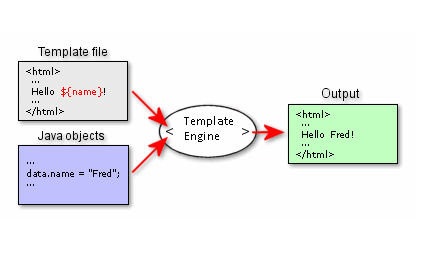
The exact syntax and setup vary considerably, but the main components data, template and placeholders are found in every engine. In addition to replacing data, many templating engines support some form of conditional expressions and loops/forEach for dealing with arrays.
There are many implementations of templating engines available: Mustache, Pug (Jade), Handlebars, etc. In this course we will use Handlebars.
The syntax for placeholders (that will be replaced with actual data) in Handlebars is double curly brackets: {{}}. Let's look at a simple example:
Template Name: {{firstName}} {{lastName}}
Data { "firstName": "John", "lastName": "Doe" }
Output Name: John Doe
You can find more examples in the documentation here.
A commonly used combination in node is using handlebars together with Express, we will use a special package called express-handlebars. This package lets handlebars interact directly with the Express request handler and render content directly to the response object. You can find a basic example here.
The following tutorial shows how this works:
{% hyf-youtube src="https://www.youtube.com/watch?v=1srD3Mdvf50" %}
If you just can't get enough, here are some extra links that mentors/students have found useful concerning this topic: