- Objects group together a set of variables and functions
- If a variable is part of an
objectit is called a property Properties tell us about theobject
- If a function is part of an
object, it is called a method that represent tasks that are associated with theobject
-
is the easiest and most popular way to creat objects
-
This example starts by creating an object using literal notation :
This object is called hotel which represents a hotel called Quay with 40 rooms (25 of which have been booked).
var hote l = {
name: 'Quay',
rooms: 40,
booked : 25,
checkAvailability: function() {
return this.rooms - this.booked;
}
} ;
JAVASCRIPT
var el Name = document .getElementByld('hotelName');
elName.textContent =hotel .name;
var elRooms = document.getElementByid{'rooms');
elRooms.textContent = hotel .checkAvailability();
- DOM : specifies how browsers should create a model of an
HTMLpage and howJavaScriptcan access and update the contents of a web page while it is in the browser window.
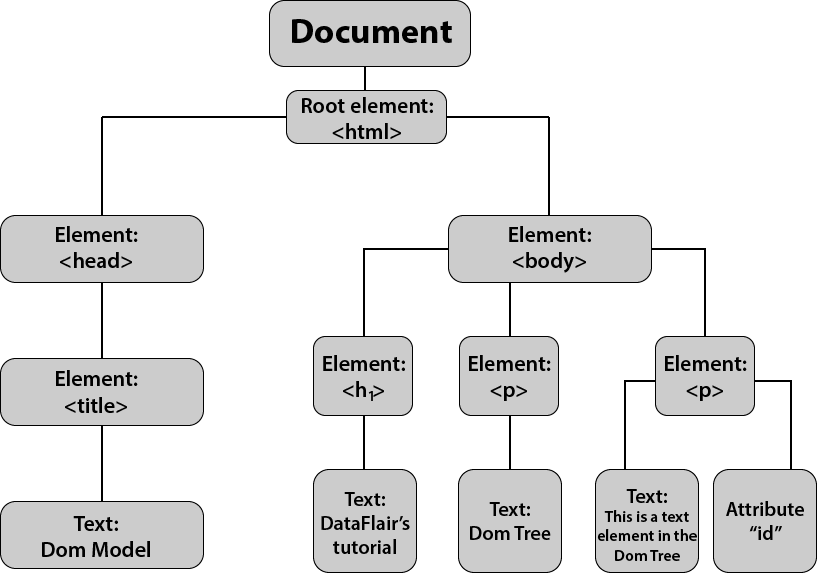
- when the browser load the webpage it creates a model of that page, the model is called a DOM tree and it consists of four main types of nodes :
-
THE DOCUMENT NODE
-
ELEMENT NODES
-
ATTRIBUTE NODES
-
TEXT NODES
- we can access and update the DOM with two steps :
- Locate the node
- Use its text content, child elements, and attributes
- to access the element :
- Using the
IDattributes- using the
CLASSattributes- using the
tag name- using the
CSS Selectors
-
When a a DOM query can return more than one node it will always return a Nadelist.
-
from the element node we can access and update its content using properties such as
textContentandinnerHTML or usingDOM manipulation techniques -
An element node can contain multiple text nodes and child elements that are siblings of each other
-
Browsers offer tools for viewing the DOM tree