-
Images can be used to set the tone for a site in less time than it takes to read a description
-
the image should be relevant and contain information and be instantly recognisable and fit with to web site colors
-
if building a website from scratch its a good practice to store image all the images for the website in separate folder it will help to organize the web site
- the
<img>element its a self closing element there is no closing tag
src: This tells the browser where it can find the image file
alt: This provides a text description of the image which describes the image if you cannot see itwe can also use the
titleattribute with theelement to provide additional information about the image.
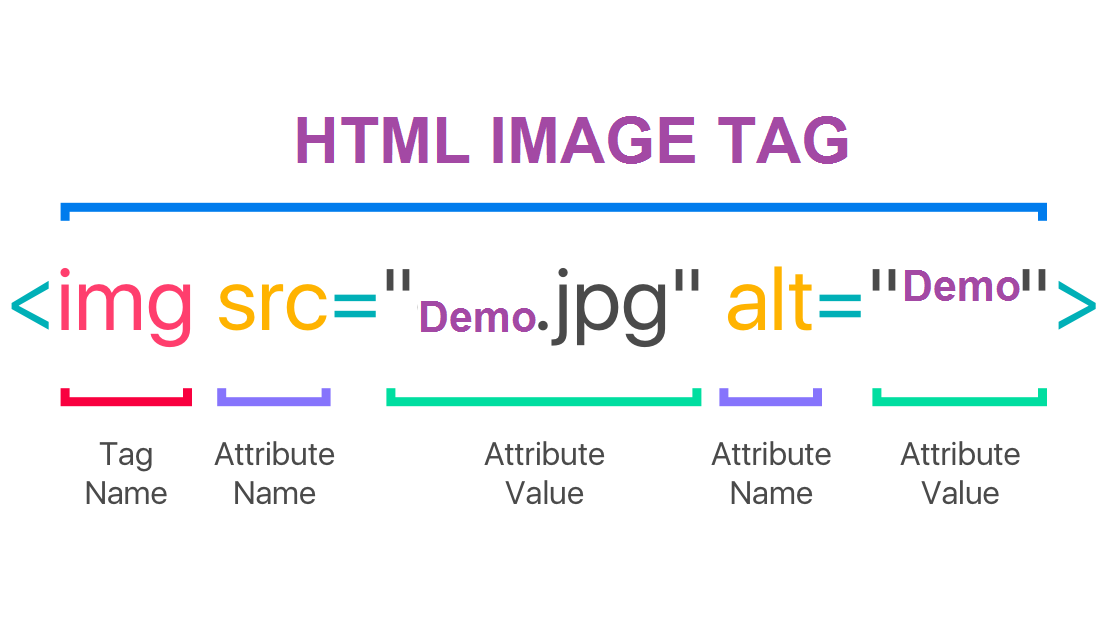
heightThis specifies the height of the image in pixels
widthThis specifies the width of the image in pixels
-
we specify the size of the image because images takes a long time to load in HTML than the code
-
where we placed images will affect how it is displayed in the code for example :
before a paragraph
inside the start of a paragraph
in the middle of a paragraph
- Save images in the right format like jpeg, gif, or png
- Save images at the right size of width and height
- Use the correct resolution most computer screens only show web pages at 72 pixels per inch
-
we can use tools for editing images like Adobe Photoshop
-
the images should be saved at the same width and height that we want them to appear on the page
- The color property allows us to choose the text color inside an element in three ways
-
RGB Values RGB stand for RED GREEN BLUE color can be set of how much red and green and blue are used to make the color example
rgb(100,100,90) -
Hex Codes
These are six-digit codes that represent the amount of red, green and blue in a color example #ee3e80
- Color Name
its a predefined color names that are recognized by browsers example blue
-
CSS treats each HTML element as if it appears in a box, and the background-color property sets the color of the background for that box
-
we can use the three ways to choose color RGB,hex,color names
-
every color on a screen is created by mixing of red,green,blue
-
computer monitors are made of pixels and every pixels color is mix of red,green,blue
- the opacity property which allows you to specify the opacity of an element and any of its child elements.
The value is a number between 0.0 and 1.0
- alpha allow you to add a fourth value to the RGB --> (RGBA) to indicate opacity.
- CSS3 bring a new way to specify new color using:
-
HUE is the colloquial idea of color. In HSL colors, hue is often represented as a color circle where the angle represents the color, although it may also be shown as a slider with values from 0 to 360.
-
saturation is the amount of gray in a color.
-
lightness is the amount of white (lightness) or black (darkness) in a color.
- Choosing a Typeface for your Website
the browser will usually only display it if it's installed on that user's computer
sites often use a small set of typefaces that are installed on most computers
It is possible to specify more than one typeface and create an order of preference
The
font-familyproperty allows to specify the typeface that should be used for any text inside the elementsThe
font-sizeproperty enable to specify a size for the fontthe unit of font size like Pixels, Percentages, Ems
Different browsers support different formats for fonts
-
Bold the
font-weightproperty allows to create bold text -
Italic the
font-styleproperty allow to create italic text -
The
text-transform propertyis used to change the case of text :
- uppercase
- lowercase
- capitalize
- The
text-decorationproperty allows to specify :
noneremoves any decoration already applied to the textunderlineadds a line underneath the textoverlineadds a line over the top of the textline-throughadds a line through wordsblinkanimates the text to make it flash on and off
-
Leading
line-heightused for the vertical space between lines of text -
Alignment
text-alignproperty allows to control the alignment of text -
Indenting Text
text-indentallows to indent the first line of text within an element -
Drop Shadow
text-shadowused to create a drop shadow, which is a dark version of the word just behind it