
A code indexing and semantic search VSCode extension powered by Claude Context.
📖 New to Claude Context? Check out the main project README for an overview and setup instructions.

- 🔍 Semantic Search: Intelligent code search based on semantic understanding, not just keyword matching
- 📁 Codebase Indexing: Automatically index entire codebase and build semantic vector database
- 🎯 Context Search: Search related code by selecting code snippets
- 🔧 Multi-platform Support: Support for OpenAI, VoyageAI, Gemini, and Ollama as embedding providers
- 💾 Vector Storage: Integrated with Milvus vector database for efficient storage and retrieval
- VSCode Version: 1.74.0 or higher
-
Direct Link: Install from VS Code Marketplace
-
Manual Search:
- Open Extensions view in VSCode (Ctrl+Shift+X or Cmd+Shift+X on Mac)
- Search for "Semantic Code Search"
- Click Install
The first time you open Claude Context, you need to click on Settings icon to configure the relevant options.
Configure your embedding provider to convert code into semantic vectors.
OpenAI Configuration:
Embedding Provider: Select "OpenAI" from the dropdownModel name: Choose the embedding model (e.g.,text-embedding-3-small,text-embedding-3-large)OpenAI API key: Your OpenAI API key for authenticationCustom API endpoint URL: Optional custom endpoint (defaults tohttps://api.openai.com/v1)
Other Supported Providers:
- Gemini: Google's state-of-the-art embedding model with Matryoshka representation learning
- VoyageAI: Alternative embedding provider with competitive performance
- Ollama: For local embedding models
Configure how your code is split into chunks for indexing.
Splitter Settings:
Splitter Type: Choose between "AST Splitter" (syntax-aware) or "LangChain Splitter" (character-based)Chunk Size: Maximum size of each code chunk (default: 1000 characters)Chunk Overlap: Number of overlapping characters between chunks (default: 200 characters)
Recommendation: Use AST Splitter for better semantic understanding of code structure.
Get a free Milvus vector database on Zilliz Cloud.
Claude Context needs a vector database. You can sign up on Zilliz Cloud to get a free Serverless cluster.
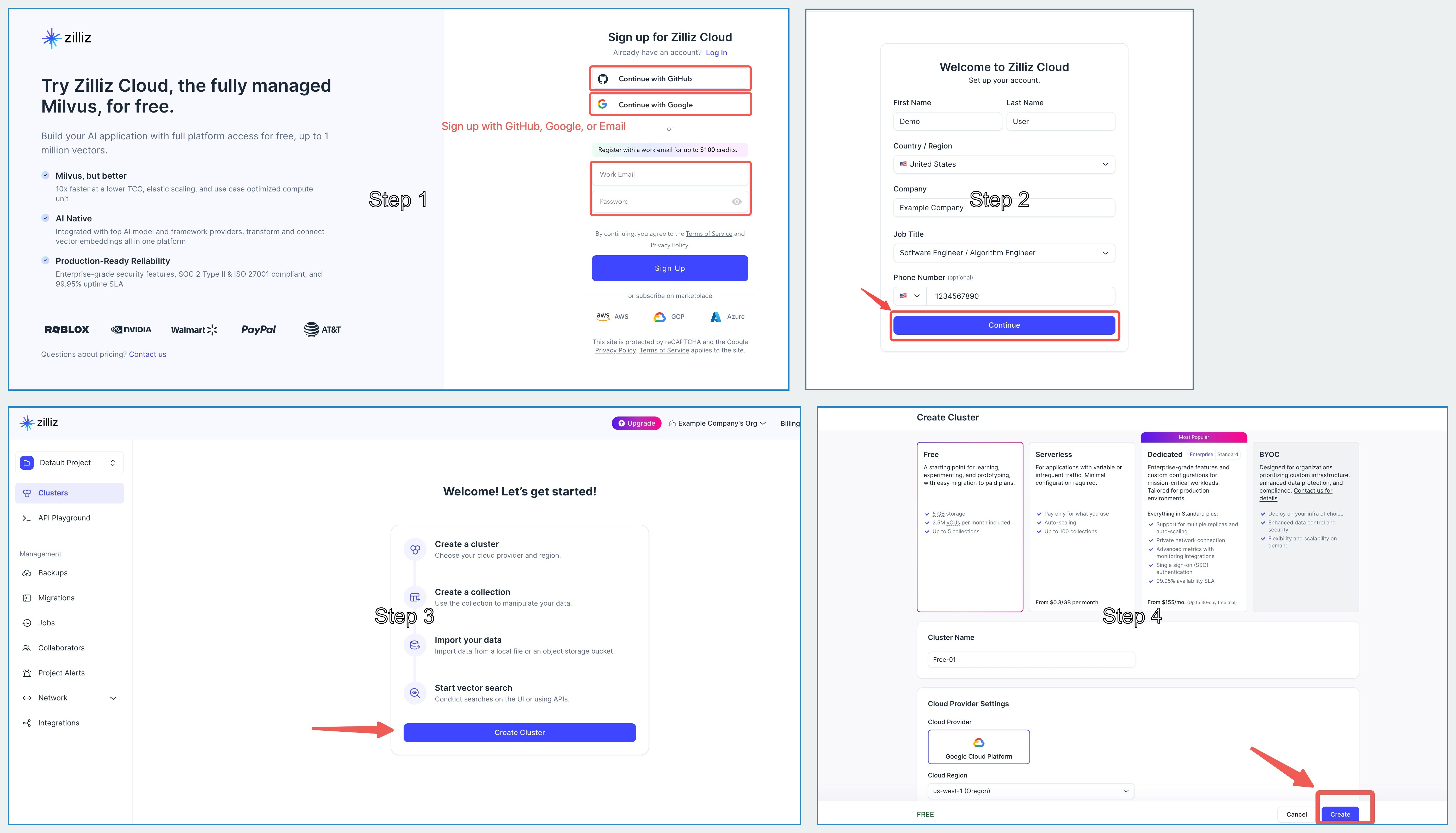
After creating your cluster, open your Zilliz Cloud console and copy both the public endpoint and your API key.
These will be used as your-zilliz-cloud-public-endpoint and your-zilliz-cloud-api-key in the configuration examples.
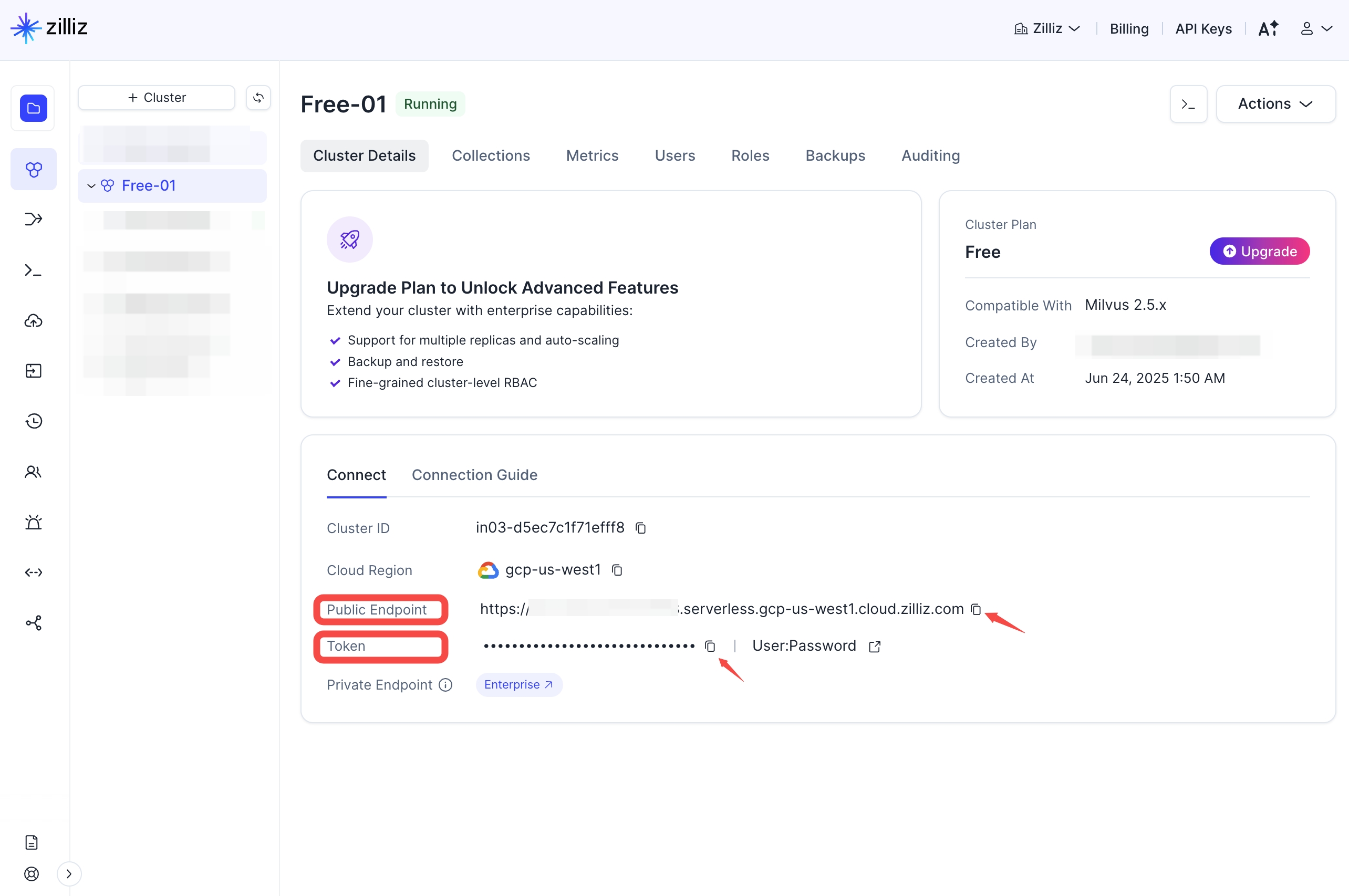
Keep both values handy for the configuration steps below.
If you need help creating your free vector database or finding these values, see the Zilliz Cloud documentation for detailed instructions.
MILVUS_ADDRESS=your-zilliz-cloud-public-endpoint
MILVUS_TOKEN=your-zilliz-cloud-api-key-
Set the Configuration:
- Open VSCode Settings (Ctrl+, or Cmd+, on Mac)
- Search for "Semantic Code Search"
- Set the configuration
-
Index Codebase:
- Open Command Palette (Ctrl+Shift+P or Cmd+Shift+P on Mac)
- Run "Semantic Code Search: Index Codebase"
-
Start Searching:
- Open Semantic Code Search panel in sidebar
- Enter search query or right-click on selected code to search
Semantic Code Search: Semantic Search- Perform semantic searchSemantic Code Search: Index Codebase- Index current codebaseSemantic Code Search: Clear Index- Clear the index
semanticCodeSearch.embeddingProvider.provider- Embedding provider (OpenAI/VoyageAI/Gemini/Ollama)semanticCodeSearch.embeddingProvider.model- Embedding model to usesemanticCodeSearch.embeddingProvider.apiKey- API key for embedding providersemanticCodeSearch.embeddingProvider.baseURL- Custom API endpoint URL (optional, for OpenAI and Gemini)semanticCodeSearch.embeddingProvider.outputDimensionality- Output dimension for Gemini (supports 3072, 1536, 768, 256)semanticCodeSearch.milvus.address- Milvus server address
This VSCode extension is part of the Claude Context monorepo. Please see:
- Main Contributing Guide - General contribution guidelines
- VSCode Extension Contributing - Specific development guide for this extension
- @zilliz/claude-context-core - Core indexing engine used by this extension
- @zilliz/claude-context-mcp - Alternative MCP server integration
- TypeScript
- VSCode Extension API
- Milvus Vector Database
- OpenAI/VoyageAI Embeddings
MIT - See LICENSE for details