Check out the content standards for guidance on writing lesson outline.
Important points from the content standards:
- A lesson outline is a skeleton that illustrates the progression of the lesson at a high level.
- They're a tool which guides development of the course, but not an actual content item.
- Highlight new pieces of information as introduced and give context (why are you teaching it in this order?).
- Be explicit about any metaphors or analogies used to convey material.
Some example lesson outlines:
Generally, a lesson has between 8 - 12 exercises. However, this is not a strict rule.
Insert any resources you used while researching to help plan your lesson.
We keep track of resources internally to keep track of what we are using as the source of truth. These resources may not appear anywhere in the lesson, but may sometimes be listed as good resources for learners to look at for further learning (in review, or inline links for definitions of functions, variables, terms...).
Check out the content standards for guidance on writing learing standards.
Important points from the content standards:
- Learning Standards focus on the goals for understanding, or the what of learning.
- They are un-opinionated about the how of learning.
- Learning Standards include objective statements about desired understanding, knowledge, and/or skills.
Learning standards can be written before completing lesson outline for individual exercises. It can also be derived from exercise outlines after they have been written out. Learning standards state facts that are covered in this lesson. They are also used for quiz assessments. Each quiz assessment is related to a particular learning standard (in Author, you will have to directly link a quiz assessment to a learning standard).
Examples of Learning Standards:
- Browsers parse HTML tags inside the and render them to a webpage as DOM Elements.
- The CSS display: flex property/value pairing sets an HTML element as a flex container. Any child elements within this flex container are known as flex items and will change size and location in response to the size and position of this parent container. The flex container will be a block level element.
- Inside an .html file, include A-Frame in the
<head>element:
<script src="https://aframe.io/releases/0.9.2/aframe.min.js"></script>- ...
- ...
- ...
Important points from content standards:
- A Learning Objective is a learner-focused goal of any introduction to new material (on CC: exercises and articles). We generally use "Learners will be able to..." or LWBAT to describe Learning Objectives.
- Objectives typically start with an action verb that describes what the learner will be able to do.
- Bloom's Taxonomy is a helpful guide when writing effective Learning Objectives.
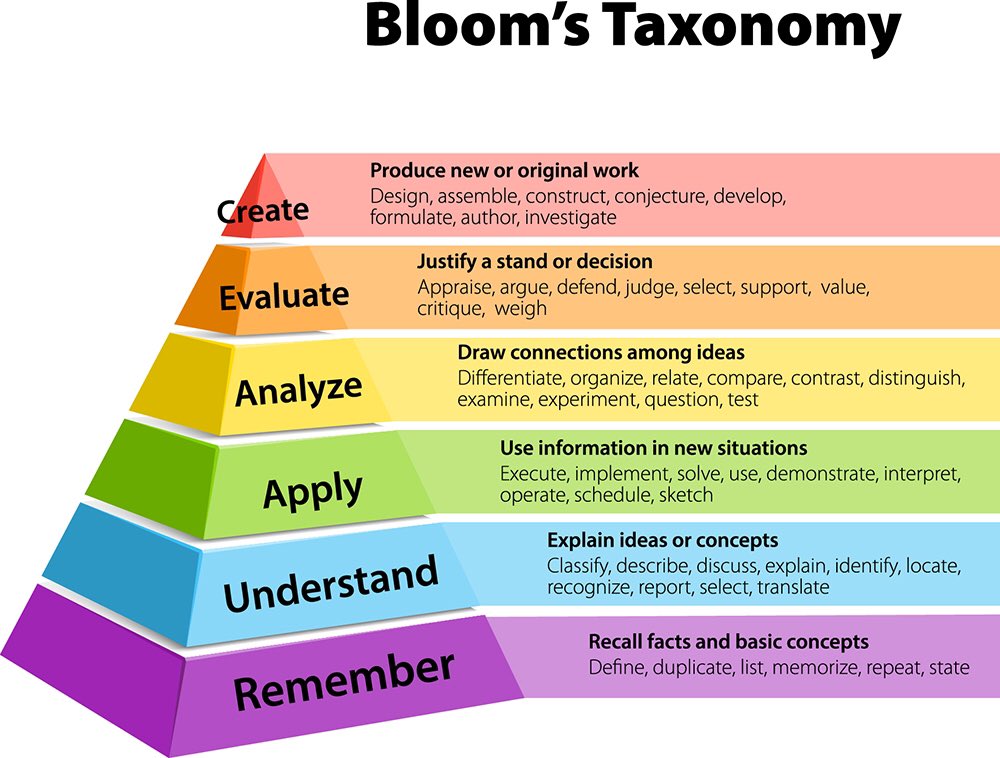
- Learners will be able to...
- LWBAT ...
Check out the content standards for guidance on writing narratives for exercises.
For the purpose of a lesson outline, provide bullet point list of the contents of the narrative. The bullet points should be in the order of appearence. It can also be ordered by priority / importance of the topics that should be covered in this narrative.
Check out the content standards for guidance on writing narratives for exercises.
Provide a bullet point list of checkpoints (instructions) that learners will complete. Checkpoints allow learners to test what was covered in this exercise and usually involve editing or adding lines of code. Checkpoints can also direct learners to interact with a website / web app displayed in the workspace. In this case, the workspace usually displays a web page with the various elements that will be covered in the whole lesson.
- Checkpoint one
- Checkpoint two
Briefly explain what the checkpoints will test learners of.
Check out the content standards for guidance on writing narratives for exercises.
There are various types of workspaces. Some workspace types that we will most likely be using are:
- Web view: We can display an existing website (via url), or we can upload files for a web page and display the rendered view
- Web page & code editor: We can display code editor and web page view side by side. This is the workspace type you will be using if you want learners to edit / add code and see they effects of the code changes.
- Image view: We can display images (usually diagrams, illustrations, GIFs) that may aid explanation of concepts and structures. We can request an artwork to be created.
If you have an idea of other types of content that you think would work great for a particular exercise, let me know!