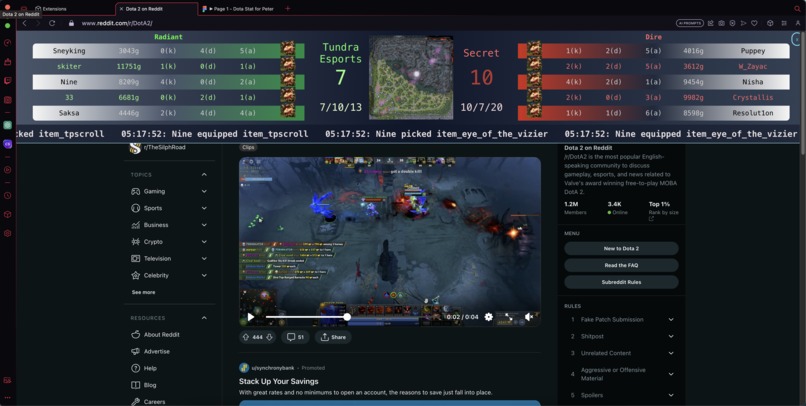
This is a Chrome/OperaGX extension that provides updates via websockets for selected Dota 2 games. It includes a ticker for incoming game data and a heatmap that reflects the intensity of activity in different areas of the Dota 2 map.
- Real-time game ticker
- Team board updates
- Dota 2 map heatmap
- Node.js installed
- Google Chrome installed
- Git installed
``` git clone https://github.com/your-username/dota2-ticker-extension.git ```
``` cd into the backend folder ```
``` npm install ```
``` npm start ```
``` cd into the heavenly-beauty-extension folder ```
``` npm install ```
``` Comment in this line in the index.js file to run the project locally on localhost.
ReactDOM.render( <React.StrictMode> </React.StrictMode>, testRoot ); ```
``` npm start ```
- Open a new tab in Chrome and navigate to
chrome://extensions/. - Enable "Developer mode" in the upper right corner if it's not already enabled.
- Click on the "Load unpacked" button.
- Navigate to the
frontendfolder of your project directory and click "Open". - The extension should be added to your extensions, in the extensions tab click the 3 dots(...) and hover over
This can Read and change Site Datathenselect When you click the extension. - Your extension should now be installed for local testing!
- Open the extension by clicking on its icon in the Chrome extension tray.
- The Dota 2 game ticker and heatmap should start displaying data.