- Because there have been several versions of HTML, each web page should begin with a DOCTYPE declaration to tell a browser which version of HTML the page is using
- HTML 5
- HTML 4
- Transitional XHTML 1.0
- Strict XHTML 1.0
- XML Declaration
- If you want to add a comment to your code that will not be visible in the user's browser, you can add the text between these characters:
<!-- comment goes here -->
- allow you to identify particular elements.
- Block Elements
- Some elements will always appear to start on a new line in the browser window. These are known as block level elements.
Examples of block elements are
<h1>, <p>, <ul>, and <li>. - Inline Elements
- Some elements will always appear to continue on the same line as their neighbouring elements. These are known as inline elements.
Examples of inline elements are
<a>, <b>, <em>, and <img>.
** The
and elements allow you to group block-level and inline elements together. **
** The new HTML5 elements indicate the purpose of different parts of a web page and help to describe its structure. **
- The and elements can be used for:
- The main header or footer that appears at the top or bottom of every page on the site.
- A header or footer for an individual or
within the page.
- Navigation
- The element is used to contain the major navigational blocks on the site such as the primary site navigation.
- Articles
- The element acts as a container for any section of a page that could stand alone and potentially be syndicated.
- Sections
- The
element groups related content together, and typically each section would have its own heading.
- The
It's important to understand who your target audience is, why they would come to your site, what information they want to find and when they are likely to return
- WireFrames
- A wireframe is a simple sketch of the key information that needs to go on each page of a site. It shows the hierarchy of the information and how much space it might require.
- A wireframe is a simple sketch of the key information that needs to go on each page of a site. It shows the hierarchy of the information and how much space it might require.
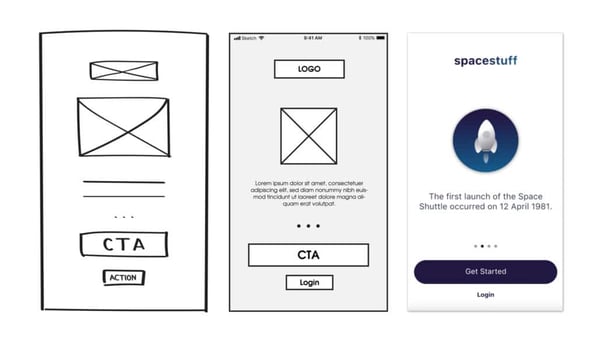
Wireframes allow you to organize the information that will need to go on each page.