HTML pages are text documents.
- HTML Uses Elements to Describe the Structure of Pages
Each element has an opening tag and a closing tag.
- Tags act like containers. They tell you something about the information that lies between their opening and closing tags.
Because there have been several versions of HTML, each web page should begin with a DOCTYPE declaration to tell a browser which version of HTML the page is using
- HTML 5
- HTML 4
- Transitional XHTML 1.0
- Strict XHTML 1.0
- XML Declaration
- EXTRA MARKUP
- The id and class attributes allow you to identify particular elements.
- The and elements allow you to group block-level and inline elements together.
- cut windows into your web pages through which other pages can be displayed.
- The tag allows you to supply all kinds of information about your web page.
- Escape characters are used to include special characters in your pages such as <, >, and ©.


** The new HTML5 elements indicate the purpose of different parts of a web page and help to describe its structure. **
- The and elements can be used for:
- The main header or footer that appears at the top or bottom of every page on the site.
- A header or footer for an individual or
within the page.
- Navigation
- The element is used to contain the major navigational blocks on the site such as the primary site navigation.
- Articles
- The element acts as a container for any section of a page that could stand alone and potentially be syndicated.
- Sections
- The
element groups related content together, and typically each section would have its own heading.
- The
**It's important to understand who your target audience is, why they would come to your site, what information they want to find and when they are likely to return **
- WireFrames
- A wireframe is a simple sketch of the key information that needs to go on each page of a site. It shows the hierarchy of the information and how much space it might require.
- A wireframe is a simple sketch of the key information that needs to go on each page of a site. It shows the hierarchy of the information and how much space it might require.
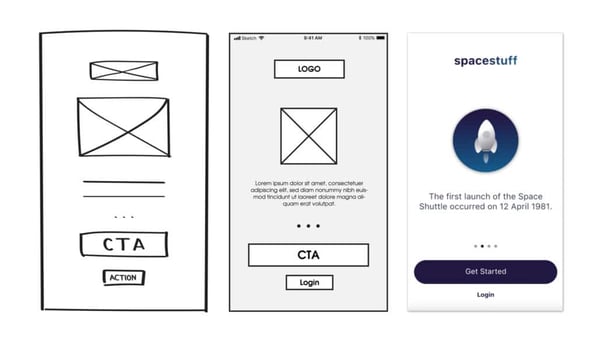
Wireframes allow you to organize the information that will need to go on each page.
The ABC of Programming
- A : What is a script and how do I create one?
- B : How do computers fit in with the world around them?
- C : How do I write a script for a web page?
- B : How do computers fit in with the world around them?
** A script is a series of instructions that a computer can follow to achieve a goal. **
** To write a script, you need to first state your goal and then list the tasks that need to be completed in order to achieve it. **
Start with the big picture of what you want to achieve, and break that down into smaller steps.
- DEFINE THE GOAL
First, you need to define the task you want to achieve.
- DESIGN THE SCRIPT
To design a script you split the goal out into a series of tasks. This can be represented using a flowchart.
- CODE EACH STEP
Each of the steps needs to be written in a programming language that the compu ter understands.

